EDIT: I have released a new CFW! Check the features!
As of now this guide requires a 3ds flashcart that allows eShop access, or an eShop game to already be installed on your SD card. I will assume ownership of a Gateway cart, but the steps should be very similar regardless of what cart you own.
Disclaimer: I take no responsibility for any damage caused by attempting this mod. Although there have been no reported problems so far, this is cutting edge stuff that has been only lightly tested. Continue at your own risk.
Downloads
Rop MultiLoader
Hex Workshop
Win32DiskImager
Palantine CFW v1.0
DevMenu Cia - not legal to link. Use Google

- Make sure your 3DS is configured to connect to the internet properly before going any further. Write down the LAN IP of your 3ds for later.
- Copy the Rop Multiloader to your DS mode flashcart. Launch the Rop Multiloader rom from your cart and select "Gateway 4x"
- Copy the Gateway Launcher.dat to your SD card, and load it with the usual exploit. Select "Nand Backup".
- When it finishes, copy the nand.bin from your SD card to your computer.
- If you have not already done so, boot the Gateway Launcher and select "Format Emunand". Be careful, as this will erase all the files on your SD card.
- On your SD card navigate to "sdmc:/Nintendo 3DS/<id0>/<id1>/dbs/". Create two files in this folder named title.db and import.db . Put the SD card back in your 3ds and go to System Settings, and attempt to manage the SD software. Let the 3DS do its repair process.
- Mount your SD card on your computer. Make a backup of the card with Win32DiskImager.
- Open Hex Workshop as administrator. Select Disk-> Open Drive. Choose "All" from the drop down menu and select the disk with the size matching your SD card. Once opened, the very beginning should say "GATEWAYNAND"
- Choose Disk->Restore Sectors and select your saved nand.bin. Change "Starting Sector" to be "1".
- Now that that is finished, your SD is ready to launch the CFW. Copy the contents of the folder "SD Card" folder to your SD card.
- Launch the "Rop Multiloader" from your DS cart again. This time select "Homebrew 4x".
- Finally launch the exploit the usual way, and make sure to hold down the L Button. it may take as many as 10 tries to work, but don't give up. You will know it worked when the screen flashes white then black for a second.
- Download "DevMenu_2x.cia" and put it in the "Palantine CFW" folder.
- On your computer, in the CFW files, edit run.bat and replace "IPTOMODIFY" with the IP of your 3DS, and then run it by double clicking it. This will try to install the DevMenu onto your device.
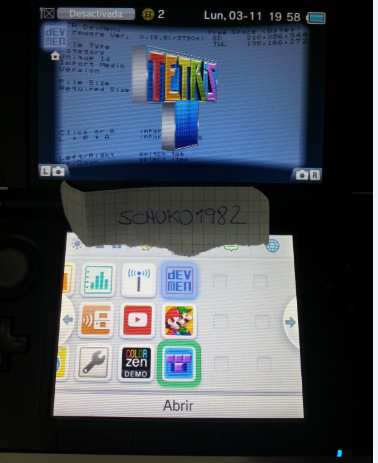
- Reboot your 3DS and launch the CFW again. If it worked you will see a present on the homescreen.
- Congrats! You have installed a CFW to your 3DS!
Let me know if I have made any mistakes, or if there is need for clarification.
Win32DiskImager is used to make a backup of your emunand which you can restore to your SD card to revert back to Gateway. If you have 2 SD cards like I do then this is unnecessary.
Thanks to idunoe for the db trick!
ctrclient commands
I have reverse engineered most of the ctrclient commands and have exposed some very interesting functionality. These commands are for developers only. You run a very real risk of doing permanent damage to your device if you try to play around with these.
Code:
ctrclient.exe --serveradr=<3ds ip> --customcmd=“<custom cmd>“

installcia:<cia name>

readmem:<mem type> <offset> <size>    @<optional output file name>
    memtypes: 11kern, 11usr=, 9
    11usr=<process name> (i.e. pxi, pm)

writemem:<mem type> <offset> <size> @<input hex file>
    memtypes: 11kern, 11usr=, 9
    11usr=<process name> (i.e. pxi, pm)

getservhandle <service name> (i.e. ir:u )

sendservicecmd <service handle> <header code> <arg1>,<arg2>…

getprocinfo:addrconv <arm11 procname>  <vaddr>  (i.e. pxi 0x100000)
getprocinfo:kprocess <arm11 procname>  (i.e. pxi)
getprocinfo:mmutable <arm11 procname>  (i.e. pxi)