Hardware first time computer build advise

  • Thread starter Thread starter ichidansan
  • Start date Start date
  • Views Views 1,612
  • Replies Replies 12

ichidansan

Well-Known Member
Member
Joined
Feb 10, 2010
Messages
266
Reaction score
69
Trophies
1
Age
34
XP
670
Country
United States
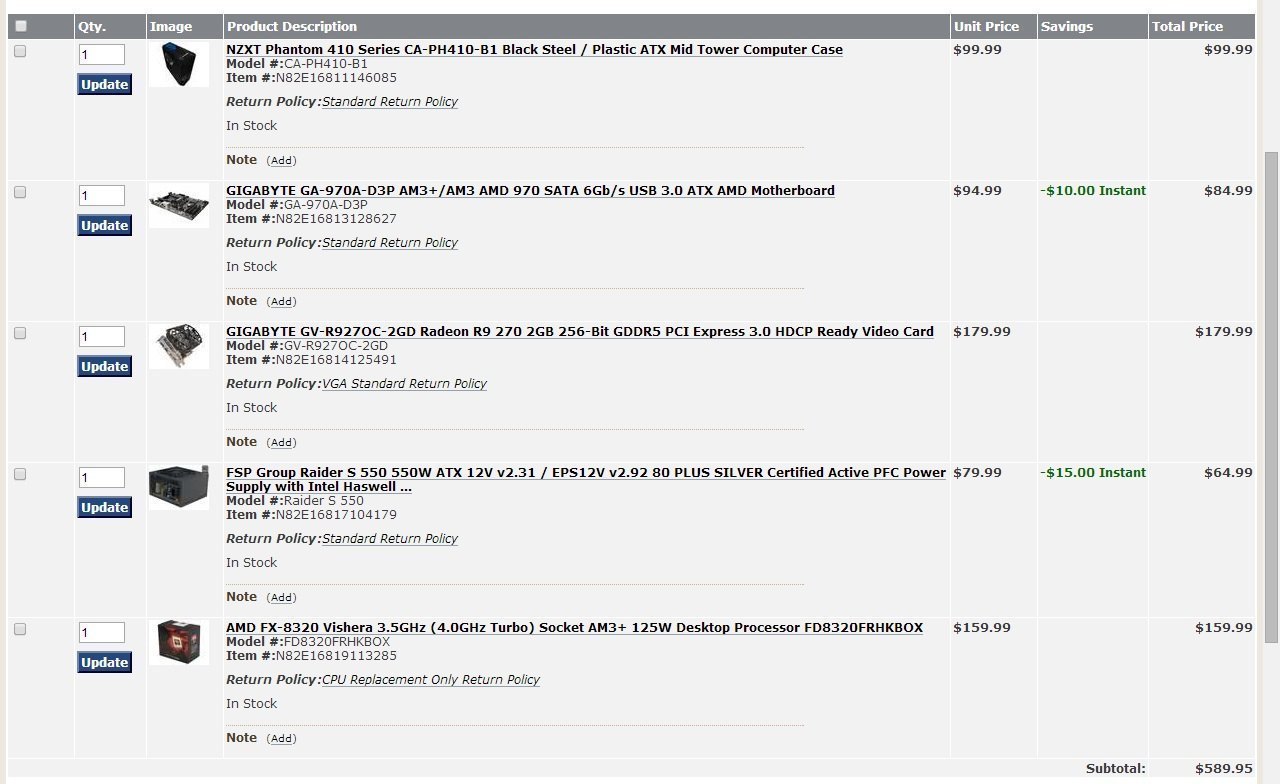
ok, so im pretty much set on what im getting, just sorta want an experienced hand's opinion on the setup.
asdfasdfasddd.jpg
im scrapping ram/hdd from my current comp. and yes 8 cores seem a bit excessive but id like to see how well it would do with video processing and 3d modeling as well as with gaming. any thoughts, opinions or things that i should do to make it work better are appreciated.
 
IF you wanna save some money you could go with a cheaper NZXT case unless your dead set on that one, I've got a white NZXT case that is pretty good that I only paid $50 for, but that's about the only problem I see everything else looks good, although if you wanted you could overclock your graphics to make it a 270x for free saving you about $30.
 
  • Like
Reactions: ichidansan
yea, im dead set on the case lol. this will be my first build, so idk much about setting things on over clock and stuff. and with the psu being 550watts that would suffice for all components?
 
thanks for the info, the reviews on the psu i have selected are pretty good, hoping it'll work the same for me. as long as this build will last a few years and do the other things i want it to do (3d modeling/video editing) in a timely manner with no hiccups then i guess im set.

was also wondering if my current HDD has a factory restore section, could i use that to install windows to this build or do i have to get a new copy?
 
If your old computer was an OEM build (e.g. Dell), then it's unlikely to let you restore onto a new motherboard/CPU configuration (Windows licenses are tied to the hardware ID of the motherboard/CPU). If it was a custom build (using a full Windows license), then you may need to reactivate Windows (often done with a quick call to MS) and possibly reinstall the chipset drivers for the new motherboard.

I generally recommend a fresh install of Windows when you upgrade. It removes a lot of crap that tends to build up over the years.
 
gotchya, anything else recommend for a first time builder? i've got a few friends who've made them, and have been looking at tut's and other guides too. but more of a hands on learner.
 
Building computers isn't hard, just take your time in seeing how the parts fit together and put it together. Take a little extra care with the heatsink for the CPU - you only want to attach it once so the thermal paste between the heatsink and CPU is at its best. If it uses push pins (I've never used an AMD stock heatsink before), then push them in a X pattern (top left first, then bottom right, then top right, etc) for even pressure. Everything else is pretty straight forward. Hardest part is tidying up all the cables at the end.

Also, clean your hands before starting, and make sure to touch something metallic to ground any static energy from your hands. There are many stories about static shocks killing computer parts, although I've not had it happen to me yet (maybe because I always start by grounding myself).

For specific advice, feel free to ask specific questions.

 
  • Like
Reactions: ichidansan
i built several pc's over 10 yrs ago , and recently attempted again , in the end i plumped for a pre asembled mobo , mem and cpu/fan bundle , that actually came in much cheaper than the parts seperately , and on top of that i get cover. Just a thought. Still leaving me to install case psu , gfx , hdds / optical drives and the OS and configure it .. still felt like i built my own system .
 
as for grounding, do i need to have one of the wrist bands? i've installed my current gpu and ram with out it, and things work fine, but should i chance it with a full build? also bios are with the mother board already or do i have to get all that as well?
 
as for grounding, do i need to have one of the wrist bands? i've installed my current gpu and ram with out it, and things work fine, but should i chance it with a full build? also bios are with the mother board already or do i have to get all that as well?
You don't need to. Just touch the metal part of the case every few seconds.
Also you can get a Radeon R9 280 for $30 more dollars which is a great price considering the perfomance.

http://pcpartpicker.com/parts/video-card/#c=167&sort=a8
 
ok, and thanks for the tip, though things have already been ordered lol

oh yea, any ad-on suggestions is appreciated as well. going to try and find a 22in monitor for it too.
 

Site & Scene News

Popular threads in this forum