ROM Hack Tinke 0.7.2

  • Thread starter Thread starter pleonex
  • Start date Start date
  • Views Views 134,093
  • Replies Replies 367
  • Likes Likes 9
I suspect a trouble in map compression algo in tinke.
Without map compression, all graphs in MTSWic are scrambled in the game (it's normal, this file NEED map compression), and with map compression, the buttons are scrambled only on the number (2 and 3). When you click on the buttons, the lighter buttons are scrambled.

It wasn't actually a problem, just that the image needed mooooore map compression.
Ok, I have implemented more of it but so quickly and I have only tested with this image. Be careful because it could give problems in others (tell me if you find any of them).

Tinke rev144-1
 
I suspect a trouble in map compression algo in tinke.
Without map compression, all graphs in MTSWic are scrambled in the game (it's normal, this file NEED map compression), and with map compression, the buttons are scrambled only on the number (2 and 3). When you click on the buttons, the lighter buttons are scrambled.

It wasn't actually a problem, just that the image needed mooooore map compression.
Ok, I have implemented more of it but so quickly and I have only tested with this image. Be careful because it could give problems in others (tell me if you find any of them).

Tinke rev144-1
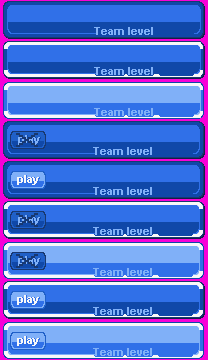

Real strange. It work with WTD_B19, but, after, when i insert WTD_B13, the resulting rom has B19 scrambled like before. ????
I have done:
1- insert b19
2- sav the rom (without closing rom and tinke)
3- Test the result rom with B19 => OK
4- come back on tinke, insert WTD_B13
5- sav the rom
6- test the result rom, with B19 and B13 => B19 scrambled....

here is WTD_B13:
wtd_b112.png
 
Awesome tool much less work to be done, also if you export an image to png and edit, let's say the colours will it also edit the pallet file ?
 
The moderator deleted the post but you have a incomplete Korean localization of Tinke.
Since I DON'T know Korean, I CAN'T translate Tinke to Korean. I don't really known from where you have downloaded tinke...

Awesome tool much less work to be done, also if you export an image to png and edit, let's say the colours will it also edit the pallet file ?
You can specifiy when importing the image to not modify the palette, but you must use the same colors as the original image. To do that check "Swap to original palette"

Real strange. It work with WTD_B19, but, after, when i insert WTD_B13, the resulting rom has B19 scrambled like before. ????
I have done:
1- insert b19
2- sav the rom (without closing rom and tinke)
3- Test the result rom with B19 => OK
4- come back on tinke, insert WTD_B13
5- sav the rom
6- test the result rom, with B19 and B13 => B19 scrambled....
I'm working on it.
 
Any news ?
I saw r145 on googlecode, could you post it here please ?
Here is the version:
Tinke rev145
I have fixed a little problem unpacking SPD + SPL files from Inazuma Eleven (I wrote the wrong argument to the unpacker method), and some temporal fix to import sprite images (the map compression feature is from rev144-1)

After investigate your problem I can only tell you that the translated image can't be more compressed and as it's bigger (the compressed) than the original it doesn't fill in the memory (it shifts the tiles from other images). The only solution I can think is to modify it to be more "compressible" (maybe small text?), I mean, with more tiles equals. You can check that opening the nbfc files and comparing with the original.

If you import the original file, the map compression create identical file as the original so I don't think it's a problem of tinke. Furthemore if you modify only B13 the image will be also corrupted and if you import the original image (without edit) it will work fine. Sorry I can't give you a better solution.
 
  • Like
Reactions: 1 person
Complete compatibility to Encryption and Decryption of Item.dat in Inazuma Eleven 3.

Pleonex will add it later to svn, for now, take the plug in :)

See Down for link.

This plugin goes in folder Plugins in Tinke Folder.

If you have some problem, write there :)

Enjoy

EDIT:

Hey Boys, i'm here again to present you new Fix.

This fix will be fix completely Subtitles in Inazuma Eleven 3.

Link for DLL:
https://dl.dropbox.c...9/INAZUMA11.dll

Link for Font File:
https://dl.dropbox.c...009/FONT12.NFTR

Guide to use it:

- Paste DLL in Tink\Plugins Folder, overwrite old one.
- Open Inazuma Eleven 3 with Tinke.
- Go to Folder root\data_iz\font and replace FONT12.NTFR with one you downloaded up.
- Save Rom.

And Now, Can edit Subtitle without problem!

For any problem, tell me there :)
Thanks,

Daviex


@[member='Daviex'], will you provide your code to pleonex to enhance tinke ?
@[member='pleonex'], i have some tweaks to put correct file extensions in spd files and open IE2 French ? do you want it ?
 
After investigate your problem I can only tell you that the translated image can't be more compressed and as it's bigger (the compressed) than the original it doesn't fill in the memory (it shifts the tiles from other images). The only solution I can think is to modify it to be more "compressible" (maybe small text?), I mean, with more tiles equals. You can check that opening the nbfc files and comparing with the original.

If you import the original file, the map compression create identical file as the original so I don't think it's a problem of tinke. Furthemore if you modify only B13 the image will be also corrupted and if you import the original image (without edit) it will work fine. Sorry I can't give you a better solution.


I have solved trouble on MTSWic.spf by replacing in B13, the word "Level" by "Lv.". Compression used is the one in the r144 you've provided me. (I don't know if r145 work like it). I will test the same way on MPSAct.spf, to see if i could solve all the troubles before releasing v0.4.

And if you have some informations on solving the length of the players names (using trace), i will be pleased to read you !
 
@[member='Daviex'], will you provide your code to pleonex to enhance tinke ?

Sorry, I forgot to add the code to the Inazuma plugin. The last version include it but (as I didn't test it properly) it has some bugs:
In Main.cs, line 175 it's "Encryption.Encrypt_Item(unpacked.files[0].path, fileout);"
In Encryption.cs, remove line 65
 
pleonex thank you very much for your great work, well, to the point, I should know I am the NDS-extra.blogspot, and I mean that with the translation of conquest pokemon'm fine, but the problem is to reinsert the images. png with Tinke, the latest version, are inserted, but when you save the new ROM changes I appear, I hope to tell me if I'm doing something wrong or if the program fails (not that I think).
 
pleonex thank you very much for your great work, well, to the point, I should know I am the NDS-extra.blogspot, and I mean that with the translation of conquest pokemon'm fine, but the problem is to reinsert the images. png with Tinke, the latest version, are inserted, but when you save the new ROM changes I appear, I hope to tell me if I'm doing something wrong or if the program fails (not that I think).
If the imported image works (you see it good) with Tinke, you should get the same result in-game. Remember to pack (clicking Pack button) every file you have unpacked and in inverse order, I mean, the last to be unpacked, the first to be packed.
 
ok, that is if all pictures decompress, and translating randomly, ie without any order, not I be able to log in again?, I have all the images in appropriate folders, but with respect to (the button to compress) She had not actually think this is the error q, just thank you very much, and let it clear that I respect a lot as a computer that I am, I hope to learn from you and help once in life, with anything.
thank you very much again. :yay: :yay: :yay: :yay: :yay: :D


(other thing if the English is bad, the fault of google translator, I speak Spanish, English and not very bn management hahahahahaha :P :P :P :P :P :P )
 
black the knigt can you post me the page of the source code of tinke rev 146 because i can't fin it
 
Thank you Kaphotics :), i just don't know why i can't compile rev 146 last week, :/ is always fail :O i was using win 7 os, is still fail o.o
 
hi pleonex is the new version of tinke ready?if it is can you post it there?
The new version is in the way, a lot of stuff still to do. Mainly, I have to fix some problems importing sprites images, then continue to translate the user interface and I will upload the new version. Meanwhile, you can use the last revision from here: Tinke rev147.zip
 
pleonex could you give me the code to convert sadl to waw because my father could try to do the reverse
 

Site & Scene News

Popular threads in this forum