
Hacking How To Softmod (Hack) Your PSP

  • Thread starter Thread starter Rydian
  • Start date Start date
  • Views Views 612,472
  • Replies Replies 1,237
  • Likes Likes 28
I need a little help. I have a PSP-3000, 6.37. Although this guide says that every PSP-3000 model can be hacked, I can't downgrade, and can't find a downgrading program despite some googling. Am I stuck with 6.37 (and by extension, a non-permanent mod with 6.60 CWF?)
Upgrade to 6.60 and install this: http://filetrip.net/...60-PRO-B10.html

I advise you to be happy staying here at CFW 6.60 but this is the file to downgrade to 6.20:
http://filetrip.net/...ch-5-0-Fix.html

You may get stuck there at 6.20 so run this to see if you have a TA-095v2 system (risk of getting stuck) or TA-095 (relatively safe):
http://filetrip.net/...ident-0-75.html

(if you have anything less than TA-095 you're safe to downgrade)
 
I need a little help. I have a PSP-3000, 6.37. Although this guide says that every PSP-3000 model can be hacked, I can't downgrade, and can't find a downgrading program despite some googling. Am I stuck with 6.37 (and by extension, a non-permanent mod with 6.60 CWF?)
Upgrade to 6.60 and install this: http://filetrip.net/...60-PRO-B10.html

I advise you to be happy staying here at CFW 6.60 but this is the file to downgrade to 6.20:
http://filetrip.net/...ch-5-0-Fix.html

You may get stuck there at 6.20 so run this to see if you have a TA-095v2 system (risk of getting stuck) or TA-095 (relatively safe):
http://filetrip.net/...ident-0-75.html

(if you have anything less than TA-095 you're safe to downgrade)
Okay, so I got the identifying program, but when I try to run it, it says the data is corrupted. Gotta format the memory stick again or what?

Although I did accidentally run the Chronoswitch app and it told me my firmware wasn't supported. Should I upgrade to 6.60 first, or is my system just not going to take it?
 
Upgrade your firmware first -- you can't do anything with it at 6.37.

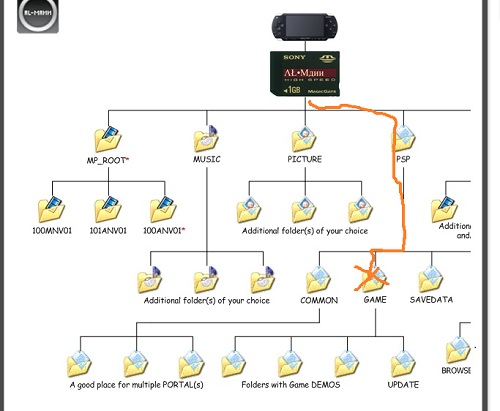
Here is the Game folder:
gallery_262855_65_21306.jpg
 
Okay, upgraded to 6.60, still can't load up that identifier program, so I'm going to format and stick it back on the card.

Edit: It's still saying it's corrupted. The Chronoswitch app said I was at 09g and was going to downgrade, but I didn't throw the 6.20 firmware back on the card after upgrading to 6.60, so I haven't tried downgrading yet.

So what's the deal with PSPident? Formatted the card and it still won't run.

Edit 2: Another question. I ran the Chronoswitch app just to check it and it said it would downgrade me from 6.60 > F.FF. I had the OFW 6.20 in the update folder. Does this mean my system came with a later firmware version out of the box and I can't downgrade past it?

Edit 3: Disregard #2, I recopied it over and it's displaying properly now.
 
You need to install PRO B10 to run pspident.

It's important to run that to see what motherboard you have before downgrading. Upload the screenshot.

As for that last sentence, well it's possible if your system is brand new. Sony could release a new PSP MB at any time.
 
The motherboard detector thing can't run in a non-hacked mode (because unlike a lot of homebrew it needs kernel access), the corrupt message is what the PSP gives for programs it refuses to run whether they're legit or not.

Yes your PSP came with later than 6.20, but that doesn't mean you can't downgrade, davee's blog explains it.
http://lolhax.org/2011/09/01/chronoswitch-downgrader-5-0-advanced-09g-support/

Though staying on 6.60 and just having the temporary hack is likely less trouble/risk.
 
It's a used system. I'll get PRO B10 running and test PSPident again.

Edit: Okay, here's the screenshot. I take it the TA-095 (and not v2) means it's relatively safe to downgrade?

pspident000n.png
 
TA-095 Version 1

I have that same PSP version and it downgraded fine so you should be good to go. If you need to upgrade out of 6.20 for whatever reason the file you need is in the chronoswitch pack I linked you to (Frostegator fix).

Remember downgrading is still a risk so think twice before you try it.

Edit: The screen goes black for a long time, don't panic and turn it off whatever you do.
 
Okay, new problem. I ran Chronoswitch with OFW 6.20 in the proper folder, but after the black screen it gave me an error and said the data was corrupted (IDXFFFFFFFF) and it couldn't update.

Should I be downgrading from OFW 6.60 rather than PRO B10?

Edit: I tried going back to OFW, but it gave me the same error.
 
Wait are you on 6.20 now? If you can't upgrade back then use the upgrade fix like I mentioned before. If you're on 6.20 you should just stay there and install perma b10.

If your still stuck on 6.60 you might try this: http://psdev.ru/?attachment_id=246

It's very experimental and new so think thrice before trying it.
 
Yes, I'm still on 6.60. Like I said, I tried to run Chronoswitch to downgrade, but it gave me a corrupted data error and said it couldn't run the update/downgrade. Not sure if I want to do some crazy experimental stuff...would rather just try to figure out why I keep getting corrupted data errors.
 
There's no other fix that I know of presently for the IDXFFFFFFF errors. Frostegater is the only dev actively working on 09g downgrades that I know of.

Choices:
1. Try the pre-downgrader (risky)
2. Be satisfied with lcfw. (smart)
3. Wait for something better to come along (lol)
 
Damn it. Guess I'll stick with 6.60 B10. Still going to hold out hope that a more stable fix will come about, because I'd rather have a permanent hack than a temporary one.
 
Damn it. Guess I'll stick with 6.60 B10. Still going to hold out hope that a more stable fix will come about, because I'd rather have a permanent hack than a temporary one.
Sorry I couldn't help you. Maybe bounce this problem off the wololo forums. If anybody knows what to do, they will be there. http://temp.wololo.net/talk/index.php

You should really be satisfied with 6.60 b-10 given it has all the same major features of perma 6.20 b10. :)
 
It doesn't matter. GEN/Prome firmware used a version.txt botch to prevent updating....if you're confident you can just edit that version.txt file in your flash0 so it no longer reads 9.90 (change it to 5.50) and then just run the standard 6.60 OFW update.
 
So to go to 6.20 immediately is somewhat risky? I don't have a Pandora or anything so I'd rather not screw the the psp up! :P

5.50 prom4 to 5.00 OFW it is then!?
 
No it's not risky at all. It's risky playing about in your flash0 if you have no clue what you're doing.
 
never mind.. screwed up advanced mode. :P

Anyway, It says I won't be able to get back on CFW without a Pandora, that isn't correct is it? :S
 

Site & Scene News

Popular threads in this forum
