Gaming Hamachi problem, what's wrong?

  • Thread starter Thread starter gifi4
  • Start date Start date
  • Views Views 9,512
  • Replies Replies 19

gifi4

How am I a 'New Member'?
Member
Joined
Apr 21, 2010
Messages
2,350
Solutions
3
Reaction score
143
Trophies
0
Age
29
Location
Melbourne
XP
733
Country
Hey guys, I've just built a new computer and unlike my old computer, Hamachi isn't working, I'm using Windows 7 64bit, in the Network and Sharing Center, my internet connection is connected but Network 2 (Hamachi) says it isn't connected, and now I can't connect to my friends network over Hamachi. I manage to get in the network but the only person in there is me and it says I'm offline.

I've done many Google searches and found this problem but no solutions that help me. Any ideas guys?
 
I'll tell you when I do the same myself later. Two things I know, move the Hamachi network to network one to give it priority over your local network. And ensure Windows Defender and any AV/firewall software have hamachi on their exclusions list.
 
I'll tell you when I do the same myself later. Two things I know, move the Hamachi network to network one to give it priority over your local network. And ensure Windows Defender and any AV/firewall software have hamachi on their exclusions list.
Both things are now covered but I still receive the same problem... I really hope someone can help me fix this, I was hoping to do some gaming with friends now that I'm using my new PC.
 
One more idea (because I just got it fully set up myself). Are you sure you're logged in (into LogMeIn, not hamachi)?

When I set mine up, I logged into my LogMeIn account, downloaded it from the site, ran the installation and it worked straight away. The LogMeIn website also noted that my computer name was added to the client list, with my IP and other details listed. All I need to do now is try and find out the details for the Terraria network I was on before.
 
One more idea (because I just got it fully set up myself). Are you sure you're logged in (into LogMeIn, not hamachi)?

When I set mine up, I logged into my LogMeIn account, downloaded it from the site, ran the installation and it worked straight away. The LogMeIn website also noted that my computer name was added to the client list, with my IP and other details listed. All I need to do now is try and find out the details for the Terraria network I was on before.
Still no luck... Any idea what I should try next?
 
All that's left is a complete uninstall, restart, reinstall. It's a long shot, but it's worth a try.
I hate to say it, but I've tried that, several times infact, would the fact that I'm using Windows 7 Enterprise have anything to do with it?
 
Well the only things I can think of is either your router is blocking the connection or windows firewall is being stubborn (mine refused to allow hamachi no matter what I did so I ended up disabling it & installing another firewall) . Try temporary disabling your antivirus & windows firewall and see if it works . If it still doesn't then its probably something router related .
 
Well the only things I can think of is either your router is blocking the connection or windows firewall is being stubborn (mine refused to allow hamachi no matter what I did so I ended up disabling it & installing another firewall) . Try temporary disabling your antivirus & windows firewall and see if it works . If it still doesn't then its probably something router related .
I've also tried these not long after the problem first occurred, I turned off Windows Firewall and even uninstalled my AV but it still failed...
Which leaves your other idea, the router, this is the same modem and router that I used on my old PC and I was able to use Hamachi.
So any other ideas? Also as I mentioned above, could it be related to Windows 7 Enterprise?
 
Hey guys, I've just built a new computer and unlike my old computer, Hamachi isn't working, I'm using Windows 7 64bit, in the Network and Sharing Center, my internet connection is connected but Network 2 (Hamachi) says it isn't connected, and now I can't connect to my friends network over Hamachi. I manage to get in the network but the only person in there is me and it says I'm offline.

I've done many Google searches and found this problem but no solutions that help me. Any ideas guys?
ok i've had this issue before, first make sure you the 64 bit version installed, turn off your firewall (for simplicity sake) and restart , i think instead of looking in win7 networking look on hamchi itself, sometimkes you just need to switch hamachi on and off
 
What exactly happens when you press the power on button in hamachi ? Does it show normal progress then freeze at some point or nothing happens at all?
 
Hey guys, I've just built a new computer and unlike my old computer, Hamachi isn't working, I'm using Windows 7 64bit, in the Network and Sharing Center, my internet connection is connected but Network 2 (Hamachi) says it isn't connected, and now I can't connect to my friends network over Hamachi. I manage to get in the network but the only person in there is me and it says I'm offline.

I've done many Google searches and found this problem but no solutions that help me. Any ideas guys?

ok i've had this issue before, first make sure you the 64 bit version installed, turn off your firewall (for simplicity sake) and restart , i think instead of looking in win7 networking look on hamchi itself, sometimkes you just need to switch hamachi on and off
Yeah, done that multiple times, no luck.
What exactly happens when you press the power on button in hamachi ? Does it show normal progress then freeze at some point or nothing happens at all?
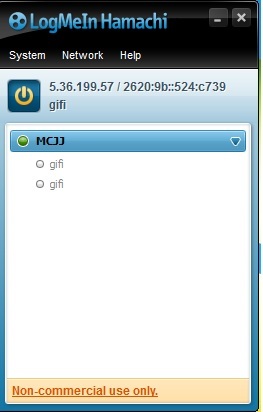
Once I press the power button, everything happens as usual, But when I join an existing network (That I have the password to) It puts me in the network in which there are 2 offline users and both are me (gifi) Screenshot for simplicity sake:
gallery_251771_763_22384.jpg
 

Site & Scene News

Popular threads in this forum