ROM Hack 3DSMovie converter

  • Thread starter Thread starter spinal_cord
  • Start date Start date
  • Views Views 25,087
  • Replies Replies 47
Yup, same error message over here too, can't find file.

My brother said he was having trouble using a 3DS video converter of his own, he said it was due the fact he was using a certain kind of hard drive though I can't remember what.

Running Win 7 X86

Edit: Here's your problem, the version of ffmpeg.exe you're distributing does not work on 32 bit systems.
[Window Title]
K:\3DS Video Conversion\ffmpeg.exe

[Content]
The version of this file is not compatible with the version of Windows you're running. Check your computer's system information to see whether you need an x86 (32-bit) or x64 (64-bit) version of the program, and then contact the software publisher.

[OK]

Edit: I tried downloading the ffmpeg.exe from SifJar's converter and replacing your one with his, but your converter gives the same "file not found" error even if I can using 32bit ffmpeg.

Maybe because your 32bit executable was buiit pointing to a 64bit executable for processing?
 
It's nothing to do with 64 bit, my computer is 64 bit and it didn't work for me. (I haven't tried the update, and don't have time now, sorry).
 
There's a chance I might have found the problem... Uploading now :)

OK, uploaded, hopefully problem solved, also replaces 64bit ffmpeg with 32bit, which may or may not make any difference.
 
There's a chance I might have found the problem... Uploading now :)

OK, uploaded, hopefully problem solved, also replaces 64bit ffmpeg with 32bit, which may or may not make any difference.
I think you only change the included FFmpeg file...sadly I must say the application still has the same problem.
 
There's a chance I might have found the problem... Uploading now :)

OK, uploaded, hopefully problem solved, also replaces 64bit ffmpeg with 32bit, which may or may not make any difference.
I think you only change the included FFmpeg file...sadly I must say the application still has the same problem.

I think I solved this. Disassambled the 3DS Movie.exe and found that the path to ffmpeg.exe was hardcoded to c:\convert. Just make this folder and put ffmpeg.exe in that and everything works fine for me. I run on 64bit windows 7. Exellent tool btw. Works perfectly with my bloggie 3d. :)
 
There's a chance I might have found the problem... Uploading now :)

OK, uploaded, hopefully problem solved, also replaces 64bit ffmpeg with 32bit, which may or may not make any difference.
I think you only change the included FFmpeg file...sadly I must say the application still has the same problem.

I think I solved this. Disassambled the 3DS Movie.exe and found that the path to ffmpeg.exe was hardcoded to c:\convert. Just make this folder and put ffmpeg.exe in that and everything works fine for me. I run on 64bit windows 7. Exellent tool btw. Works perfectly with my bloggie 3d. :)

Information like that would have been useful to know earlier,. Just running this now and its running fine on my Windows7 32Bit machine.
 
Ah that's silly, it really should be looking for ffmpeg.exe in the same folder.
No problem I can just stick the ffmpeg in c:\convert and try that out.

Edit: After that, the converter works and does a damn good job.
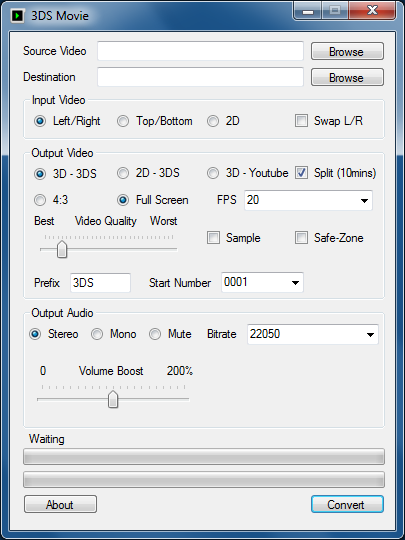
It's more optimal for converting 2d videos since it has the option for it, and the option for 24fps makes videos that need it look much nicer.
Compared to the same video at 20fps I converted with SifJar's converter, it shaved about 13mb off the original 90mb converted video.

The volume boost didn't seem to work too well though, the audio became pretty crackly from a minor audio boost, and it wasn't the 3DS speakers.

Needless to say this'll be my 3DS video converter for the time being, better GUI and better options.
 
I know people are already using everyone else converters (great work guys) but here's mine.
Don't expect too much, It's technically beta although I *think* it works fine.

gallery_90607_639_21225.png


Download -

http://socoder.net/u...24/3DSMovie.zip

The errors reported on the next couple of pages have now been fixed, everything is working fine :)
no... still have same error... probably something wrong with my windows somewhere... arf driving me crazy ^^
 
Just tried it on my Win7 64 bit machine and got the error. Tried the convert folder and still didn't work. Tried switching between 32 and 64 bit ffmpeg and no luck there either. Not sure what else to try.

I like the interface, btw. If I can get it working on my comp, then it might replace my tutorial (sig).
 
i get
Code:
See the end of this message for details on invoking
just-in-time (JIT) debugging instead of this dialog box.
************** Exception Text **************
System.ComponentModel.Win32Exception (0x80004005): The specified executable is not a valid application for this OS platform.
at System.Diagnostics.Process.StartWithCreateProcess(ProcessStartInfo startInfo)
at System.Diagnostics.Process.Start()
at WindowsApplication1.MainWindow.Button1_Click(Object sender, EventArgs e)
at System.Windows.Forms.Control.OnClick(EventArgs e)
at System.Windows.Forms.Button.OnClick(EventArgs e)
at System.Windows.Forms.Button.OnMouseUp(MouseEventArgs mevent)
at System.Windows.Forms.Control.WmMouseUp(Message& m, MouseButtons button, Int32 clicks)
at System.Windows.Forms.Control.WndProc(Message& m)
at System.Windows.Forms.ButtonBase.WndProc(Message& m)
at System.Windows.Forms.Button.WndProc(Message& m)
at System.Windows.Forms.Control.ControlNativeWindow.OnMessage(Message& m)
at System.Windows.Forms.Control.ControlNativeWindow.WndProc(Message& m)
at System.Windows.Forms.NativeWindow.Callback(IntPtr hWnd, Int32 msg, IntPtr wparam, IntPtr lparam)

************** Loaded Assemblies **************
mscorlib
Assembly Version: 4.0.0.0
Win32 Version: 4.0.30319.239 (RTMGDR.030319-2300)
CodeBase: file:///C:/Windows/Microsoft.NET/Framework/v4.0.30319/mscorlib.dll
----------------------------------------
3DS Movie
Assembly Version: 1.0.0.0
Win32 Version: 1.0.0.0
CodeBase: file:///C:/Users/Mat/Desktop/Connor's%20Shit/3DS%20Video%20v1.1%20-%20improved%20progressbars/3DS%20Movie.exe
----------------------------------------
Microsoft.VisualBasic
Assembly Version: 10.0.0.0
Win32 Version: 10.0.30319.1 built by: RTMRel
CodeBase: file:///C:/Windows/Microsoft.Net/assembly/GAC_MSIL/Microsoft.VisualBasic/v4.0_10.0.0.0__b03f5f7f11d50a3a/Microsoft.VisualBasic.dll
----------------------------------------
System.Windows.Forms
Assembly Version: 4.0.0.0
Win32 Version: 4.0.30319.235 built by: RTMGDR
CodeBase: file:///C:/Windows/Microsoft.Net/assembly/GAC_MSIL/System.Windows.Forms/v4.0_4.0.0.0__b77a5c561934e089/System.Windows.Forms.dll
----------------------------------------
System.Drawing
Assembly Version: 4.0.0.0
Win32 Version: 4.0.30319.1 built by: RTMRel
CodeBase: file:///C:/Windows/Microsoft.Net/assembly/GAC_MSIL/System.Drawing/v4.0_4.0.0.0__b03f5f7f11d50a3a/System.Drawing.dll
----------------------------------------
System
Assembly Version: 4.0.0.0
Win32 Version: 4.0.30319.236 built by: RTMGDR
CodeBase: file:///C:/Windows/Microsoft.Net/assembly/GAC_MSIL/System/v4.0_4.0.0.0__b77a5c561934e089/System.dll
----------------------------------------
System.Runtime.Remoting
Assembly Version: 4.0.0.0
Win32 Version: 4.0.30319.1 (RTMRel.030319-0100)
CodeBase: file:///C:/Windows/Microsoft.Net/assembly/GAC_MSIL/System.Runtime.Remoting/v4.0_4.0.0.0__b77a5c561934e089/System.Runtime.Remoting.dll
----------------------------------------
System.Xml
Assembly Version: 4.0.0.0
Win32 Version: 4.0.30319.1 built by: RTMRel
CodeBase: file:///C:/Windows/Microsoft.Net/assembly/GAC_MSIL/System.Xml/v4.0_4.0.0.0__b77a5c561934e089/System.Xml.dll
----------------------------------------
Accessibility
Assembly Version: 4.0.0.0
Win32 Version: 4.0.30319.1 built by: RTMRel
CodeBase: file:///C:/Windows/Microsoft.Net/assembly/GAC_MSIL/Accessibility/v4.0_4.0.0.0__b03f5f7f11d50a3a/Accessibility.dll
----------------------------------------
************** JIT Debugging **************
To enable just-in-time (JIT) debugging, the .config file for this
application or computer (machine.config) must have the
jitDebugging value set in the system.windows.forms section.
The application must also be compiled with debugging
enabled.
For example:


When JIT debugging is enabled, any unhandled exception
will be sent to the JIT debugger registered on the computer
rather than be handled by this dialog box.

when trying to use the whole program.
 
gonna try this as soon as i'm finished "getting" that Legend of the Guardians 3D. 4GB sized files... i wonder how it'll be. how fast the conversion is, what's the final quality, and how big the converted files will be.

however, i fully expect the size to bloat around 300%, so i'll probably need to get a bigger SD card (at least 16GB-- can 32GB work on this thing?).
 
@ spinal_cord:
Seems like you have bundled your Download with the x64 Version of "ffmpeg.exe" Tested it on my Win7 32-bit and got this Error until I replaced it with a 32-bit Version. And maybe it has to do something with the ffmpeg version. You can find it out with ffmpeg.exe --version. My working version is:
C:\Users\NekuSoul\Downloads\3DSMovie>ffmpeg --version
ffmpeg version N-36193-gf514695, Copyright © 2000-2011 the FFmpeg developers
built on Dec 26 2011 17:50:37 with gcc 4.6.2
configuration: --enable-gpl --enable-version3 --disable-w32threads --enable-ru
ntime-cpudetect --enable-avisynth --enable-bzlib --enable-frei0r --enable-libope
ncore-amrnb --enable-libopencore-amrwb --enable-libfreetype --enable-libgsm --en
able-libmp3lame --enable-libopenjpeg --enable-librtmp --enable-libschroedinger -
-enable-libspeex --enable-libtheora --enable-libvo-aacenc --enable-libvo-amrwben
c --enable-libvorbis --enable-libvpx --enable-libx264 --enable-libxavs --enable-
libxvid --enable-zlib
libavutil 51. 33.100 / 51. 33.100
libavcodec 53. 48.100 / 53. 48.100
libavformat 53. 28.100 / 53. 28.100
libavdevice 53. 4.100 / 53. 4.100
libavfilter 2. 54.100 / 2. 54.100
libswscale 2. 1.100 / 2. 1.100
libswresample 0. 5.100 / 0. 5.100
libpostproc 51. 2.100 / 51. 2.100
But why are you launching ffmpeg directly after a video is chosen? Makes no sense to me. :unsure: (Just Curios)

And to avoid freezing of the Main Window during Conversion, have you tried using Backgroundworkers

BTW: Can you give me a hint on how to make a progress bar like the one you made? I don't get it how you can ask ffmpeg how many percent the video is converted. :dry:
 

Site & Scene News

Popular threads in this forum