Hacking R4 card confusion

  • Thread starter Thread starter cruzstyle
  • Start date Start date
  • Views Views 7,312
  • Replies Replies 11

cruzstyle

Member
Newcomer
Joined
Dec 9, 2011
Messages
10
Reaction score
0
Trophies
0
XP
1
Country
United States
ok i have a r4i-3DS card from r4i-SDHC.com i have a few questions.

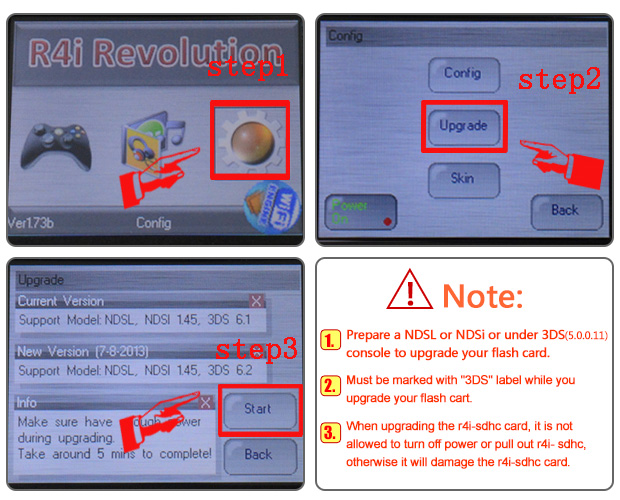
what is the difference between upgrading firmware and updating the card or kernal. i have the latest one the 1.50b but the card still wont work in my never updated DS lite. so do i need to upgrade the firmware, if so where he hell do i get a firmware update?? it not on any website that i have found a friend said it will be something like a FWUPV type file name. please help, thanks

 
Kernel is the menu which allows more game capabilty

Firmware allows updates on the console to be bypassed

you need to re-flash the card so latest firmware works fine

read the website better

ens.jpg


if its not working at all then the card is broken and u need to buy another

if it loads but give MENU?
then you havnt installed the kernel correctly
 
pong, thank you for helping me out. the card just comes on and then says please update firmware. it cant get to the screen u have posted and that the ???website shows. where can i download the firmware online.?? also i dont have wifi to connect it
 
pong, thank you for helping me out. the card just comes on and then says please update firmware. it cant get to the screen u have posted and that the ???website shows. where can i download the firmware online.?? also i dont have wifi to connect it

According to www.r4i-sdhc.com

If the screen displays "Please upgrade the hardware for support the latest firmware", how should i do?
0. When you have this kind of the flash card which is marked with V1.42 or V1.41 or 3DS upgraded successfully for NDSi 1.4.3, but still using with old kernel v1.41b/1.42b, an error message will be showed as below, please download and update the latest kernel to use.

So if you download the latest kernel 1.50b and format your SDHC card with panasonic formatter this hopefully will solve your problem.
 
List the files you have on your micro sd card at the root and include extensions (example, R4I folder, r4.dat), if the above solutions don't work for you. Also, are you really using a DS Lite? If so, DS Lite's never had firmware updates, only DSi and 3DS have firmware updates. The r4i-sdhc team embed the kernel update into their firmware downloads. In your case 1.50b, it already contains the file you need to upgrade the firmware of the flash card. Don't pay attention to the words, pay attention to the message; you have all the files you need right now. You just need a little direction and all should go well. Some people have had a similar problem as you and have said that the 1.42 firmware was the only one that helped them get over the hurdle where they could run 1.48b+ firmwares. Another question I have for you is when and where did you get your flash card?
 
i have

moonmemo
moonshl2
r4imenu
r4.dat

got it from a friend i think he bought it like 4 months ago. yes i have a DS lite
 
ok after i format i just drag and drop the files onto the SD card right??
Just extract the contents of the R4i-3DS V1.50b English folder onto your SDHC card.
what does this message mean>> firmware expired! Please check NDS machine date configuration.
Try changing the date of your DSL to one year earlier and see what happens then (assuming that your DSl has the todays date set on it).
 
It's a regular failing with the r4i-sdhc.com kernel. They usually fix it a few days later but they still haven't found a permanent fix (after 2 years of trying). The latest kernel of 1.51b should fix this error and you can have the date back to the correct one.
 

Site & Scene News

Popular threads in this forum