
Hardware Missing title folder on corrupted SD card (unmodded 3DS) please help!

  • Thread starter Thread starter doumori
  • Start date Start date
  • Views Views 1,409
  • Replies Replies 15

doumori

Member
Newcomer
Joined
Jan 14, 2026
Messages
8
Reaction score
0
Trophies
0
XP
26
Country
Canada
Back in September, I took out my SD card to transfer photos I took at a concert to my friend's phone using an SD card adapter. I don't think I did anything wrong when ejecting the SD card but for some reason taking it out seems to have corrupted it (it is an old SD card I've been using since 2014 though...)

At first, when I tried turning my DS on with the SD card inserted, I would just see a black screen. I took the SD card out and was able to somewhat fix it on my laptop (as in I no longer have a black screen when turning my DS on) but now I'm unable to open games such as animal crossing and I'm missing a digital game. I was able to open tomodachi life but I have not tried opening any other games besides that and animal crossing.
Animal crossing tells me I need to install an update before playing but I get the following messages:
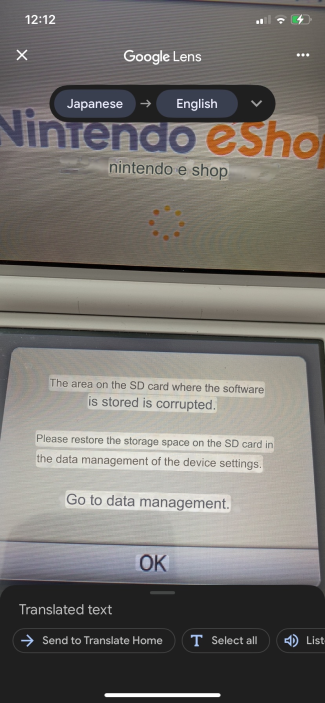
1768411070871.png
1768411104358.png

I did not initialize anything because I don't want to lose my save data and I want to try recovering my SD card first but I don't know how :(
I did some research and ran my SD card through testdisk and I found that the title folder is missing which is where I'm assuming the issue lies but I'm not sure where to go from here:
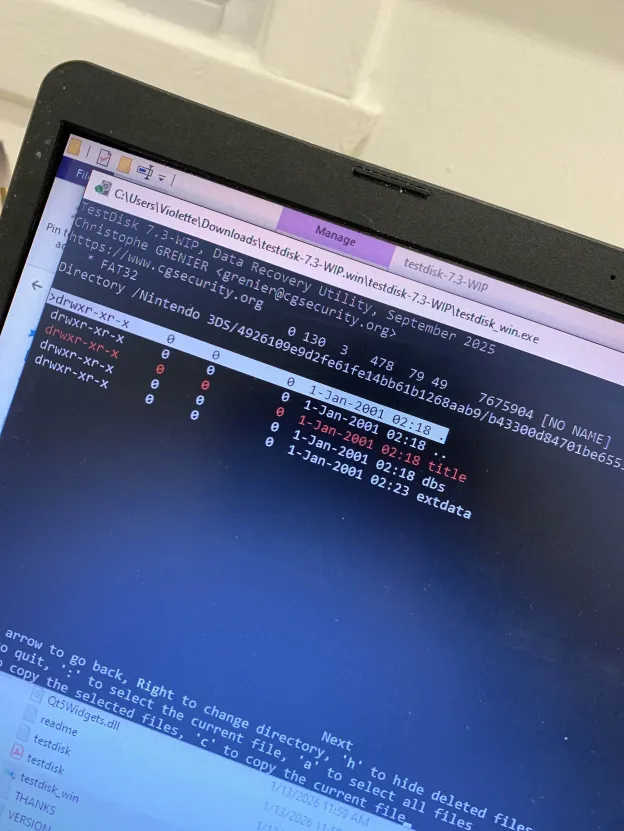
1768410189799.png
 
Back in September, I took out my SD card to transfer photos I took at a concert to my friend's phone using an SD card adapter. I don't think I did anything wrong when ejecting the SD card but for some reason taking it out seems to have corrupted it (it is an old SD card I've been using since 2014 though...)
This is why I usually advise handling the SD card as little as possible. You can transfer files wirelessly with FTPD if you have CFW.

I took the SD card out and was able to somewhat fix it on my laptop (as in I no longer have a black screen when turning my DS on)
What exactly did you do on your laptop to "somewhat fix it"?

I was able to open tomodachi life
Is that game stored on your SD card?

I did some research and ran my SD card through testdisk and I found that the title folder is missing
Pretty much everything is stored in the "title" folder. Can you still see the folder in Windows Explorer?
 
This is why I usually advise handling the SD card as little as possible. You can transfer files wirelessly with FTPD if you have CFW.

What exactly did you do on your laptop to "somewhat fix it"?

Is that game stored on your SD card?

Pretty much everything is stored in the "title" folder. Can you still see the folder in Windows Explorer?
I don't exactly remember what I did on my laptop but I'm pretty sure there was a prompt when I inserted the SD card and it said it was corrupted and it reformatted it or something... I wasn't able to transfer files wirelessly because I don't have FTPD or CFW.

I'm pretty sure the game is/was stored on my SD card since it was downloaded from e-shop.

I can't see the folder in windows explorer as it was deleted or lost somehow. I can only see the folder when I run it through testdisk but I don't think I'm able to see it's contents. The only other place where there is a title folder is under dbs and it contains "import.db" and "title.db" but I can't open either one.
 
Well, this is rather unusual.

I suppose the next step is to use Testdisk to try to copy the title folder to your computer's hard drive, as per https://www.cgsecurity.org/testdisk_doc/undelete_fat.html .

Oh, right, that would be a problem. (Technically you can run FTPD without installing CFW, but it's a little tricky.)
I copied it but it's not on the SD card itself so I'm not sure how it helps me. Also the title folder is empty and I don't know if it's supposed to be that way...
 
Did you copy it using Testdisk, or what?

Are you saying the copy you created with Testdisk is empty? This is confusing.
Sorry! Yes, I copied the "title" folder that was marked as deleted using Testdisk, but I put the copy in a backup of my 3ds data on my laptop in the same place where there is "dbs" and "extdata" because it seemed like the correct spot following this:
1768420969487.png


I did not copy the "title" folder onto the SD card because the guide says "For maximum security, TestDisk doesn't try to unerase files but lets you copy the deleted files onto another partition or disk. Remember, you must avoid writing anything on the filesystem that was holding the data. If you do, deleted files may be overwritten by new ones." and I've never worked with files like this before so I didn't want to risk losing anything.

The copied "title" folder itself does not seem to contain anything (i.e. game/title IDs etc.).
 
I put the copy in a backup of my 3ds data on my laptop in the same place where there is "dbs" and "extdata" because it seemed like the correct spot following this
How did you make that backup..?

I did not copy the "title" folder onto the SD card
Yes, that is why I wrote "copy the title folder to your computer's hard drive" earlier.

The copied "title" folder itself does not seem to contain anything (i.e. game/title IDs etc.).
If you right-click it and select "Properties", does Windows say it is zero bytes?
 
How did you make that backup..?

Yes, that is why I wrote "copy the title folder to your computer's hard drive" earlier.

If you right-click it and select "Properties", does Windows say it is zero bytes?
I just copied everything that was on the SD card to my laptop. Sadly it was only after it got corrupted though
When I right-click the folder I copied windows says it has 0 bytes.
 
I would say the situation is quite hopeless, but you say you're still able to open Tomodachi Life.

Inside your "Nintendo 3DS" folder, there should be exactly one folder with a long random name. (As per the image you posted, this is your "ID0".) Inside that folder there should be exactly one folder with a different, long random name. (This is your "ID1".) Do you more than one folder in either case?
 
I would say the situation is quite hopeless, but you say you're still able to open Tomodachi Life.

Inside your "Nintendo 3DS" folder, there should be exactly one folder with a long random name. (As per the image you posted, this is your "ID0".) Inside that folder there should be exactly one folder with a different, long random name. (This is your "ID1".) Do you more than one folder in either case?
Inside my "Nintendo 3DS" folder there's the "ID0" folder as well as "Private" and when I open "ID0" there's just "ID1" which contains "dbs" and "extdata"
 
To be clear:
Sadly it was only after it got corrupted though
Were you playing Tomodachi Life only before it got "corrupted"? Because I can't imagine how you would be able to play that from your SD card as it is now.

I heard a suggestion once that Easeus can recover data even when Testdisk cannot. (I don't know where you can get a copy of the full version of Easeus.)
 
To be clear:
Were you playing Tomodachi Life only before it got "corrupted"? Because I can't imagine how you would be able to play that from your SD card as it is now.

I heard a suggestion once that Easeus can recover data even when Testdisk cannot. (I don't know where you can get a copy of the full version of Easeus.)
No, I played it after it got corrupted and there is a pop-up saying that I need to update the game first before playing but I am able to skip the update and play anyway whereas I can't do the same for ACNL. I remember the game giving me a warning or something about my SD card but that was 4 months ago so I don't remember what it said.

If I go ahead and initialize my SD card as my 3DS prompts me to, what exactly will I lose?

As far as I'm aware cartridge games save to the cartridges themselves but store the update on the SD card. I've already backed up my photos etc. and I only ever had one digital game (specifically, Disney Magic Castle: My Happy Life) but I read somewhere that you can still re-install games and install updates even though eshop and the Nintendo servers are no longer active.

Obviously I'd prefer not to lose my save progress but if it's just for the one game then I guess it's not the worst outcome...
 
I remember the game giving me a warning or something about my SD card but that was 4 months ago so I don't remember what it said.
Well, I'm guessing that four months ago your SD card wasn't like it is now.

If I go ahead and initialize my SD card as my 3DS prompts me to, what exactly will I lose?
You should probably just get a new SD card at this point. They're cheap enough, and you wouldn't want to risk this one failing again if you keep using it.

As I said in my first post: pretty much everything is stored in the "title" folder, including most save data. There is nothing really salvageable in the folders that remain. (Your photos are still in the DCIM folder, of course.) A few games store some mostly minor data in "extdata", but none of the ones you've mentioned.

If you're playing Animal Crossing from a cartridge, then your save data is indeed stored on the cartridge. (If you downloaded the Welcome Amiibo update, and your cartridge pre-dates that update, then you will have to download the update again before you can use that save data.)

I read somewhere that you can still re-install games and install updates even though eshop and the Nintendo servers are no longer active.
Yes, the eShop still functions and you can still download previously-purchased software and updates for cartridge-based games. You just can't make new purchases.
 
  • Like
Reactions: doumori
Well, I'm guessing that four months ago your SD card wasn't like it is now.

You should probably just get a new SD card at this point. They're cheap enough, and you wouldn't want to risk this one failing again if you keep using it.

As I said in my first post: pretty much everything is stored in the "title" folder, including most save data. There is nothing really salvageable in the folders that remain. (Your photos are still in the DCIM folder, of course.) A few games store some mostly minor data in "extdata", but none of the ones you've mentioned.

If you're playing Animal Crossing from a cartridge, then your save data is indeed stored on the cartridge. (If you downloaded the Welcome Amiibo update, and your cartridge pre-dates that update, then you will have to download the update again before you can use that save data.)

Yes, the eShop still functions and you can still download previously-purchased software and updates for cartridge-based games. You just can't make new purchases.
What SD card would you recommend? The one that my DS came with is a Toshiba SDHC 4gb but I can't seem to find the exact same online...
 
What SD card would you recommend?
Are you thinking this question hasn't been asked before..? If there was a "recommended SD card" then that recommendation would be easy to find everywhere. Any given brand can source their cards from any number of different places and can change their source at any given time.

Just make sure you properly test the empty card with h2testw before you start using it. And you should probably avoid bargain prices from disreputable vendors.

4 GB is very small. 64 GB is plenty (though you will not be able to format a 64 GB card as FAT32 with the standard Windows formatter). Some people use 128 GB, but that's probably more space than you'll ever need and problems can start appearing with cards of that size.
 

Site & Scene News

Popular threads in this forum