Hacking Homebrew ModMii is now supporting the Wii U!

  • Thread starter Thread starter Gabubu
  • Start date Start date
  • Views Views 25,536
  • Replies Replies 87
  • Likes Likes 122
I can confirm that last year, when setting up my isfshax + SDUSB mods, it was pretty jank and the documentation wasn't all the way there. It's definitely something for more advanced users before things stabilize, especially if you want things to be properly persistent and automated. I wouldn't recommend someone who isn't advanced to try pulling this off, especially with all the parts where you risk a brick when you set stuff up manually, even involving manual file management inside of SLC.
 
Thanks so much for this update. But question, if I've long since had my vWii hacked and modded, is it worth upgrading to the latest d2x v11 beta 3? With all of the tons of modifications I've made on my Wii U, with the exception of adding Priilosder, I've only tampered with my vWii once.
 
The new cios coupled with the new gx's auto settings makes everything generally just 'work' out of the box without having to tweak game settings individually so much. Now if all the titles u have are working fine, it's up to u if u want to update before u run into something that doesn't, or u can be reactive to any issues.
 
  • Like
Reactions: nWo
ModMii 8.0.1 Released!
See website or github for changelog and download

One of the bigger changes in this update is the updated and improved Advanced Download Page; here are some screenshots of what it looks like now compared to what it looked like before (and of course it's more functional and faster, see changelog for more info)
 
View attachment 490278
Yep, you've seen the title of this thread right! ModMii is now supporting the Wii U!

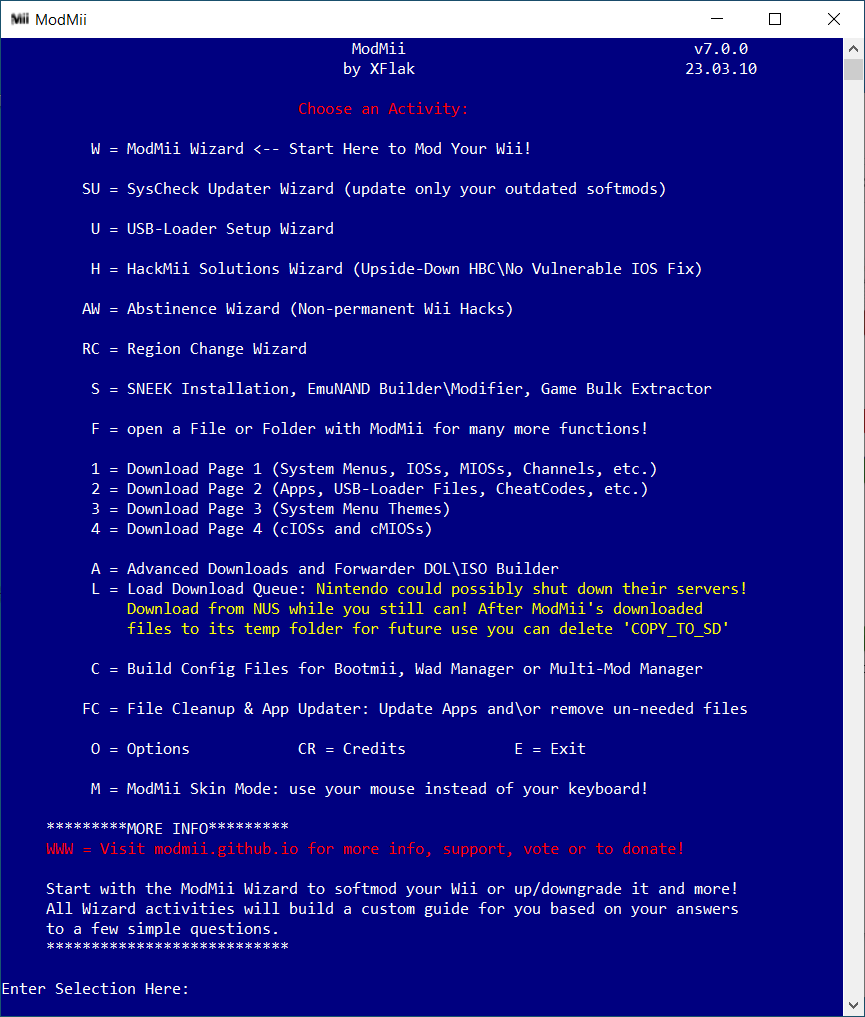
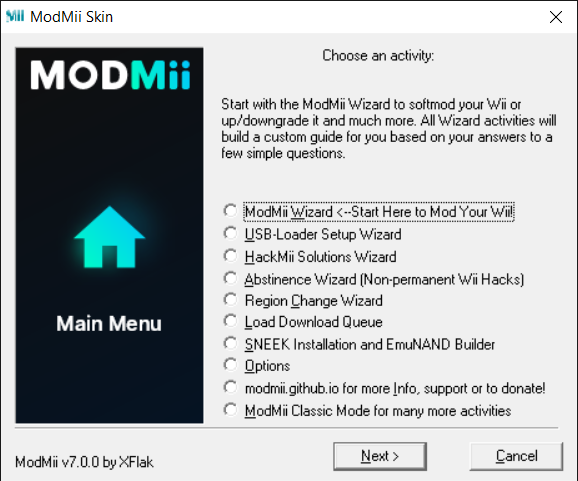
Originally, ModMii was made for modifying every Wii console, which it can generate custom guides based on your console's specifications, and save the files in their appropriate locations for easy offline softmodding where possible. (Sample guides for illustrative purposes only are available here.)
With the new release of ModMii (version 8.0.0), you can also modify Wii U and/or vWii, allowing you to safely Homebrew your system without any fear.


classic.png
skin.png

What can ModMii do?
  • Softmod any Wii, WiiU or vWii
  • Generate custom guides depending on the options that you select
  • Update only your outdated softmods based on a SysCheck log from your Wii or vWii
  • Check for updates to your Wii\vWii\WiiU homebrew
  • Softmod Wii and vWii completely offline without requiring internet on the console
  • Safely upgrade or downgrade your Wii System Menu to 4.1, 4.2 or 4.3 protecting against 003 bricks
  • Able to build a custom easy to follow guide to setting up a USB-Loader (including how to format/partition your external hard drive)
  • Install SNEEK (Wii only), build emulated NANDs (Wii & vWii) and Batch Extract Wii/Gamecube Games for use with SNEEK+DI or UNEEK+DI
  • Load NEEK on a Wii without softmodding it using the Abstinence Wizard (i.e. Non-permanent Wii Hacks)
  • Region Change Your Wii
  • Download\build IOS & cIOS WADs, Official Wii Channels, System Menus, Homebrew\apps, etc.
  • Install patched IOSs without a wifi connection on your Wii\vWii
  • Customize Bootmii, Wad Manager and MMM config files to adjust their start-up settings
  • Build Wii\vWii\Wii-Mini System Menu Themes
  • HackMii Solutions Wizard for Wii's experiencing an upside-down homebrew channel or HackMii Installer No Vulnerable IOS problems
  • Advanced Custom Downloads Feature to easily patch and change the slot/version of IOSs/cIOSs. It can also build 3 different types of forwarder dol's and iso's (only use this feature if you know what you are doing!!)
  • Drag and Drop \ open various file types to perform different functions (e.g. nand.bin check\clone\defragment, WAD modify\unpack\trasmit\info, mym & csm theme creation, dol & elf app launcher, zip HBC transfer tool, patch deflicker video filter, modify EmuNANDs, etc.)
  • and much much more!
All of that was made by @XFlak, with his contributors, beta testers and video designers. Oh, you too, because you are using ModMii and modding the Wii or Wii U consoles!

For more:
That's really cool!
 
I see the problem with antivirus. They see as a "trojan". (Thanks VirusTotal) Maybe there is better an update without to be a trojan. I download on the official modmii for the context. Yeah the Windows defenser risk to dectect modmii for that.

EDIT: I recommended the zip files because the installer.exe dellet himself because windows11 and windows defenser know the exe files is a virus. Thanks Microsoft lol:rofl2:
 
Last edited by Antho27mellilium,
I see the problem with antivirus. They see as a "trojan". (Thanks VirusTotal) Maybe there is better an update without to be a trojan. I download on the official modmii for the context. Yeah the Windows defencer risk to dectect modmii for that.
It's a false positive, the code is open source for anyone to see and there is nothing malicious about it.
 
Thanks for the update that I won't use cause I refuse to suffer modern Windows. 😀
Even though this one change was specifically for you? Lol

- Improved ModMii's legacy cIOS construction mode to avoid using WiiPy to unpack WADs; only relevant for users running older\unsupported versions of Windows allowing them to build cIOSs (provided that they already have base IOSs cached).
 
Even though this one change was specifically for you? Lol

- Improved ModMii's legacy cIOS construction mode to avoid using WiiPy to unpack WADs; only relevant for users running older\unsupported versions of Windows allowing them to build cIOSs (provided that they already have base IOSs cached).

Well send me the link by PM.

Do do a fresh install or something?
 
Just run the latest modmii on your win7, so long as u already have the required base ios wads saved to modmii's temp folder (from a previous modmii installation or wherever) then modmii will be able to build cios's even if you're running an older version of windows that isn't fully supported

Edit: also there are ways to install modern windows without all the bloat/AI/recall features. I think the process should be much simpler, but as it stands I feel it's still worth the trouble to avoid running an outdated/insecure OS.
 
Last edited by XFlak,
  • Like
Reactions: raxadian
there are ways to install modern windows without all the bloat/AI/recall features.

Microsoft keeps making it harder and it will break compatibility with some videogames I have, plus remove my Windows XP VM.

I use Android and Linux for web browsing and doing stuff offline and my Win 7 laptop is keep offline most of the time.
 
Last edited by XFlak,
Edit: also there are ways to install modern windows without all the bloat/AI/recall features. I think the process should be much simpler, but as it stands I feel it's still worth the trouble to avoid running an outdated/insecure OS.

Windows 10 and 11 are insecure systems by design, and classified as malware as per Microsoft's own admittance (e.g. keyloggers) since the Windows 10 launch.

Security, privacy, stability and superior UI and UX design are the reasons Windows 7 remains so popular today and into the future.

This is no exaggeration: You think you can remove all the evil and ultra-invasive stuff, but you can't. Not 100%. And even with what you can remove, it necessarily leaves your system in a broken and unsupported state. In no way, shape or form should it be the default option for anyone.

Aside the 1st party keyloggers, spyware and the massive malware behavior of the AI and other "features", lack of consent with OneDrive and so on, users keep losing their data due to several AI slop bugs that govern Microsoft's software updates, breaking Windows in ways that have caused terabytes upon terabytes of data loss worldwide, be it from the terror of various BitLocker bugs or other forms of irreversible destruction.

Microsoft is very open about the malware they push. Now imagine all else they aren't being open about. It only gets worse with time, not better, so the further you are able to go back, the more you go forward where it actually counts.

Remember: Where there is a risk, there needs to be a choice. It's no one's business but their own what other users decide to use for themselves. At minimum, the best we can do is not to try to take away that choice from them. If I develop Windows software, I won't go out of my way to ensure it's broken on Windows 10/11 to protect users from the various infringements caused by their poisoned OS of choice. The best I can do is educate, and let them come to their own opinions and decide.

Windows 8 and 8.1 are also problematic, although to a lesser degree. Still should be avoided nonetheless.

Incidentally, for what it's worth, it should be known and made clear that Windows 7 (and even Vista) have been officially supported by Microsoft until January 2026, meaning until just know, way before ModMii 8.0.0 was released. Perhaps you just didn't know of it, but not only there were ESU updates, but also PA (Premium Assurance) updates. They are for Server 2008 and 2008 R2, whose non-Server counterparts are Vista and 7 respectively, and work equally on them.

With or without the updates, though, Windows 7 SP1 has TLS 1.2 support, various modern tools, apps and webbrowsers (if you try and look), and extremely solid security overall. What's essential to ANY operating system, above all, is how you, the end user, use it. If need be, you can harden its built-in security even further for any given edge case, simply ask around the "Windows XP Vista 7 fans" Discord community from where the likes of VxKex originated from, as well as a lot of general good advice.

TL;DR I think you meant well, but please consider not fighting how users use their systems. They might know something you might not. This is not to say you are guilty of the following, but never impose anything onto others over the terrible pretext or premise of "because it's good for you" or "I know better than you". Thank you for making ModMii for all these years.

 

Site & Scene News

Popular threads in this forum