I'm not sure SBITools works well with other discs besides PS1 ones. DiscoHawk has worked for me with many PC games.
You also don't have to use the command-line with DiscoHawk.
Hi everyone, I read the entire post and I'm discovering that after years, over a decade, the problem is not just mine.
In the last few weeks I have done nothing but create bin/cue copies of my old PSX titles and then convert them to EBOOT via PSX2PSP.
The conversion success is always zero, considering that in the Game Title list the number never matches, in fact during the incomplete conversion, apart from a couple of PAL multi-language chapters, those natively with only one language (ita) are not taken into consideration.
If I select another Game Title obviously PAL tells me abort or close the program.
This does not happen with PopstationGUI 3.0, but even there using the FIX from PAL to NTSC I managed to start only Suikoden II.
Legend of Legaia and many other titles are problematic and in my opinion it is due to the fact that these tools have not been updated over the years and therefore many Game IDs are missing.
I think so because PAL multi-languages work and I'm happy that there is also a very long list of PAL games protected with libcrypt, in fact for those I use SBITools_v0-3-2 (it doesn't matter whether they are sbi or lsd files).
Has anyone found a solution to a similar problem?
With PopstationGUI 3.0 the conversion happens and it also edits the EBOOT, but in the end it tells me corrupt data.
All on PSP 3004 with ARK-4 mod, I hope that such a precious discussion is kept alive and doesn't get lost over the years.
Let's keep retro gaming alive guys!
Thanks to Sony kindly giving us a very good Playstation Emulator for PSP and DarkAlex hacking it to run any PS1 ISO converted to an eboot we now have the lovely ability to run old PSX games on our PSP.
Note: This will only work if you have Custom Firmware installed on your PSP, see the 2 modding stickies for instructions on how to install this
Step 1. Get your PS1 ISO
This is one of the simplest steps, just pop your disk in your CD drive, open up your selected ripping software and rip to either ISO or Bin/CCD format.
The ripping software I personally use is Alcohol 52% which has a Playstation template for its ripping so it will read and dump all data. It is free and you can download it Here
Step 2. Get PSX2PSP v1.42 (latest version as of writing)
Download PSX2PSP here: PSX2PSP v 1.4.2(3rd option down, no hotlinking allowed)UPDATE: Link updated to Filetrip download
Download the file and extract to your chosen directory. Now open the folder and double click on “Theme Mode” as this is the nicest looking and simplest GUI to use.
Step. 3 Prepare your file for conversion
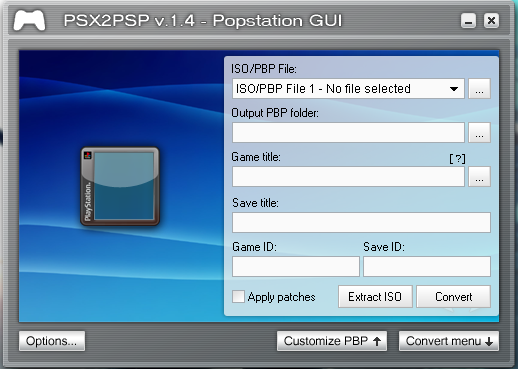
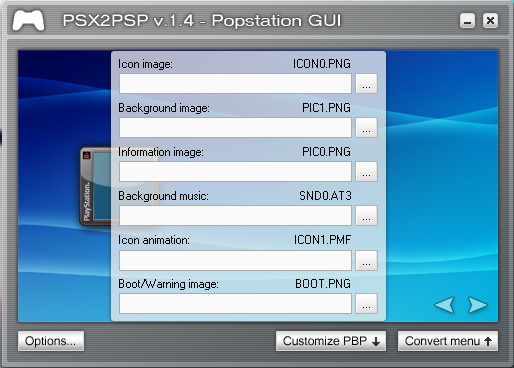
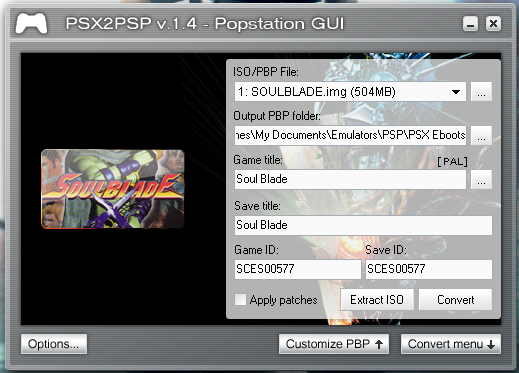
Click on “Convert Menu” in the bottom right of the Window, this should bring up a menu like this
Now click on the “...” beside the “ISO/PBP File 1 – No File Selected” dropdown menu and navigate to where you placed your ISO/BIN file, select it and return
N.B. If you have a premade eboot with images you don't like you can open it in this step and edit the images just the same. Same goes for other compaitibility issue fixes. You can also click the "Extract ISO" button to remove the ISO from the eboot and play the game in your favourite PC emulators
If your PS1 game has multiple disks and you wish to make them into a single eboot simply bring down the dropdown menu, click on File 2, and select your next ISO. Repeat this for all disks in the game.
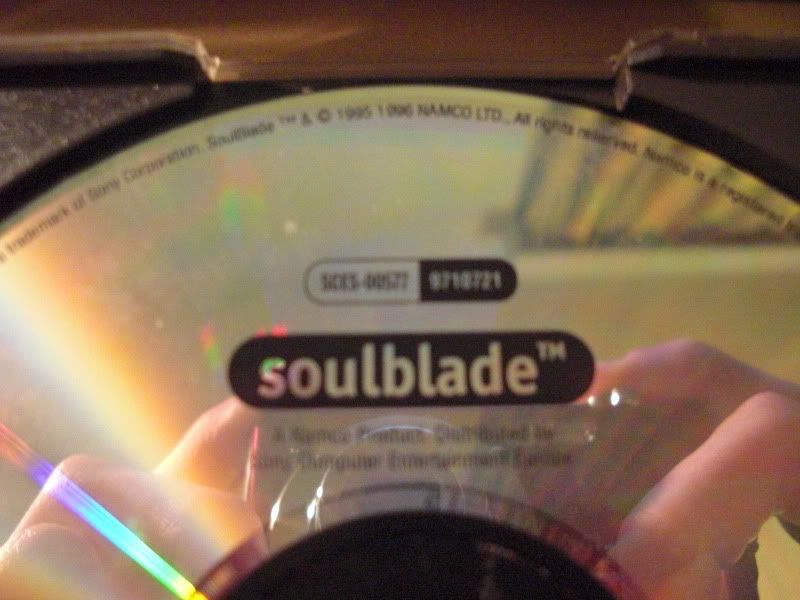
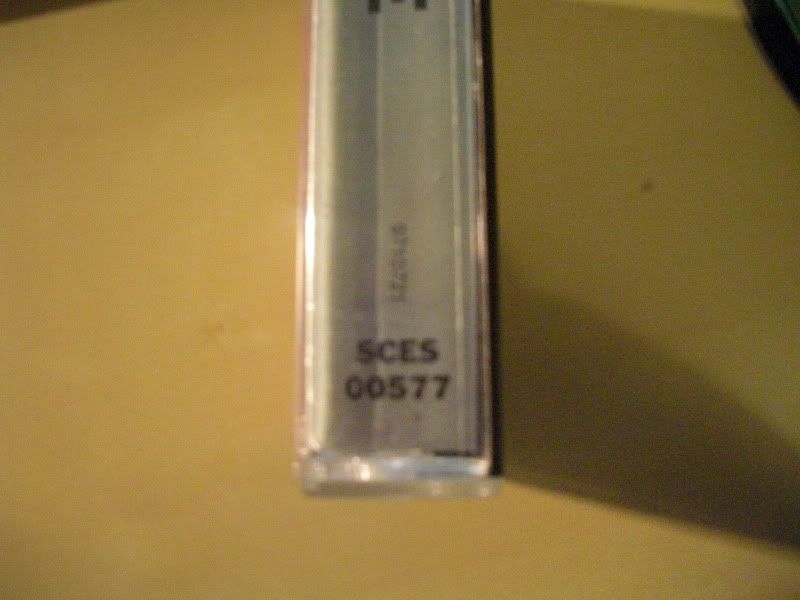
Now make sure that the GameID shown is correct for your ISO, this ID should be displayed on the original PS1 disk or at the foot of the box's end label. You may also wish to change this for compatibility reasons. (Check Here to check whether your game has any compatibility issues
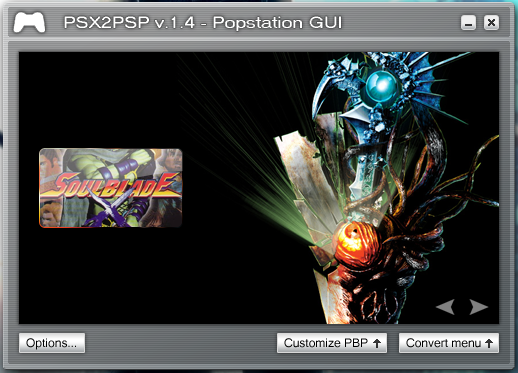
Now we're ready to make the eboot look a bit better, close the “Convert Menu” by clicking the button in the bottom right again and now click “Customise PBP” which should bring up a menu like this.
Using this menu we can customise what the eboot will look like on the PSP, you may make these yourself or download from the internet. Personally I use this site as it has background images and icons for many popular PS1 games but the list is not extensive and you may have to search around for your own.
Note: PSX2PSP's Icon size is defaulted to the 80x80 PS1 box art size, if you have an icon that is not boxart size you will have to go into Options and change the Icon0 to “Default”
Step 4. Converting your eboot
This step's pretty easy as well, now we've customised the eboot we can convert and save it for use in our PSP.
Close the “Customize PBP” menu and open the “Convert Menu” again now click on the button beside “Output PBP” and navigate to where you wish to place your Eboot, do not worry about creating a subfolder for each game as PSX2PSP will automatically create one. Once this is doen simply click “Convert” and wait. Once finished just navigate to where you placed the Eboot, plug in your PSP and copy the folder containing the Eboot to ms0:/PSP/Game on your PSP's memory stick.
This guide is outdated, people should be using pop-fe instead, more modern, maintained, and with a better compatibility list for both PSP and VITA PSPemu.
This guide is outdated, people should be using pop-fe instead, more modern, maintained, and with a better compatibility list for both PSP and VITA PSPemu.
This guide is outdated, people should be using pop-fe instead, more modern, maintained, and with a better compatibility list for both PSP and VITA PSPemu.
It still works. There's no reason to use something else just because it's newer but offers nothing that the old tools didn't already.
It's good to have alternatives, but one doesn't invalidate the other just because it's new.
It's the same with ARK4. I have a perfectly working PSP with PRO CFW that runs all games that I want, why should I move to ARK4 just because it's more "modern" and maintained? This sounds exactly like Microsoft and new Windows versions.
It offers something that the old tools didn't, better compatibility with converted games, i.e. most games that converted with PSX2PSP won't work, they will work with pop-fe, for both PSP and VITA PSPemu.
You shouldn't, you, the user, can do whatever you please. But a educational content should teach new users to use the tool that has better compatibility, and maintained if possible, so users can report issues and they actually being fixed.
Related to ARK, it is recommended to switch for it fixing many issues and bugs still existent on PRO, you happen to not be affected by none of them, then it doesn't matter if you prefer to stay on PRO or move to ARK.
That's not true at all for the PSP, it must be something specific to PS Vita.
As I said, PSX2PSP works fine and can be used today, but I'm not opposed to a second guide for pop-fe as an alternative.
It is, PSX2PSP does not apply POPS configuration to generated eboots, causing some games to not work as best as it could, or in rare cases not working at all, or working best/only on specific versions of POPS (probably default values changing between versions or changes on the inner works of the emulator). The VITA POPS just made the list of incompatible games (on the Vita PSPemu) bigger, as it is considerably different from PSP version (even though it is based on the PSP version) and even includes config options exclusive to PSPemu POPS iirc.
This is one of the new things in pop-fe that PSX2PSP lacks for another argument agains your "offers nothing that the old tools didn't already". It has a huge database of configs to generate eboots that will create an eboot that will work good on both PSP and VITA PSPemu, and the user also has the option to provide his own POPS configuration if they need.
I also opposed for this post to be heavily modified or changed, it has historical and technical value. But ideally, a new tutorial using pop-fe should becomes the fixed post and this one be just unfixed once the other becomes fixed
It is, PSX2PSP does not apply POPS configuration to generated eboots, causing some games to not work as best as it could, or in rare cases not working at all, or working best/only on specific versions of POPS (probably default values changing between versions or changes on the inner works of the emulator).
Ok, so that's not "most games not working" as you previously said. AFAIK most games work fine with POPS 6.60 with a few requiring a different POPS versions to work correctly, that's precisely why there's a popsloader pack with basically all modules of POPS from 3.02 to 6.60, so you can choose one to use holding R when booting the game.
Correct me if I'm wrong, but I don't think there's a public database listing which games require a certain version of POPS, so I'll stand by what I previously said: PSX2PSP still works fine.
Can pops-fe actually change the version of POPS that will load with a certain game by injecting some configuration into the EBOOT? That's news to me, but sounds very interesting.
Ok, so that's not "most games not working" as you previously said. AFAIK most games work fine with POPS 6.60 with a few requiring a different POPS versions to work correctly, that's precisely why there's a popsloader pack with basically all modules of POPS from 3.02 to 6.60, so you can choose one to use holding R when booting the game.
Ah, ok, that is fair, re-reading my message, I think I could make the sentence more clearer: Most game conversions with PSX2PSP that is currently not working on integrated (no popsloader) POPS, work when converted with pop-fe.
Correct me if I'm wrong, but I don't think there's a public database listing which games require a certain version of POPS, so I'll stand by what I previously said: PSX2PSP still works fine.
Can pops-fe actually change the version of POPS that will load with a certain game by injecting some configuration into the EBOOT? That's news to me, but sounds very interesting.
No, but POPS has configuration that changes the emulator behavior, this is called POPS config by the community. It can be set on the EBOOT itself, so it is applied on per-title basis.
It was discovered and documented after PSX2PSP stopped being maintained, so if people wanted to create and insert those config in your converted EBOOT, you had to manually edit the EBOOT in a hex editor.
These configuration options is that allows to tweak the POPS emulator behavior and achieve better emulation, some games even requiring some options to even work on current POPS. That way, most of the time, you don't even need to use a different version of POPS to make a game work, just a different, tweaked config. Some other times it still requires a different version to run even better (I wished that there was a better document on that, but the informations is out there, just a mix of github issues comments, forum post, etc).
PSX2PSP is no longer useful today; using it is outdated. It converts to EBOOT.PBP simply, a one-time conversion without any additional features. Perhaps it's still useful for converting some modified or translated games.
Pop-fe, even before we started creating custom configurations for it, already had the important ability to convert multi-track game audio to ATRAC3. This alone fixed many games that crashed because of CDDA music, requiring the use of CDDAEnabler (which could cause crashes). Examples include Alien Resurrection, Wipe Out, Ducati, etc., which would freeze in parts of the game, and no popsloader could help. For the rare games that might have problems with ATRAC3, pop-fe has a checkbox; check it, and it will remain in CDDA.
Pop-fe also automatically adds cover art, background art, music, and a manual to your game. Among other bonuses.
Pop-Fe applies fixes for libcrypt games, and also patches for games like Jackie Chan Stuntmaster, which is unplayable without Pop-Fe on both the PSP and PS Vita, among many other games.
Then we have customizable settings, where so far 349 games have received substantial improvements, and this applies not only to the PS Vita but to both. Games like Digimon World 2003, Bugs Bunny Lost in Time, Gran Turismo 2, Roll Cage 2, Dragon Quest VII, Final Fantasy IX, Worms Armageddon, etc., run poorly on both handhelds and no Popsloader can help; you will experience slowdowns and crashes.
Overall, these settings fix all kinds of problems:
Popsloader is still minimally useful for a few games on the PSP, such as playing Mortal Kombat Trilogy, where we still don't have a solution, just as RetroArch is useful for the Vita in this respect.
And the lack of updates for PSX2PSP is causing some bugs with versions of Windows Defender, where the conversion freezes.
Below is a list of the games that have benefited so far:
007 Racing
A Ressha de Ikou Z - Mezase! Tairiku Oudan
A.IV - Evolution Global
Ace Combat 2
Aces of the Air
Actua Tennis
Air Combat
Air Management '96
Alundra
Alundra 2
Aoki Ohkami To Shirokimejika - Genchohishi
Ape Escape
Arc Arena - Monster Tournament
Armored Core
Armored Core - Master of Arena
Armored Core - Project Phantasma
Assault - Retribution
Battle Arena Toshinden
Battle Arena Toshinden 2
Battle Arena Toshinden 3
Battle Konchuuden
Beatmania Best Hits
Beltlogger 9
Blasto
Blockids
Bloody Roar 2 - Bringer of the New Age
B-Movie
Bomberman
Brain Dead 13
Brave Fencer Musashi
Breath of Fire IV
Bugriders - The Race of Kings
Bugs Bunny - Lost in Time
Bushido Blade
Bust a Groove
Bust-A-Groove
Bust-A-Move 2 - Arcade Edition
Buster Bros Collection
Capcom Generation 5
Carom Shot 2
Championship Bass
Championship Motocross 2001 featuring Ricky Carmichael
Chaos Break
Chocobo Racing
Clock Tower
Clock Tower - Ghost Head
Clock Tower - The First Fear
Colony Wars
Colony Wars - Vengeance
Command & Conquer
Command & Conquer - Red Alert - Retaliation
Cooking Fighter Hao
Cool Boarders
Cool Boarders 2
Crash Bandicoot 3 - Warped
Crash Bash
Crusaders of Might and Magic (Europe)
Crusaders of Might and Magic (USA)
CTR - Crash Team Racing
Cyberia
D
Dance Dance Revolution - 4th Mix
Dance Dance Revolution - Konamix
Dark Hunter - Ge Youma No Mori
Dark Hunter (Jou) Ijigen Gakuen
Destrega
Destruction Derby
Detana Twinbee Yahoo! Deluxe Pack
Digimon Rumble Arena
Digimon Tamers - Pocket Culumon
Digimon World
Digimon World 3
Dino Crisis
Disney's Donald Duck - Goin Quackers
Disneys Hercules Action Game
Disney's Lilo & Stitch
Disney's Mickey's Wild Adventure
Disney's The Emperor's New Groove
Disney's The Lion King - Simba's Mighty Adventure
Disney's The Little Mermaid II
Disney's Treasure Planet
Doki Doki Shutter Chance - Koi no Puzzle o Kumitatete
Dr. Slump
Dragon Quest Monsters IúII - Hoshiori no Yuusha to Bokujou no Nakamatachi
Dragon Valor
Dragon Warrior VII
Driver
Driver - Sennyuu! Car Chase Daisakusen
Driver 2
Ducati World Racing Challenge
Dynasty Warriors
Echo Night
Ehrgeiz - God Bless the Ring
Einhander
Elder Gate
Emit Value Pack
Everybody's Golf 2
Evil Zone
Extreme 500
Extreme Go-Kart Racing
Fighting Force
Final Fantasy Anthology
Final Fantasy IX
Final Fantasy Tactics
Final Round
Front Mission 3
Fushigi no kuni no Angelique
Fuuraiki
G Darius
Game Nihonshi Kakumeiji Oda Nobunaga
Gear Fighter Dendoh
Geki-Oh Shooting King
Goemon - Shin Sedai Shuumei
G-Police
Gran Turismo 2
Guilty Gear
Gunbare Game Tengoku - The Game Paradise 2
Gundam Battle Assault
Gundam Battle Assault 2
Harvest Moon - Back to Nature
Heroine Dream
Hi-Octane
Hokuto no Ken - Seikimatsu Kyuuseishu Densetsu
Hyakujuu Sentai GaoRanger
Hyper Olympic in Atlanta
I.Q - Intelligent Qube
In Cold Blood
Incredible Crisis
International Superstar Soccer
International Superstar Soccer Deluxe
Inuyasha - A Feudal Fairy Tale
Iznogoud
Jackie Chan Stuntmaster
Jade Cocoon - Story of the Tamamayu
Jaleco Collection vol.1
Jet Moto 2
Jumping Flash! 2
Kagero - Deception II
Kahen Soukou Gunbike - Speed Power Gunbike
Kartia - The Word of Fate
Kimi ni Steady
King's Field
Kingsley's Adventure
Klonoa - Door to Phantomile
Konami 80's Arcade Gallery
Kosodate Quiz Motto My Angel
Kotobuki Grand Prix
Kuon no Kizuna
Kururin Pa!
Kurushi Final
Langrisser IV & V
Legacy of Kain - Soul Reaver
Legend of Legaia
Looney Tunes - Sheep Raider
Lunar 2 - Eternal Blue
Magic Castle
Mass Destruction
Medievil
Mega Man Legends
Mega Man Legends 2
Mega Man X4
Megaman - Battle & Chase
Megaman 8
Megaman X3
Meremanoid
Metal Gear Solid - Integral
Mobile Armor
M”bius Link 3D
Monster Farm Hop-A-Bout
Monster Race
Moto Racer
Moto Racer 2
Motorhead
MTV Sports - Pure Ride
MTV Sports - Snowboarding
Myst
Namco Anthology 1
Namco Anthology 2
Namco Museum Vol. 3
Nascar 2000
Neo Planet
Neorude
Nickelodeon SpongeBob SquarePants - SuperSponge
Nightmare Creatures
Ninja Jaja Marukun Oniriki Ninpoucho
Ninpuu Sentai Hurricanger
Nobunaga no Yabou - Haouden
nomes.txt
Nuclear Strike
One
Ore no Ryouri
Overblood 2
Pachi Slot Kanzen Kouryaku - Cranky Pro
Pachi Slot Kanzen Kouryaku 1 - Universal Koushiki Gaido Vol.1
Pachi Slot Kanzen Kouryaku 2 - Universal Koushiki Gaido Vol.2
Pachinko Dream
Paqa
Parappa the Rapper
Persona
Persona 2 - Eternal Punishment
Philosoma
Pocke-Kano - Fumio Ueno
Pocke-Kano - Shizuka Houjouin
Pocke-Kano - Yumi Aida
Pocket Fighter
Pocket Jiman
Pool Academy
Pop n' Pop
Populous - The Beginning
Power Spike Pro Beach Volleyball
Pro Pinball - Fantastic Journey
Pro Pinball - Timeshock!
Psychic Force 2
Puchi Carat
Puyo Puyo Box
Puyo Puyo Sun Ketteiban
Puyo Puyoon - Car-kun to Issho
Puzzle Bobble 3 DX
Racing Lagoon
Rage Racer
Rally Cross
Rapid Racer
Ray Tracers
RayCrisis
Rayman
RayStorm
RC de Go!
Real Bout Fatal Fury
Red Asphalt
Reel Fishing
Reel Fishing II
Re-Loaded - The Hardcore Sequel
Return to Zork
Re-Volt
Rhapsody - A Musical Adventure
Ridge Racer
Ridge Racer Revolution
Rising Zan - The Samurai Gunman
Rival Schools - United By Fate
Riven - The sequel to Myst
Road Rash
Roll Away
Rollcage
Rollcage - Stage II
Romance of the Three Kingdoms IV - Wall of fire
Rosco McQueen - Firefighter Extreme
R-Types
Saga Frontier
Saga Frontier 2
Samurai Shodown III
Sanvein
Shadow Madness
Shadow Master
Shadow Tower
Sheep
Shingata Kururin Pa!
Shiritsu Justice Gakuen - Nekketsu Seisyun Nikki 2
Shockwave Assault
Shrek Treasure Hunt
Silent Bomber
Silent Hill
Silhouette Stories
SimCity 2000
Slam Dragon
Sled Storm
Smash Court
SnoCross Championship Racing
Soul Blade
Soviet Strike
Space Griffon VF-9
Spec Ops - Covert Assault
Speedball 2100
Spyro - Year of the Dragon
Spyro 2 - Ripto's Rage!
Spyro the Dragon
Star Gladiator - Episode I - Final Crusade
Star Ocean - The Second Story
Star Wars - Episode I - The Phantom Menace
Star Wars - Rebel Assault II
Startling Adventures - Kuusou Daibouken X3
Street Fighter Alpha - Warriors' Dreams
Street Fighter Alpha 2
Street Fighter Alpha 3
Street Fighter Collection
Street Fighter Zero
Strider 2
Strider Hiryu 1&2
Suikoden
Suikoden II
Summon Night 2
Super Black Bass
Super Puzzle Fighter II Turbo
Super Robot Taisen Alpha
Super Robot Taisen Alpha Gaiden
Super Shot Soccer
Surf Riders
Suzuki Bakahatsu
Syphon Filter
Tactics Ogre - Let Us Cling Together
Tail Concerto
Tail of the Sun
Tales of Destiny
Tales of Eternia
Tales of Phantasia
Tall - Infinity
Tantei Jinguuji Saburo - Mikan No Rupo
Tecmo's Deception - Inivitation to Darkness
Tekken
Tekken 2
The Great Battle VI
The Hive
The King of Fighters '99
The Legend of Dragoon
The Misadventures of Tron Bonne
The Raiden Project
Theme Park
Theme Park World
Tobal No. 1
Tomb Raider
Tomb Raider II
Tomba
Tomba! 2 - The Evil Swine Return
Torneko - The Last Hope
Toshinden 4
Transformers - Beast Wars Transmetals
Treasures of the Deep
Twinbee Taisen Puzzle Dama
Twisted Metal
Um Jammer Lammy
Vagrant Story
Valkyrie Profile
Vandal Hearts
Vib-Ribbon
Victory Boxing 2
Vigilante 8
Vigilante 8 - 2nd Offense
V-Rally
V-Rally 2
Walt Disney World Quest - Magical Racing Tour
Warriors of Might and Magic (Europe)
Warriors of Might and Magic (USA)
Wayne Gretzky's 3D Hockey '98
Wing Commander III - Heart of the Tiger
Wing Over 2
Worms Pinball
Worms World Party
Xevious 3D-G+
YoYo's Puzzle Park
Zero Divide
Zero Divide 2 - The Secret Wish
@The_Ho I see that you listed the games that are here: https://github.com/sahlberg/pop-fe/tree/master/pspconfigs
After a quick search, I couldn't find any issue (inside https://github.com/sahlberg/pop-fe/issues/) for some of those games that would justify a custom config.
Do you happen to know how those patches were made, what exactly does each one fix and who made them or is this info impossible to find these days? I'm genuinely curious, because I didn't know these configs even existed until Gray_Jack pointed them out. If most of those patches are related to libcrypt, it would make sense to me, as I never played any PAL game.
I did create a PBP for US FF9 and it didn't give me any issues back then, granted I didn't get very far. I'll probably play it some more one of these days to see if anything happens.
Another question, do you guys happen to know if there's a database of ICON0, ICON1, PIC0, PIC1 and SND0? Similar to https://www.gametdb.com?
In fact, more than 349 games benefited from Pop-Fe; I forgot to include the games that received .ppf and xdelta patches.
The fixes were a mutual effort from several users inside and outside this forum in the PS Vita section. That's where the fixes started; Pop-Fe already existed before that, and then the fixes were integrated into it.
So guys, I looked around and never saw anything about it.
We know that PS1 games not working properly on PSP or Adrenaline (Vita), we have some means of repair like:
- Compression level
- GameID change
- Use of POPsLoader (PSP)
- Games with more than 1 CD may work better in some cases with separate EBOOTs.
etc...
But I bumped into something curious that...
From the first page to the last, you can see everyone's contributions, the evolution of fixes with HEX, GameIDs, etc., up to the refinement with custom settings and important links.
You will also find several games reported with problems that were subsequently fixed.
Regarding FFIX, even the PSN version has problems and is the same as the PSX2PSP conversion; you will encounter very annoying slowdowns when fighting in a forest and using magic. This was reported by a user, verified, and fixed.
Another game that was impossible to play was Valkyrie Profile; it had all sorts of problems, and it was only possible to fix it thanks to custom settings.
Libcrypt patches are unrelated to POPS config, I totally forgot about it because modern CFW (ARK 4/5 and nightly Adrenaline) patch it as well on game launch.
Sony made a shocking announcement today, revealing that the company plans to move away from physical game releases in the future. Citing claims of how the industry is...
Remember when you could get an Xbox Series S for $300? Those were the days. Microsoft has today announced the latest in their console price hikes, seeing their...
The delays may be behind us, but the news isn't all good for Grand Theft Auto VI. Rockstar have today announced that pre-orders for the game will go live tomorrow, on...
Last month we got confirmation of a new model of Switch 2 to better comply with upcoming EU regulations. With the legislation set to come into effect in February of...
The end has come for the PlayStation 3 and the PlayStation Vita. After supporting the PSN Store on the PS3 and PS Vita since 2006 and 2011 respectively, Sony has...
Tired of waiting for Game Freak to bring Pokemon Emerald to modern platforms? We've got you covered with a brand new port in the works. Currently available on GitHub...
In this time of economic uncertainty and rampant price hikes, the Steam sales stand as our final bastions of affordability for those opting to avoid the seas. The...
Apple have today announced price increases, primarily focused on their MacBook and iPad lines. These increases have already come into effect, with both prices and the...
For fans of Sinnoh, the pickings are slim. If you want the best experience you're left deciding between the updated region in Platinum, or the somewhat controversial...
The Switch 2 has been out for a year now, but you shouldn't count the original system out yet! Released a few days ago, popular PS2 emulator NetherSX2 has found its...
Sony made a shocking announcement today, revealing that the company plans to move away from physical game releases in the future. Citing claims of how the industry is...
Remember when you could get an Xbox Series S for $300? Those were the days. Microsoft has today announced the latest in their console price hikes, seeing their...
The delays may be behind us, but the news isn't all good for Grand Theft Auto VI. Rockstar have today announced that pre-orders for the game will go live tomorrow, on...
Last month we got confirmation of a new model of Switch 2 to better comply with upcoming EU regulations. With the legislation set to come into effect in February of...
The end has come for the PlayStation 3 and the PlayStation Vita. After supporting the PSN Store on the PS3 and PS Vita since 2006 and 2011 respectively, Sony has...
Tired of waiting for Game Freak to bring Pokemon Emerald to modern platforms? We've got you covered with a brand new port in the works. Currently available on GitHub...
Ocarina of Time is back in style as the upcoming Switch 2 remake looms on the horizon. But what's a fan of the game to do over the next few months? If you've been...
Apple have today announced price increases, primarily focused on their MacBook and iPad lines. These increases have already come into effect, with both prices and the...
In this time of economic uncertainty and rampant price hikes, the Steam sales stand as our final bastions of affordability for those opting to avoid the seas. The...
Amidst news of layoffs and cancellations in the wake of Xbox's larger changes, Bethesda has today come out with a statement discussing their active projects. In this...