Follow this guide here, if you have not done so yet: https://wiki.ds-homebrew.com/ds-index/rtcom
Also, make sure that Luma is running from the SD card instead of CTRNAND.
you are just a legend.
Follow this guide here, if you have not done so yet: https://wiki.ds-homebrew.com/ds-index/rtcom
Also, make sure that Luma is running from the SD card instead of CTRNAND.

*Games are run by nds-bootstrap
TWiLight Menu++ (or TWLMenu++, for short)
GUI for DS(i) games, and DSi Menu replacement for DS/DSi/3DS/2DS
View attachment 176367
View attachment 174327
Features
- Launch DS, DS⁽ⁱ⁾, and DS⁽ⁱ⁾Ware ROMs from the SD card and/or flashcard, via nds-bootstrap (comes included with the app)!
- For flashcards, the flashcard kernel/firmware can optionally be used to boot the games, but only for regular DS games, and DS⁽ⁱ⁾-Enhanced games in DS mode.
- 400+ DS⁽ⁱ⁾Ware titles can be played on DS & DS Lite consoles. (See this list for which can be played.)
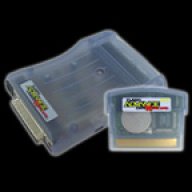
- Play GameBoy Advance games via GBARunner2 or the DS' native GBA mode, which the latter requires one of these Slot-2 flashcards:
- M3
- G6
- SuperCard SD/MiniSD/MicroSD
- EZ-Flash (before Omega) (Disabled by default, saving does not work)
- Automatic on-the-fly AP-patching for DS games! Drag and drop your ROMs onto the SD card, and play, without any additional steps!
The included AP-patches are loaded for a specific game, by nds-bootstrap, and the patching is done in RAM, leaving your original ROM untouched.- Bring the DSi Menu to your DS Phat/lite, by installing TWLMenu++ on a flashcard!
- First DS flashcard UI to show animated icons from DS⁽ⁱ⁾-Enhanced, DS⁽ⁱ⁾-Exclusive, and DS⁽ⁱ⁾Ware games!
- Set the language and region to your preference.
- 10 save slots for DS⁽ⁱ⁾ games!
- For DSi/3DS/2DS users: Overclock your DS games to 133mhz, faster than normal DS clock speed of 67mhz!
- For DSi/3DS/2DS users: Change sound frequency from 32kHz to 48kHz for higher sound quality!
- Directly access the flashcard's microSD card, and switch to and from there anytime!
- Run the last played ROM on TWiLight Menu++ startup by holding B.
- Play retro games from these popular consoles after installing the Virtual Console add-on:
- NES/Famicom, via nesDS
- (Super) GameBoy (Color), via GameYob
- Sega Master System/Game Gear, via S8DS
- Sega MegaDrive/Genesis, via jEnesisDS (or PicoDriveTWL, if ROM is above 3MB) (.gen only)
- Super Nintendo/Famicom, via SNEmulDS
- See more in this list here.
- View images/photos and play videos after installing the Multimedia add-on.
- 3DS/2DS users: Play DS games in 16:10 widescreen! Not all games will work with this feature.
(Find the tab "3DS/2DS: Playing in Widescreen" for how to use this feature.)
nds-bootstrap: Running DSiWare on DS lite
Download (See here for skins)
If you have a DS⁽ⁱ⁾, or a 3DS/2DS without CFW, you'll need a DSiWare exploit to run TWiLight Menu++.
Also works with flashcards. Please check the instructions for flashcard users.
NOTE: If you have any issues happening in the DS games themselves on the SD card, please post in the nds-bootstrap thread.
Instructions
InstallingUpdating3DS/2DS: Playing in WidescreenEnabling DS Download Play and Pictochat in Quick MenuCreating a RAM disk for homebrewBox art/game cover displayCustom top screen image in DSi themeDSi: Getting your DSiWare as .nds files
https://wiki.ds-homebrew.com/twilightmenu/playing-in-widescreen.html
https://wiki.ds-homebrew.com/twilightmenu/download-play-pictochat.html
https://wiki.ds-homebrew.com/twilightmenu/creating-ram-disks.html
https://wiki.ds-homebrew.com/twilightmenu/how-to-get-box-art.html
https://wiki.ds-homebrew.com/twilig...screen-of-the-dsi-theme-can-i-hide-it-instead
https://dsi.cfw.guide/dsiware-backups.html
NOTES:
- Please check this list for what games work and do not work from the SD card.
If you're running the game from a flashcard, then you won't need this, unless if you're running B4DS (nds-bootstrap for flashcards).
Controls
DSi, 3DS Menu, SEGA Saturn, and Homebrew Launcher themes
R4 theme
- Left/Right: Select a game/app
- A/START: Launch game/app
- L/R or SELECT+LEFT/RIGHT: Switch pages
- (DSi/Saturn/HB theme) SELECT+UP/DOWN & release SELECT: Switch between the SD card and flashcard
- Y: Per-game settings
- X: Cheat menu
- X: Delete/hide game
- (DSi/Saturn/HB theme) SELECT: SELECT menu or DS Classic Menu (Where system menu, TWLMenu++ Settings, and GBA Mode can be accessed)
With CFW: DS ROMs (on SD)/carts
- Up/Down: Select a game/app
- A: Launch game/app
- L: Switch between the SD card and flashcard
- Y: Per-game settings
- X: Cheat menu
- L+R+DOWN+B for 2 seconds: Return to TWiLight Menu++
(If using an O3DS, then it does not work on all models)
Credits
FAQ & Troubleshooting

Omg I’ve totally missed this, when did this become available?Follow this guide here, if you have not done so yet: https://wiki.ds-homebrew.com/ds-index/rtcom
Also, make sure that Luma is running from the SD card instead of CTRNAND.
need to set this up right away!


How YSMenu runs GBA games is it loads the ROM into a flashable Slot-2 flashcard such as the EZ-Flash 3-in-1.I there!
Here using TWLMenu++ latest version with DS LITE and M3 DS REAL flashcart.
I'm playing DS games using "kernel" option, so as far as I have YSMENU, DS games run nice and smoothly.
But, with GBA games, we don't have exactly de "kernel" option... We have "native > gbarunner2", and with this option GBA games don't run through YSMENU. Natively, most of the games don't run, and same with gbarunner2... I would like to use "kernel" option like DS games. Is it possible?
Thankes!

Which Slot-2 GBA Expansion Pak do you have?Yes, I have a Slot-2 GBA Expansion pack. It works fine. It would be nice launch GBA with YSMenu as kernel, exactly like DS games. Before TWLMenu, I always use YSMenu for GBA because natively it was problematic. Thankes!!

Try using GBA exploader.Yes, I have a Slot-2 GBA Expansion pack. It works fine. It would be nice launch GBA with YSMenu as kernel, exactly like DS games. Before TWLMenu, I always use YSMenu for GBA because natively it was problematic. Thankes!!
.sms extension. If I want TWiLight Menu++ to recognize it as an SG-1000 ROM instead of a Master System ROM, should I rename it to .sg?
Yes,I have a question. One of my SG-1000 ROMs has a.smsextension. If I want TWiLight Menu++ to recognize it as an SG-1000 ROM instead of a Master System ROM, should I rename it to.sg?
.sg will work fine.
is here!
Mini's March Again uses more than 4MB of RAM, which is why it's not compatible on DS or DS Lite.About my issue with GBA titles, probably I will make a video to show what's happening. English is not my first language and it's difficult for me to explain properly.
Now, I'm testing DSi games in my DS Lite. Games like Box Pusher work without issues, but I am not able to start "Minis March Again". Twilight Menu show a message "only for DSi consoles" message. I tried several donor roms as Pokemon White 2, but always find the same message. Is there a way to start this game in a DS Lite console, or this DSiWare game is too powerful for a DS and need a DSi?
Thanks!
compatibleGameListB4DS are compatible.
Shantae does not take advantage of any RAM expansion cart, and last I checked, it'd be difficult to add support for it.Hi, I'm trying to run the DSiWare game Shantae: Risky's Revenge on my DS Lite (on DSPico cart), and as expected, I'm getting an out-of-memory error. I tried EZ-Flash Definitive Edition in RAM mode (with EZ_FLASH_RAM = 1) and a SuperCard with SuperFW, but the error still persists. I was wondering if it's even possible to run it with the Expansion Pack (if I understand correctly, some games can work according to the compatibleDSiWareMap.h)? Is there a way to test whether the memory expansion works with the DE/SuperCard? Is it possible to use the new SuperChis Prime flashcart with SuperFW as Expansion Pack? Thanks![]()
ESRB.ini files. My apologies for not notifying you all earlier... I was taking a break from Discord for a while.