
HandleOS: A Revolutionary Lightweight, Reversible OS for Handheld PCs and More!

  • Thread starter Thread starter CrisMod
  • Start date Start date
  • Views Views 5,355
  • Replies Replies 21
  • Likes Likes 9

CrisMod

Well-Known Member
Member
Joined
May 4, 2020
Messages
430
Reaction score
282
Trophies
0
Age
41
XP
1,494
Country
Italy
By CrisMod - March 2025

PS:
I’ve noticed that people DON’T READ—they love to downplay the work of others. I give my FULL support to all developers who are trying to create something out there. I also understand why many developers end up abandoning their projects, frustrated by pointless criticism instead of constructive feedback

HandleOS DOES NOT PROVIDE CRACKED WINDOWS. That would be illegal, and I want to make this clear because I keep seeing comments from people who DON’T READ. HandleOS is a genuine product, and you NEED YOUR OWN ORIGINAL WINDOWS LICENSE. Soon I will release a tool to mod the ISO, downloaded by YOU!!!


Introducing a new Project called HandleOS !
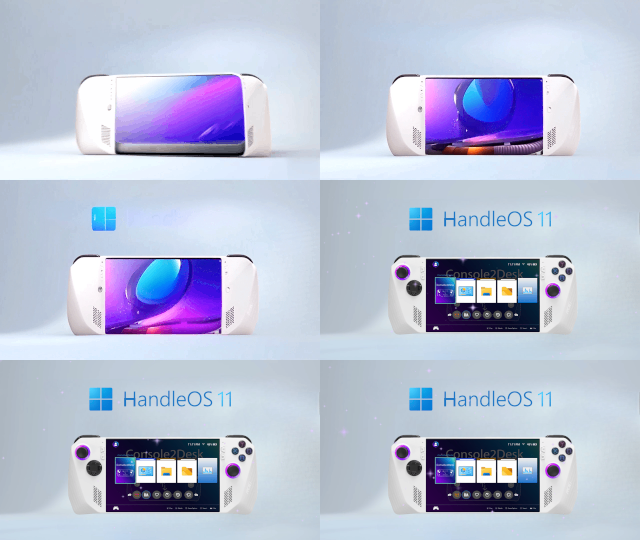
HandleOS_GitVid320.gif


After months of intensive development, I’m thrilled to announce the release of HandleOS , a unique fan-made project that offers a completely optimized, secure, and privacy-focused version of Windows. The key word here is "Reversible." With HandleOS, you get a Windows experience that is both lightweight and fully functional, offering the best of both worlds.

But what does "Reversible" really mean? It means we don't sacrifice core system features or compatibility for the sake of making Windows ultra-lightweight. Unlike other custom Windows ISOs that strip down the system and risk breaking essential functionalities, HandleOS retains everything that makes Windows work—just faster and more efficient.

What Makes HandleOS Unique?

HandleOS is based on the official Windows 11 ISO, but with significant optimizations. Telemetry, unnecessary services, and bloatware are removed, but crucial features like Windows Defender are retained for security. The result is an OS that uses around 1GB of RAM in idle mode (on a virtual machine), allowing more system resources to be allocated to the APU GPU, which boosts overall responsiveness. All of this is made possible by my work as the main developer, with the support and valuable advice from the community, allowing us to continuously develop and improve the system together.

If you’re looking for an operating system that gives you maximum performance without compromising compatibility and inoovative solutions, HandleOS is your ideal choice. It’s designed with future handheld PCs in mind, but it’s also perfect for any device that requires a lean, powerful OS.


Developed the tool Console2Desk: A Complete Overhaul​


With Console2Desk 4.1.0, HandleOS introduces a major new updates that takes the customization and performance to new heights. This update is a complete rework of the previous versions, bringing Hybrid Mode, an enhanced UI, and several new functionalities.

New Features in Console2Desk 4.1.0:

  • Hybrid Mode: A revolutionary feature that bridges the gap between desktop and UWP (Universal Windows Platform) apps. Unlike the old "Console Mode" that stripped down essential services, Hybrid Mode integrates both environments seamlessly, giving users full control and customization.
  • HandleOS Touch Menu: In Hybrid Mode, we've introduced a custom touch-optimized context menu. This brand-new, user-friendly menu replaces the default Windows context menu and is designed specifically for handheld devices, ensuring smooth functionality even with touchscreens.
  • Customizable Program Shortcuts: Users can now pin their favorite applications to custom icon boxes, making it even easier to access important tools on the go.
  • Improved TabView: A complete rewrite of the TabView interface, now with better performance and more customization options for users.
  • Tweak Paradise
  • And more.....


If you can, support the Project

HandleOS is available to everyone, but if you want to support its continued development, you can help through donations. Starting from version 4.0.0, a donation-based licensing model has been introduced to unlock premium features.

  • Console2Desk Standard License: Donate €4.99 or more for basic access.
  • Console2Desk Premium License: Donate €19.99 or more for enhanced features, including support for themes and multi-language options.
Your donation helps ensure the continued improvement of HandleOS, and donations of any amount are greatly appreciated.


How HandleOS Performs: Benchmarks

HandleOS is optimized to perform excellently even on low-end devices. In fact, tests show that it uses significantly less RAM compared to traditional Windows setups, and it offers a noticeable FPS boost in various applications and games. With just 2GB of RAM and a dual-core CPU, HandleOS performs beautifully in both Hybrid Mode and Console Mode.


Why Choose HandleOS? (No jokes, it's a serious project with no hidden agendas or suspicious behavior in the operating system.)​


If you’re tired of dealing with bloated Windows installations that eat up system resources, HandleOS offers a streamlined, reversible alternative. Whether you’re using a handheld device like the Steam Deck, or a low-power PC, HandleOS provides an optimized, responsive experience. Here are just a few reasons why you should give it a try:

  • Fully Reversible: Make changes and optimizations without sacrificing functionality.
  • Lightweight: Uses minimal resources, improving overall system performance.
  • Customizable: Adjust settings to fit your needs, including touch optimization and UI tweaks.
  • Secure and Private: Removes telemetry and unnecessary background services while retaining Windows Defender for security.


How to Get Started with HandleOS

Getting started with HandleOS is simple. You can check the project for more details and all the necessary information, visit my GitHub page: https://github.com/Special-Niewbie/HandleOS

Minimum System Requirements:

  • CPU: Intel Atom N550 or similar (Dual-Core)
  • RAM: 1.5 GB or more
  • Storage: 15 GB free space
  • GPU: Any with compatible drivers


Conclusion:

HandleOS represents the future of optimized, lightweight Windows experiences. By focusing on reversibility, performance, and compatibility, HandleOS provides an OS that performs at its peak without sacrificing any essential functionality. If you’re someone who wants try, support and the best performance from your hardware, whether on a handheld PC or a desktop, HandleOS is the solution you’ve been waiting for.
 
Last edited by CrisMod,
a license model for a customized version of windows? i feel like microsoft won't be too happy about that
Please read the license carefully; it applies to the software I developed Console2Desk:). I'm not trying to mislead anyone – you will still need your official Microsoft license for the OS. There’s nothing shady here.

Inside the ISO, you'll find version 3.9.0 of Console2Desk and it's completely free, which is still available for testing . However, version 4.1.0 is a significant step forward with many improvements.
 
  • Angry
Reactions: Exnor
By CrisMod - March 2025

Introducing a new Project called HandleOS !

View attachment 488640


After months of intensive development, I’m thrilled to announce the release of HandleOS , a unique fan-made project that offers a completely optimized, secure, and privacy-focused version of Windows. The key word here is "Reversible." With HandleOS, you get a Windows experience that is both lightweight and fully functional, offering the best of both worlds.

But what does "Reversible" really mean? It means we don't sacrifice core system features or compatibility for the sake of making Windows ultra-lightweight. Unlike other custom Windows ISOs that strip down the system and risk breaking essential functionalities, HandleOS retains everything that makes Windows work—just faster and more efficient.

What Makes HandleOS Unique?

HandleOS is based on the official Windows 11 ISO, but with significant optimizations. Telemetry, unnecessary services, and bloatware are removed, but crucial features like Windows Defender are retained for security. The result is an OS that uses around 1GB of RAM in idle mode (on a virtual machine), allowing more system resources to be allocated to the APU GPU, which boosts overall responsiveness. All of this is made possible by my work as the main developer, with the support and valuable advice from the community, allowing us to continuously develop and improve the system together.

If you’re looking for an operating system that gives you maximum performance without compromising compatibility and inoovative solutions, HandleOS is your ideal choice. It’s designed with future handheld PCs in mind, but it’s also perfect for any device that requires a lean, powerful OS.


Developed the tool Console2Desk: A Complete Overhaul​


With Console2Desk 4.1.0, HandleOS introduces a major new updates that takes the customization and performance to new heights. This update is a complete rework of the previous versions, bringing Hybrid Mode, an enhanced UI, and several new functionalities.

New Features in Console2Desk 4.1.0:

  • Hybrid Mode: A revolutionary feature that bridges the gap between desktop and UWP (Universal Windows Platform) apps. Unlike the old "Console Mode" that stripped down essential services, Hybrid Mode integrates both environments seamlessly, giving users full control and customization.
  • HandleOS Touch Menu: In Hybrid Mode, we've introduced a custom touch-optimized context menu. This brand-new, user-friendly menu replaces the default Windows context menu and is designed specifically for handheld devices, ensuring smooth functionality even with touchscreens.
  • Customizable Program Shortcuts: Users can now pin their favorite applications to custom icon boxes, making it even easier to access important tools on the go.
  • Improved TabView: A complete rewrite of the TabView interface, now with better performance and more customization options for users.
  • Tweak Paradise
  • And more.....


If you can, support the Project

HandleOS is available to everyone, but if you want to support its continued development, you can help through donations. Starting from version 4.0.0, a donation-based licensing model has been introduced to unlock premium features.

  • Console2Desk Standard License: Donate €4.99 or more for basic access.
  • Console2Desk Premium License: Donate €19.99 or more for enhanced features, including support for themes and multi-language options.
Your donation helps ensure the continued improvement of HandleOS, and donations of any amount are greatly appreciated.


How HandleOS Performs: Benchmarks

HandleOS is optimized to perform excellently even on low-end devices. In fact, tests show that it uses significantly less RAM compared to traditional Windows setups, and it offers a noticeable FPS boost in various applications and games. With just 2GB of RAM and a dual-core CPU, HandleOS performs beautifully in both Hybrid Mode and Console Mode.


Why Choose HandleOS? (No jokes, it's a serious project with no hidden agendas or suspicious behavior in the operating system.)​


If you’re tired of dealing with bloated Windows installations that eat up system resources, HandleOS offers a streamlined, reversible alternative. Whether you’re using a handheld device like the Steam Deck, or a low-power PC, HandleOS provides an optimized, responsive experience. Here are just a few reasons why you should give it a try:

  • Fully Reversible: Make changes and optimizations without sacrificing functionality.
  • Lightweight: Uses minimal resources, improving overall system performance.
  • Customizable: Adjust settings to fit your needs, including touch optimization and UI tweaks.
  • Secure and Private: Removes telemetry and unnecessary background services while retaining Windows Defender for security.


How to Get Started with HandleOS

Getting started with HandleOS is simple. You can check the project for more details and all the necessary information, visit my GitHub page: https://github.com/Special-Niewbie/HandleOS

Minimum System Requirements:

  • CPU: Intel Atom N550 or similar (Dual-Core)
  • RAM: 1.5 GB or more
  • Storage: 15 GB free space
  • GPU: Any with compatible drivers


Conclusion:

HandleOS represents the future of optimized, lightweight Windows experiences. By focusing on reversibility, performance, and compatibility, HandleOS provides an OS that performs at its peak without sacrificing any essential functionality. If you’re someone who wants try, support and the best performance from your hardware, whether on a handheld PC or a desktop, HandleOS is the solution you’ve been waiting for.
This is just tiny11 with extra steps
 
  • Like
Reactions: Moseii and Exnor
Looks promising.
Is there any chance that it will be released for Switch?
Well, thank you to ask this :), Switch as you know it's ARM architecture, and this it's x86/x64 based on Windows, the main point of the project it's to bring Handled / Consoles feelings in PC world and avoid/ or manipulate Windows UI, that it's for productivity. I would like that the User choose the UI what ever they like and at the same time can Switch on Windows as for productivity. So it's not possible without doing from zero everything
 
  • Like
Reactions: Evilengine
I applaud your effort to debloat the crapfest that is Windows 11, but Is it worth it?

SteamOS is going mainstream and some games already perform better on it.

Those are very interesting minimum specs but no one is going to game on Win11 running on a Atom N550.

Also what are the " premium" features? I'm all for support devs but this is the 1st lightweight mod of Win11 with a licencing option i ever saw and it kinda feels exploitative since there are other modified Win11 distros out there that do not do this.
Why not create a Patreon or alike and let people support your work like that?

Anyway good luck in this endeavour. For me its a hard pass.
 
  • Like
Reactions: Moseii
I applaud your effort to debloat the crapfest that is Windows 11, but Is it worth it?

SteamOS is going mainstream and some games already perform better on it.

Those are very interesting minimum specs but no one is going to game on Win11 running on a Atom N550.

Also what are the " premium" features? I'm all for support devs but this is the 1st lightweight mod of Win11 with a licencing option i ever saw and it kinda feels exploitative since there are other modified Win11 distros out there that do not do this.
Why not create a Patreon or alike and let people support your work like that?

Anyway good luck in this endeavour. For me its a hard pass.
Thank you for your questions, but I’ve noticed that people DON’T READ—they love to downplay the work of others. I give my FULL support to all developers who are trying to create something out there. I also understand why many developers end up abandoning their projects, frustrated by pointless criticism instead of constructive feedback

HandleOS DOES NOT PROVIDE CRACKED WINDOWS. That would be illegal, and I want to make this clear because I keep seeing comments from people who DON’T READ. HandleOS is a genuine product, and you NEED YOUR OWN ORIGINAL WINDOWS LICENSE.

That being said, those who have actually tried the project so far are more than happy with it and support it. A project like this, developed by a single person, is an enormous effort, and it’s only fair that I receive support through donations.

What you see elsewhere are modded ISOs created by modders who sometimes even use cracked software. In HandleOS project, there is nothing but open-source software developed by me—I also create custom solutions tailored to users’ needs.

And if you want to understand what HandleOS really is, everything is explained in the project descriptions.

Edit 2:

Now, I’ve even placed these statements at the very top of the page, hoping that at least the first few lines get read—otherwise, I have no words ;) .
 
Last edited by CrisMod,
  • Like
Reactions: CoolMe and KiiWii
Thank you for your questions, but I’ve noticed that people DON’T READ—they love to downplay the work of others. I give my FULL support to all developers who are trying to create something out there. I also understand why many developers end up abandoning their projects, frustrated by pointless criticism instead of constructive feedback

HandleOS DOES NOT PROVIDE CRACKED WINDOWS. That would be illegal, and I want to make this clear because I keep seeing comments from people who DON’T READ. HandleOS is a genuine product, and you NEED YOUR OWN ORIGINAL WINDOWS LICENSE.

That being said, those who have actually tried the project so far are more than happy with it and support it. A project like this, developed by a single person, is an enormous effort, and it’s only fair that I receive support through donations.

What you see elsewhere are modded ISOs created by modders who sometimes even use cracked software. In HandleOS project, there is nothing but open-source software developed by me—I also create custom solutions tailored to users’ needs.

And if you want to understand what HandleOS really is, everything is explained in the project descriptions.

Edit 2:

Now, I’ve even placed these statements at the very top of the page, hoping that at least the first few lines get read—otherwise, I have no words ;) .
you never answered his question, what's paywalled? is it essentially playbite/steam big picture mode?

freaking out like this doesn't help portray legitimacy btw
 
Last edited by Latiodile,
  • Like
Reactions: Moseii and Exnor
Thank you for your questions, but I’ve noticed that people DON’T READ—they love to downplay the work of others. I give my FULL support to all developers who are trying to create something out there. I also understand why many developers end up abandoning their projects, frustrated by pointless criticism instead of constructive feedback

HandleOS DOES NOT PROVIDE CRACKED WINDOWS. That would be illegal, and I want to make this clear because I keep seeing comments from people who DON’T READ. HandleOS is a genuine product, and you NEED YOUR OWN ORIGINAL WINDOWS LICENSE.

That being said, those who have actually tried the project so far are more than happy with it and support it. A project like this, developed by a single person, is an enormous effort, and it’s only fair that I receive support through donations.

What you see elsewhere are modded ISOs created by modders who sometimes even use cracked software. In HandleOS project, there is nothing but open-source software developed by me—I also create custom solutions tailored to users’ needs.

And if you want to understand what HandleOS really is, everything is explained in the project descriptions.

Edit 2:

Now, I’ve even placed these statements at the very top of the page, hoping that at least the first few lines get read—otherwise, I have no words ;) .

I didn't downplay your project, and i also read your github page.

I also understand and understood that you created a tool to do this on to an iso that the user must provide.

My only question was : Is it worth it, compared to steamOS ? That is not an offense or downplay on you or on your project (!).

I also stand by my previous remark, that i don't like that "subscription" idea and for that reason (alone), for me, its a hard pass .

Again kudos for your work and best of luck.
 
  • Like
Reactions: Moseii and CoolMe
I see a lot of people here who reason without having tried the operating system.

The project is intended to create a windows-based os heavily focused on handhelds, something that microsoft currently has not implemented yet because of the constant procrastination.

Get into git and try it out before you post random comments just so you can get your user level up.

These kinds of unintelligent comments made me remember why I no longer frequented this forum.
 
  • Like
Reactions: CrisMod
Never install custom images of an operating system like Windows for example, not even on a handheld PC (and especially when you use it as a normal PC as well). It's obvious why, end of story.
 
My only question was : Is it worth it, compared to steamOS ?
This all depends on the user, not the developer. It's personal preference.

From what I read of this project, it looks and sounds super interesting. I currently am planning on building a computer for a TV in the living room specifically for gaming, and I've been wondering what OS to go with. While SteamOS was a good choice, one of the downsides was needing a Steam Account (which although I already have, I don't want my steam account to be accessible by everyone on a computer which I can't supervise constantly.)

Gonna give this project a shot in a VM and see how well it preforms, and if it works nicely then I'll most likely use it for my living room PC (It being on Windows is a big plus given that most games would work natively with it.)
 
  • Like
Reactions: Exnor and CrisMod
While SteamOS was a good choice, one of the downsides was needing a Steam Account (which although I already have, I don't want my steam account to be accessible by everyone on a computer which I can't supervise constantly.)
Family sharing is a thing on steam. Make a new account, add it to your family, and share what you don't mind sharing. Use that account to login to that particular machine...
 
So the OS is "free" but the whole point of this OS the console2desk cost money?

I'm confused how the licensing works and what you get and not
 
  • Like
Reactions: Exnor and CrisMod
So the OS is "free" but the whole point of this OS the console2desk cost money?

I'm confused how the licensing works and what you get and not
Everything is free and open source up to version 3.9.0 of Console2Desk (which it's included into the ISO), as I have extensively mentioned on the main page. Instead of creating a Patreon with a subscription, I decided that starting from version 4.0.0— which includes more improvements, features, and significant costs on my end— new versions with additional features will be available to those who choose to support the project. If you’d like to support me, this is a great way to do so!

That said, I believe it’s best if you try it first; otherwise, we might end up discussing many things without fully understanding each other. (If you want to try it, of course!)
Post automatically merged:

This all depends on the user, not the developer. It's personal preference.

From what I read of this project, it looks and sounds super interesting. I currently am planning on building a computer for a TV in the living room specifically for gaming, and I've been wondering what OS to go with. While SteamOS was a good choice, one of the downsides was needing a Steam Account (which although I already have, I don't want my steam account to be accessible by everyone on a computer which I can't supervise constantly.)

Gonna give this project a shot in a VM and see how well it preforms, and if it works nicely then I'll most likely use it for my living room PC (It being on Windows is a big plus given that most games would work natively with it.)
By Console2Desk you can set to run Steam and will start always in BigPicture Mode, simulate that you have a SteamOS but under the "motor" there is Windows...
 

Site & Scene News

Popular threads in this forum