Need help installing chip on Nintendo switch Lite

  • Thread starter Thread starter svendar
  • Start date Start date
  • Views Views 7,116
  • Replies Replies 21

svendar

Member
Newcomer
Joined
Nov 29, 2023
Messages
11
Reaction score
7
Trophies
0
Age
38
XP
59
Country
Belgium
Hello


After reading quite a lot and watching videos on youtube, i decided to install a chip in my Nintendo Switch Lite to jailbreak it.

There seem to be quite a lot of different chips out there.

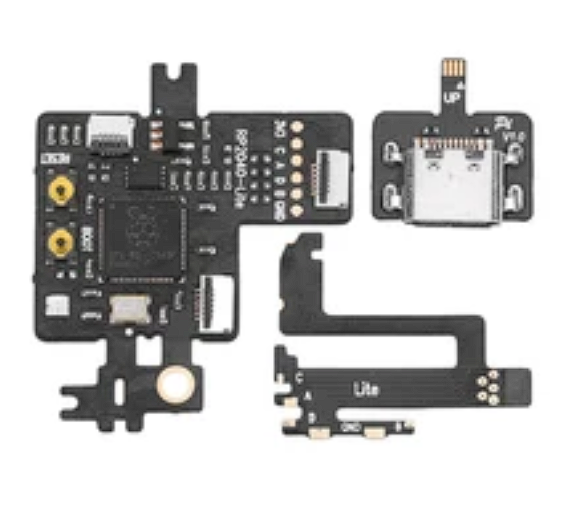
This is the one I have.
chip.PNG


One of the problems i have is I don't know what this chip is called. People seem to mix the names a lot.
Is it a RP2040? Is it a Picofly? Is it a HWFly? No clue at the moment....

I have put picofly firmware on it version 2.7.3 (Ansem-SoD/Picofly/tree/main/Firmwares on Github)


After soldering, i tried to turn on the console. The console boots in the official nintendo firmware. The error code on the chip is 2 short flashed.
(** RST is not connected)

So i guess i have somewhere a bad soldered point.

Can someone point me to the mapping of the letters? I have to solder A, B, C, D and 3,3V on one of the cables.
How do those points map to RST, CMD, D0 and CLK?


I would also like to know how i can measure if the different points are correctly soldered.
Do i need to measure the voltage levels on each point when the battery of the switch is connected? What should be the values?

Thank you very much already for your time.
 
B is RST. I just had the same problem two days ago. I spent an inordinate amount of time fixing it but essentially I took it apart down to the flex cable and peeled back the B contact in favor of running a jumper wire. I carefully cleaned and tinned the pad and eventually ran a jumper wire from it to the contact on the flex cable immediately before it connects with the mod chip proper. It really is a sensitive little bastard and like I said, took me awhile before I had a stable connection that was reading 2.3 or so volts and not dipping back to 1.6 or w/e the default value is. Did get it working though and it was been running fine. Just take your time and don't break anything!

Oh and regarding measuring, you need a multimeter set to diode mode and you can find the correct value ranges online for each solder point. Most are around .6-.9v with B/RST in the 2.3-2.9v range.
 
B is RST. I just had the same problem two days ago. I spent an inordinate amount of time fixing it but essentially I took it apart down to the flex cable and peeled back the B contact in favor of running a jumper wire. I carefully cleaned and tinned the pad and eventually ran a jumper wire from it to the contact on the flex cable immediately before it connects with the mod chip proper. It really is a sensitive little bastard and like I said, took me awhile before I had a stable connection that was reading 2.3 or so volts and not dipping back to 1.6 or w/e the default value is. Did get it working though and it was been running fine. Just take your time and don't break anything!

Oh and regarding measuring, you need a multimeter set to diode mode and you can find the correct value ranges online for each solder point. Most are around .6-.9v with B/RST in the 2.3-2.9v range.
Same, just yesterday I fixed what appeared to be correct soldering. After using a multimeter I discovered RST (B) didn't have good solder contact.
 

Attachments

  • 13d3e61e-713a-4f78-9433-271762d84e66.jpg
    13d3e61e-713a-4f78-9433-271762d84e66.jpg
    4.8 MB · Views: 169
The B point can be hard to get to stick because the little leg of the ribbon cable is so flexible. Make sure to tin bot the ribbon pad and the board pad in advance. Don't overlap the board pad too much or your joint will not have a lot of pad to anchor to. I have never done this but I know another modder who swears by tacking that leg down with a tiny dot of super glue before soldering. I would definitely recommend to switching to wire rather than banking on super glue but if it works for you, it works for you.
 
I actually got it yesterday, lite booted and I setup CFW. Today different story, all my points probed in the 7's (diode mode) but the RST point on the mobo is giving nothing. Not sure if there's an alternate RST point or what the heck happened. I desoldered 'B' point on ribbon cable, pad looks fine but I'm not getting any readings from it.
 

Attachments

  • 14ab9198-5f04-4d0f-a5cd-d358bedc6e70.jpg
    14ab9198-5f04-4d0f-a5cd-d358bedc6e70.jpg
    1.4 MB · Views: 174
That I have never seen before. The pad looks clean and unbridged. That makes me strongly suspect that something else was damaged along the way that has affected that trace.
 
That I have never seen before. The pad looks clean and unbridged. That makes me strongly suspect that something else was damaged along the way that has affected that trace.
On the surface, trace looks like this?
Post automatically merged:

I did test the other pads and the resistor
 

Attachments

Yea, on the surface it looks fine which is why I suspect damage elsewhere is the culprit here
 
Right, but was the battery connected when you took the reading? That can throw it off in some cases.
 
UPDATE:
Thank you all for your input.

In the meanwhile i fixed point B. It had indeed a bad connection.
Unfortunately i receive a new error now (I guess this mean the previous error is solved)

Short - Long - Short
*=* No eMMC block 0 read (eMMC init failure?)

Anyone an idea what could be the problem?


thanks
 
Do you own a multimeter, and can you post your readings for each point... in diode mode.
Yes i do have a multimeter but my experience with it is limited. I suppose i need to put the black lead on ground( like usb housing) and red on the point to measure, correct?
 
Opposite this time around. Red on any ground.

EDT: Battery not connected
Ok so i managed to measure the different point with battery unplugged.

with red lead on ground:
A 0,46V
B 0,4V
C 0,46V
D 0,7V

with black lead on ground:
A 0,74V
B 1,43V
C 0,74V
D 1,46V
 

Site & Scene News

Popular threads in this forum