Hacking SWITCH NOOB PARADISE - Ask questions here

  • Thread starter Thread starter APartOfMe
  • Start date Start date
  • Views Views 6,004,726
  • Replies Replies 47,917
  • Likes Likes 66
Thank you. Will I be unable to play online until I do?

What is a reliable source to check when 16.0 is supported by CFW?
Unfortunately yes. You can update if you want to play online but then you will be locked out of CFW. You will have to choose if you want CFW or online for the time being until CFW supports 16.0. In the meantime, checking the front page of this site is good enough to let you know the support has been added.
 
Is there an app to turn off and on the switch instead of long pressing the power button? like a shortcut on luma 3ds for example?
 
it's cool but it turns off properly it's not violent

I'm assuming you're concerned about a hard shutdown that might corrupt your sdcard?

In the code this turns off the switch using the following system calls:

bpcInitialize();
bpcShutdownSystem();

The way I understand it bpcShutdownSystem passes off to the bootloader and the bootloader handles the actual shutdown so it's as safe as your bootloader doing a shutdown.

I've been using this on my V1 for years without issues.

On my V2 I don't select reboot because it reboots my Switch in OFW mode which is not usually desirable. The shutdown features works great though. If you want to reduce the risk of accidentially rebooting into OFW you can comment out the code and recompile I guess.
 
Unfortunately yes. You can update if you want to play online but then you will be locked out of CFW. You will have to choose if you want CFW or online for the time being until CFW supports 16.0. In the meantime, checking the front page of this site is good enough to let you know the support has been added.
Thanks again. Once Atmosphere is released to support 16.0, will we also require an update to sigpatches to play backups?
 
When there is a new OS version of the switch is there anything you guys updating beside those (once the update are out) ?
-Official OS using daybreak
-Atmosphere
-Sigpatch
-Hekate (file on SD and payload)
 
When there is a new OS version of the switch is there anything you guys updating beside those (once the update are out) ?
-Official OS using daybreak
-Atmosphere
-Sigpatch
-Hekate (file on SD and payload)
Ideally, everything should be updated such as homebrew applications or themes. That's why you should hold off on updating until its absolutely necessary because updating the firmware is the most likely action to break anything.
 
  • Like
Reactions: fadafwet
Je suppose que vous êtes préoccupé par un arrêt brutal qui pourrait corrompre votre carte SD ?

Dans le code, cela désactive le commutateur à l'aide des appels système suivants :


D'après ce que je comprends, bpcShutdownSystem passe au chargeur de démarrage et le chargeur de démarrage gère l'arrêt réel, il est donc aussi sûr que votre chargeur de démarrage effectue un arrêt.

Je l'utilise sur mon V1 depuis des années sans problème.

Sur ma V2, je ne sélectionne pas le redémarrage car il redémarre mon commutateur en mode OFW, ce qui n'est généralement pas souhaitable. Les fonctions d'arrêt fonctionnent très bien cependant. Si vous voulez réduire le risque de redémarrage accidentel dans OFW, vous pouvez commenter le code et recompiler, je suppose.
Post automatically merged:

I'm assuming you're concerned about a hard shutdown that might corrupt your sdcard?

In the code this turns off the switch using the following system calls:


The way I understand it bpcShutdownSystem passes off to the bootloader and the bootloader handles the actual shutdown so it's as safe as your bootloader doing a shutdown.

I've been using this on my V1 for years without issues.

On my V2 I don't select reboot because it reboots my Switch in OFW mode which is not usually desirable. The shutdown features works great though. If you want to reduce the risk of accidentially rebooting into OFW you can comment out the code and recompile I guess.
I'm assuming you're concerned about a hard shutdown that might corrupt your sdcard?

In the code this turns off the switch using the following system calls:


The way I understand it bpcShutdownSystem passes off to the bootloader and the bootloader handles the actual shutdown so it's as safe as your bootloader doing a shutdown.

I've been using this on my V1 for years without issues.

On my V2 I don't select reboot because it reboots my Switch in OFW mode which is not usually desirable. The shutdown features works great though. If you want to reduce the risk of accidentially rebooting into OFW you can comment out the code and recompile I guess.
I saw a similar application but it turns off the switch as if you have to press the power button for a long time
 
Official Nintendo account seems to be linked, confirmed by going to Settings>Users and seeing my email listed there instead of "Link Nintendo Account". I do have two other users set up in the system which are not linked, but I never use these launching/playing games.
Following up on getting some help starting the N64 Switch Online. Account is linked, Tried this NSP from several sources, never had any issues with the NES and SNES ones.
Post automatically merged:

Do you have a linked Nintendo Account, fake or otherwise?
 
Hello,
The driver that manages exFAT for SD card seems unstable as said multiple times in gbatemp. Do this also apply to USB stick plugged in the dock or is it a specific driver for SD card only that have the issue ?
Thanks

edit : Also I have seen years ago on gbatemp people burning their USB connection on the dock because they were using HDD that requires too much current (those were not HDD with external power obviously). As there are portable SSD (which might require less current than HDD), how much current is it possible to take from the dock without any risk ?
 
Last edited by Temaps,
So, I screwed up a little bit. I had on old emummc install that I couldn't get working quite right even after updating atmosphere, hekate, sigpatches etc. So I made a fresh install and offline updated it from 2.30 to 15.0.1. And THEN I realized that I had updated FSS0 SYS instead of emummc (I'm almost sure that the hekate.ini I downloaded from the NH Switch Guide was the culprit - when I went to download it again for a reinstall, it was back to its usual - see attached image for a comparison of the two files downloaded less than half an hour apart).

I've since redone the install and everything is working perfectly. But now I want to understand what I did. I don't get what FSS0 SYS is compared to stock SYS. Since I've apparently updated my Switch nand, now I just want to make sure, that It is clean to go online so I can buy and use online games on the stock nand (which has never been dirtied before) and keep emummc for everything else. Thanks.
Hekate-ini-differences.jpg
 
Hello,
The driver that manages exFAT for SD card seems unstable as said multiple times in gbatemp. Do this also apply to USB stick plugged in the dock or is it a specific driver for SD card only that have the issue ?
Thanks
the issue with exfat is that it is a non-journaled file system with a single allocation table. Aside from the odd game install, Ninty doesn’t do a lot of writing back and forth to the SDCard. important things like game saves are written to internal emmc. With this in mind they could use just about any driver and if there is a problem, just tell the customer to format and redownload whatever game they owned from the eshop and their game save would be safe in emmc. We come along and copy the emmc to an emunand and drop Homebrew on it that’s writing back and forth to disk all the time. Add app crashes and logging and you have a perfect storm for disk corruption. The particular driver stack Ninty uses serves their purpose. Unfortunately it is not well suited for what we’re doing but imagine how bad Ninty feels for us and how eager they are to fix this for us.

Now move forward to the use case for a USB disk that you’re simply reading from. The driver doesn’t matter nearly as much when the disk is read only. The SXOS use case was perfect…mount the images, read only off the drive into memory, and stop touching the disk.

Bottom Line: Since external disk are used for mostly reads, exfat is fine for an external drive unless you’re looking to use homebrew to also do a lot of writes to it.

edit : Also I have seen years ago on gbatemp people burning their USB connection on the dock because they were using HDD that requires too much current (those were not HDD with external power obviously). As there are portable SSD (which might require less current than HDD), how much current is it possible to take from the dock without any risk ?

I’ve not happened across those threads yet and have plugged in many drives with wild abandon and those that would not spin up due to power requirements I simply stopped and added a power cable.


Anyone else know more about this issue?
Post automatically merged:

it c finds on github it seems to me that it is called shutdownpoweroff
Perhaps you are referring to this one?

https://github.com/Storm21CH/SwitchPoff-ShutdownSwitch

If so, it does the exact same system call (see graphic below.)

The upside to this one is it just does power off (no reboot) and doesn’t require you to press an extra button!

I recommend you use this one instead for your use case. Great find!

7E77862C-E06A-41BF-903D-647BE9EE590B.jpeg
 
Last edited by binkinator,
  • Like
Reactions: Temaps
Last working firmware for SXOS was 11.0.0. You will need to switch to Atmosphere to do this. Unfortunately if you just upgraded you will be on 16.0.0 which just came out. We are all waiting for the new compatible Atmosphere build to be released. It might take a few days so kick back and enjoy the ride. Here is some light reading on how to switch to Atmosphere while you wait.

I migrated to Hekate and Atmosphere as you suggested.
It looks like the firmware update that I did in the past installed v15.x, because I'm able to boot to OFW. "Hekate reports: Burnt fuses (odm 7/6): 17 - 0 (hos: 15.0.0+)"

Thank you!
 
  • Love
Reactions: binkinator
So, I screwed up a little bit. I had on old emummc install that I couldn't get working quite right even after updating atmosphere, hekate, sigpatches etc. So I made a fresh install and offline updated it from 2.30 to 15.0.1. And THEN I realized that I had updated FSS0 SYS instead of emummc (I'm almost sure that the hekate.ini I downloaded from the NH Switch Guide was the culprit - when I went to download it again for a reinstall, it was back to its usual - see attached image for a comparison of the two files downloaded less than half an hour apart).

I've since redone the install and everything is working perfectly. But now I want to understand what I did. I don't get what FSS0 SYS is compared to stock SYS. Since I've apparently updated my Switch nand, now I just want to make sure, that It is clean to go online so I can buy and use online games on the stock nand (which has never been dirtied before) and keep emummc for everything else. Thanks.View attachment 354831
The only difference between these two configs is the one on the right has an additional config for Emunand (emuMMC). You would not have increased your risk any higher.

The only difference between Stock SYS and FSS0 SYS is the kip1 line.

https://github.com/CTCaer/hekate#boot-entry-keyvalue-combinations

kip1={FILE path}Replaces/Adds kernel initial process. Multiple can be set.
kip1={FOLDER path}/*Loads every .kip/.kip1 inside a folder. Compatible with single kip1 keys.

Unless you’ve added nefarious kips to your kernel you will be fine.
 
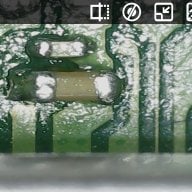
Quick question. I am trying to figure out how to "reset" my chip. I know on some revisions there are 2 pads on it and you simply bridge them. My chip doesn't appear to have those pads. Atleast not in the same location. Is there another way to reset it? I'm using the V5 chip in a V2 switch. When I boot without an SD card I get the drumpy boot.dat? logo if that helps at all.

Picture attached of back of chip.
b4a5c82356e5c5378f85c0d2a0049bad.jpg
 

Site & Scene News

Popular threads in this forum