Homebrew Wiirtual Boy

squirrelman10 said:
i can see why it was a failure of a console, i cant even handle the red graphics that would be horrible to stare at all day

Actually, this annoying reddish palette is not visible when using stereoscopic 3D glasses ( plain, old red/blue glasses ).
In fact, using the glasses the red gets filtered, and so the blue, so the image comes pretty close to what I used to see on the plain good ol' Gameboy mono.
Furthermore, the 3D effect is the best I've seen with those old fashioned glasses, maybe because of the limited numbers of colours on the screen, there is very,very little ghosting !
I used the same red/blue glasses that I used to play Attack of the Movies 3D, but with much better result.
The framerate needs to be improved a little, but over all a very solid emulator.
I really like so far Wario Land and Vertical force.
It's like finding a long lost treasure........
wink.gif
 
W00T! Got a delivery today
tongue.gif


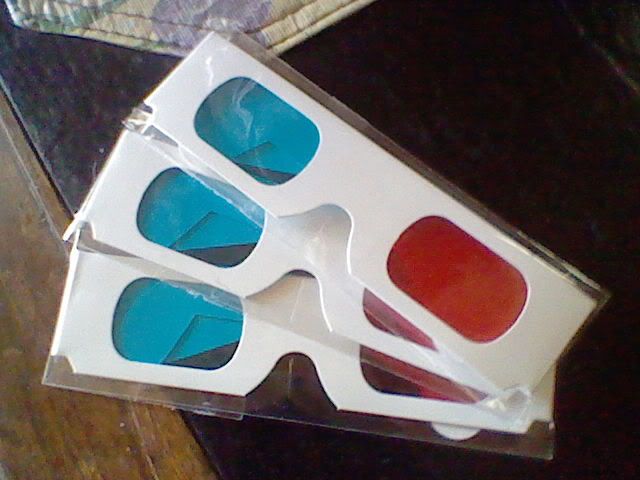
HNI_0005.jpg

The 3D effect is pretty nice. Red Alarm is a bit too busy: making your eyes adjust a little too often for the red/cyan 3D method, But the majority of games are really cool to play with them. I'd recommend picking up a pair if you want to get the most out of this emu.
 
I did now
tongue.gif


Maybe print HOME/Z = Exit for stoopid people like myself ?

Also some error handling needed...
If you go to open a save state and one is not there, then press A, code dump.
If you go to load a cartridge and one is not there, then press A, code dump.

No other settings gave me a code dump going through them trying all options.
biggrin.gif


*Random Link Time*
There were only 22 games for the Virtual Boy
http://en.wikipedia.org/wiki/List_of_Virtual_Boy_games

*IMPORTANT EDIT*
OArikadoO, I think you should get THIS GUY on the team, it could be EPIC ! ! !
rolleyes.gif
 
Slimmmmmm said:
Also some error handling needed...
If you go to open a save state and one is not there, then press A, code dump.
If you go to load a cartridge and one is not there, then press A, code dump.

Good catch! Thanks.

--Raz.
 
zombymario said:
Can't wait to get my headache
smile.gif
Emu looks nice, only the sounds is a little bit 'cracked'.

Yeah, the pre-release had quite a bit of sound cracking. It has been mostly eliminated from the version that will be released this weekend.

--Raz.
 
I've tried mednafen before on my hdtv with red/blue glasses, worked kinda but I think the lines are just too far apart when scaled so high. least I still have my vboy
 
Got to play this a little last night... don't have glasses laying around, but the 2d worked fantastic. It was great to play some of these games on a large TV.
 
jurai said:
I've tried mednafen before on my hdtv with red/blue glasses, worked kinda but I think the lines are just too far apart when scaled so high. least I still have my vboy
Seriously, try our emulator. Scaling things from your PC to display on your HDTV usually doesn't look good at all. Our emulator is properly scaled.
 
mednafen, the emulator whose core is used in wiirtual boy, is quite capable of mainting proper aspect ratio.
 
just wanted to say THANKS raz0red and OArikadoO for making this happen! mednafen is the best emulator to play virtual boy on, and now to have a port of it for the wii is just awesome. hope a few nice forwarders get created for this port soon(ill be using the mastershoes one in the meantime)
smile.gif
 
Cool emulator port, always nice to have new ones to play with and new devs taking care of the Wii scene !

I know this does not belong to this thread but, speaking of Mednafen, now that you probably got the source pretty well in hands, have you thought in later porting the PCE emulator as well ? It's probably the most accurate/compatible open-source PCE emulator out there, more than Hugo on which HugoGX and WiiEngine are both based.
 
I concur, Mednafen is my favourite emulator for PC Engine, it would be a amazing to see the Wii get a port of it!
 
I have a suggestion (I assume you haven't got this, I can't run the emulator - no hbc) --

an option to change the colors of the red and blue/green. not everyone's glasses will be exactly the same shades, so an option to change how bright the colors are would be good.

- method -
Red -- place a red block on a white background, have the user close their other eye (so they are only looking through red) and press up/down to change the R value of the red block until it is invisible against the white. Then check to see that the block can still be seen through the other eye.
Blue -- same as red but with other eye and change the B.
Green -- same but with G.
Cyan -- same but with B+G.

?
 

Site & Scene News

Popular threads in this forum