Hacking WiiFlow - an open source GUI USB-Loader

  • Thread starter Thread starter zorglub07
  • Start date Start date
  • Views Views 3,101,669
  • Replies Replies 16,228
  • Likes Likes 6
Hey Spcepmp - What would restoring an old back up of my nand achieve? I haven't lost anything on my wii, every other app and emulator is running perfectly, I see no need to do that whatsoever. It's just a dol on my external hdd that isnt launching properly for some reason.

I am quite happy to revert to 4.0.4 for playing and test any of Fix94's 4.0.5 ideas, or wait for the next version to come out, and test it until its fixed for me.
Hey KiiiWiii (hope that makes up for the missing vowels)
My mistake, I'd completely misread the context of your previous posts and assumed you were having issues following the latest homebrew channel update. I'll pummel my face into the nearest wall before besmirching you with advice again, I'm such a twunt.
 
  • Like
Reactions: KiiWii
Hi! :)
There seems to be a problem in 4.0.5 (SVN) (and also in 4.0.4) in the "NAND Extractor" tool! :closedeyes:
When I try to use it, I get this error: :(

I'm using a FAT16 formatted 2GB SD (non HC) card with more than 1GB free.
My games are in a 16GB FAT32 USB pen (with less than 100MB free).
And here's some sections of the generated "wiiflow.ini" (original and unchanged) from a clean install:


Am I doing something wrong or is this a bug? :unsure:
Is it trying to save to the USB instead of the SD? :huh:
Can you tell me how to solve this issue? :wacko:
Thanks! ^_^

Its already been reported and accepted as a bug by Fix94. http://code.google.com/p/open-wiiflow-mod/issues/detail?id=155&sort=-id

If you need to to extract the nand, if you press B and go into the emulator menu and then click Virtual console and you havent yet extracted the nand, wiiflow then extracts the nand without any errors. It just seems to be via the main settings it doesnt work.
 
There is a button that allows you to reload the cache you know....you need to press the HOME button and push that button, then you should be able to see the new games.
Thanks for the answer...

IMHO this feature is somewhat unpractical... people having more than one HD have to reload the cache every time the change the HD, and maybe even people having one only HD have to reload the cache whenever they add one more backup to the HD...

Maybe, an option to enable the autoreload of the cache at loader startup could be useful and appreciated...
something like cache_autoreload = on/off

Thanks again to you and all of the devs

Cambo
 
Thanks for the answer...

IMHO this feature is somewhat unpractical... people having more than one HD have to reload the cache every time the change the HD, and maybe even people having one only HD have to reload the cache whenever they add one more backup to the HD...

Maybe, an option to enable the autoreload of the cache at loader startup could be useful and appreciated...
something like cache_autoreload = on/off

Thanks again to you and all of the devs

Cambo
Guess what, there is one in wiiflow.ini, it is called "update_cache=" and you can find it under [GENERAL], change the "no" to "yes".

Be warned though, this might slow down wiiflow...
 
Thanks for the answer...

IMHO this feature is somewhat unpractical... people having more than one HD have to reload the cache every time the change the HD, and maybe even people having one only HD have to reload the cache whenever they add one more backup to the HD...

Maybe, an option to enable the autoreload of the cache at loader startup could be useful and appreciated...
something like cache_autoreload = on/off

Thanks again to you and all of the devs

Cambo
If you have different hard disks you have to swap them and each has a separate cache unless you have your Wiiflow to use settings from SD card. So as long as you aren't in Wiiflow and unplug the HD and plug a new one in the next time you run Wiiflow the correct cache will be loaded.

If you are using a WBFS partition or a FAT32 volume but keep your settings on an SD card this will be a problem. Just switch to FAT32 and put a Wiiflow folder on each drive.

As to adding one more backup I assume you mean adding a new game to the selection.

If you install the game from within Wiiflow it will handle updating the cache but if you install a game outside of Wiiflow you will need to manually refresh the cache.

Reloading the cache each time you run Wiiflow would slow things down. It takes over a minute to refresh the cache on my 2TB drive and even with smaller drives I don't think you would want that option on at all.
 
Guess what, there is one in wiiflow.ini, it is called "update_cache=" and you can find it under [GENERAL], change the "no" to "yes".

Be warned though, this might slow down wiiflow...
Thanks a lot, I'll check it...

If you have different hard disks you have to swap them and each has a separate cache unless you have your Wiiflow to use settings from SD card. So as long as you aren't in Wiiflow and unplug the HD and plug a new one in the next time you run Wiiflow the correct cache will be loaded.

If you are using a WBFS partition or a FAT32 volume but keep your settings on an SD card this will be a problem. Just switch to FAT32 and put a Wiiflow folder on each drive.

As to adding one more backup I assume you mean adding a new game to the selection.

If you install the game from within Wiiflow it will handle updating the cache but if you install a game outside of Wiiflow you will need to manually refresh the cache.

Reloading the cache each time you run Wiiflow would slow things down. It takes over a minute to refresh the cache on my 2TB drive and even with smaller drives I don't think you would want that option on at all.

Yes, actually I have everything in my SD card since I have also an NTFS HD...
Thanks for your answers, I think I will stay on Wiiflow r374 which has no need to refresh the cache and loads very fast.
Thanks again,


Cambo
 
Yes, actually I have everything in my SD card since I have also an NTFS HD...
Thanks for your answers, I think I will stay on Wiiflow r374 which has no need to refresh the cache and loads very fast.
Thanks again,
Cambo
Actually, WiiFlow can read NTFS partitions, too.
You could even just change the location of just your cache/lists folder in wiiflow.ini to have it be on USB1 so each hard drive would keep track of what games it has on it and leave the rest of the settings on the SD card.
 
Something that's been bothering me for a while now, I don't quite understand why hooktype was changed to off by default. Now one must change it to vbi in order to use cheats. Does vbi have some other function besides cheats that was causing a problem for someone? Also some of the settings are a bit over my (and I'm sure other people's) head, such as the other hook types. Perhaps the help file should be updated with such info. Finally, calling back an old idea of mine that seems to have been passed over, how hard would it be to enable wiiflow to overwrite the settings of different emus (such as cheats, control types, other settings)?
 
  • Like
Reactions: spacepimp
I recently added Metal Gear Solid: Twin Snakes PAL to my GameCube collection on my Wii (mainly because of 2 disk support but 2.6 caused other problems for me so I'm now back with 2.3)

Anyway, I've found that I can get it to boot just fine in DM(L) Booter with the "NTSC 480p" option but the "NTSC 480p (patched)" option doesn't work (Because it's a PAL game the "NTSC 480i" as well as any PAL options don't show up on my particular TV's screen.)

The problem is that in WiiFlow for any progressive video more it appears to use the "...(patched)" mode from DM(L) Booter which is not compatible with this game.

How do I set the non-patched progressive video mode in WiiFlow?
Is there a way to set it as a per-game option?
 
you have to install them to an emunand and set the proper path in wiiflow OR if they are on your realnand, set wiiflow to not use an emunand and use real nand.
 
Excuse me... but

How do you play games Wiiware and Virtual Console in Wiiflow??

Thanks!
Go Here https://sites.google.com/site/wiiflowiki4/ there are several sections on emunand. Check them out, it's pretty detailed info on how to set up emunands for WW/VC playing.

Edit: Forgot to mention I hope the next release of WiiFlow sees an update for DML 2.6 :)

Also there definitely seems to be something wrong with any internet connection through Wiiflow 4.0.5, has fix or any other WF dev been able to confirm?
 
Anyone else having a problem with the Wiimote not re-syncing after running a game (regular Wii ISO) and exiting back to Wiiflow.

It picks up the Wiimote when starting Wiiflow and I can select and play a game but when exiting it doesn't respond to the Wiimote. Using r814 and a black Wii with Wiimotion plus built-in the Wiimote controller.

Works fine in CFG and USB Loader GX but in Wiiflow after running a game it won't work. If I take the batteries out and put them back in then it resyncs and works but I don't want to remove the batteries after each game.
 
Anyone else having a problem with the Wiimote not re-syncing after running a game (regular Wii ISO) and exiting back to Wiiflow.

It picks up the Wiimote when starting Wiiflow and I can select and play a game but when exiting it doesn't respond to the Wiimote. Using r814 and a black Wii with Wiimotion plus built-in the Wiimote controller.

Works fine in CFG and USB Loader GX but in Wiiflow after running a game it won't work. If I take the batteries out and put them back in then it resyncs and works but I don't want to remove the batteries after each game.
I just tested this and I didn't have to resync any of my wiimotes (regular & wii motion plus)
 
Anyone else having a problem with the Wiimote not re-syncing after running a game (regular Wii ISO) and exiting back to Wiiflow.

It picks up the Wiimote when starting Wiiflow and I can select and play a game but when exiting it doesn't respond to the Wiimote. Using r814 and a black Wii with Wiimotion plus built-in the Wiimote controller.

Works fine in CFG and USB Loader GX but in Wiiflow after running a game it won't work. If I take the batteries out and put them back in then it resyncs and works but I don't want to remove the batteries after each game.
Did you resync it while still in WiiFlow or when back in the system menu? (Not sure if that would make any difference .. might just be counting it as a temp (1+2) sync. Just a guess.)


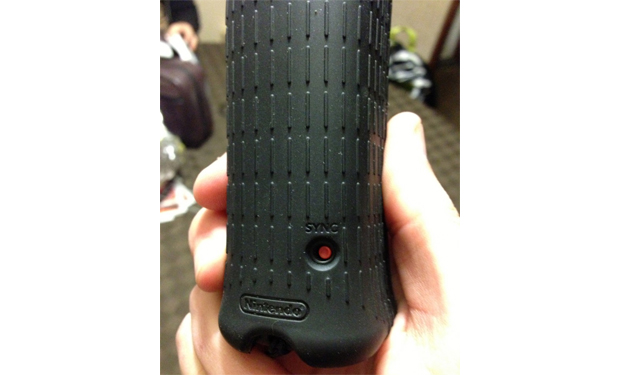
This just reminded me, though. I just barely bought myself a new WiiMote+ this weekend (the ones with the Wii U logo on the box) and it's interesting to me that the sync button is now accessible without opening the battery case and without even taking the rubber protector off.
EDIT :
wiimotesync.jpg
It's not incredibly relevant ... but just made me glad I have that now.
 
Did you resync it while still in WiiFlow or when back in the system menu? (Not sure if that would make any difference .. might just be counting it as a temp (1+2) sync. Just a guess.)


This just reminded me, though. I just barely bought myself a new WiiMote+ this weekend (the ones with the Wii U logo on the box) and it's interesting to me that the sync button is now accessible without opening the battery case and without even taking the rubber protector off.
EDIT :
wiimotesync.jpg
It's not incredibly relevant ... but just made me glad I have that now.

It turned out to be one of my cheap chinese knock-off wiimotes. My real Nintendo ones work fine. Something peculiar about that one, doesn't sync after exiting a game.

If I take the batteries out and put them back in it works fine. Probably something different on the initialization code that returns from a game versus loading the first time.
 
  • Like
Reactions: ToddofWar420
Using 4.0.5 and my wii emunand on SD... Still broken unfortunately :sad:

For info

nand[sd] cover flow displays all channels correctly but they fail loading.
The channels tested were all system channels (i think vc ww channels will also fail loading but can not confirm this as I have none on my emunand)

When nand emulation is set to game save,partial or full, wii games [usb] fail loading.
(4.0.2 had working game save nand emulation but since 4.0.3 it's broken)

Bug with SD nand emulation only. Using USB instead works.
http://code.google.com/p/open-wiiflow-mod/issues/detail?id=160
 

Site & Scene News

Popular threads in this forum