Hardware Wii Modchip Identification Guide

  • Thread starter Thread starter SylverReZ
  • Start date Start date
  • Views Views 15,039
  • Replies Replies 55
  • Likes Likes 10
Status
Not open for further replies.
Hi everyone I finally success that unbrick my 003 wii with the modchiped drive. randomly my bricked 003 wii been USA region and fortunly modchip key set to usa region I think.
You don't solder wires to the jumpers, you solder to the pads by bridging them. I would also suggest you check your connections and use better wires.

Use the following diagram here to set the jumpers properly.

schematic.jpg
 
  • Like
Reactions: Faruk1986
You don't solder wires to the jumpers, you solder to the pads by bridging them. I would also suggest you check your connections and use better wires.

Use the following diagram here to set the jumpers properly.

View attachment 472202
tanx for answer and nice guide
but soldering wire to the points is better than jump with direck soldering because if if need to ferquently change region free soldered wire is either fast and safe.
yes if one use it permanantly certain ragion yes set the jumper with solder is best choice but for me no
 
but soldering wire to the points is better than jump with direct soldering because if if need to frequently change region free soldered wire is either fast and safe.
No. Definitely not. If the jumper wires are exposed to the metal shielding, in many cases it could short out the chip. Removing a solder bridge isn't all that difficult. Add a small bit of flux to the pad/s and then swipe it away with the iron.

If you don't know how to solder correctly, watch a YouTube video.
 
No. Definitely not. If the jumper wires are exposed to the metal shielding, in many cases it could short out the chip. Removing a solder bridge isn't all that difficult. Add a small bit of flux to the pad/s and then swipe it away with the iron.

If you don't know how to solder correctly, watch a YouTube video.
no I use shielded wire for safety.
trust me if I could attach it micro latch switch for best possible state
 
no I use shielded wire for safety.
You're using enameled wire, that is NOT what 'shielded wire' is.

Enameled wire uses either 'aluminium' (or in most cases 'copper'), which is covered with a thin enameled layer to prevent the remaining slack from shorting any other component. In contrast, shielded wires are found usually on audio or USB cables. Dozens of wire strands will be within the shrink tubing because their purpose is to reduce noise.

So, in conclusion based on your recent photos, you're using enameled wire. What I've said that you should do with the jumpers, is by bridging the points together with solder. How hard is it to bridge two small pads together? You don't need to make a massive blob, just enough so that the points touch one another. You can remove them at any time if you're considering to install it in another console but I digress.

This sounds a lot like a skillset problem of which I highly advised you to watch a tutorial on soldering, not only that this will improve your skills on what you SHOULD and SHOULDN'T do in the near future, but maybe make the wires a lot tidier than they were.
 
Last edited by SylverReZ,
You don't solder wires to the jumpers, you solder to the pads by bridging them. I would also suggest you check your connections and use better wires.

Use the following diagram here to set the jumpers properly.

View attachment 472202
I have the same modchip as Faruk1986, and I mostly play via USB but now I'm curious on how these jumpers work. If I have a USA console and I bridge OP1, can I play PAL and USA discs? Or bridging depends on the console where the modchip is installed? Meaning that a USA console most have both jumpers always open.

Also, another question:

My disc drive (GC2-D2E) is FUBAR, I want to get a new one and there's no good info about this clone. Do you (or anyone who reads this) know by any chance which drive models are compatible with this thing?
 
I'm curious on how these jumpers work. If I have a USA console and I bridge OP1, can I play PAL and USA discs? Or bridging depends on the console where the modchip is installed? Meaning that a USA console most have both jumpers always open.
If your console was of USA region, then do not bridge the jumpers and leave them open. Highlighted in 'orange' is where you will need to bridge the pads based on what region your console was made for.

My disc drive (GC2-D2E) is FUBAR (as in 'junk'), I want to get a new one and there's no good info about this clone.
There were similar modchips of this type in particular, they were developed by the same manufacturer for the Mars Pro clones for the PS2.

If you've got a GC2-D2E drive, I wouldn't bother buying a 'refurbished brand-new optical drive' from China. But instead, buy a donor Wii console for an affordable price, for spares to replace the drive with.
 
  • Like
Reactions: jacksonf
This thread will help you identify what modchip you have installed in your Wii (including uncommon ones).
Updated: 20th July 2023

Original:
drivekey-mod-in-wii-v0-9395vxinsdv91.jpg

FPGA: Actel ProASIC 3 A3P250
View attachment 368991
V1.x:
FPGA: Actel ProASIC 3 A3P060

View attachment 368992
V1.3A:
FPGA: Actel ProASIC 3 A3P125

View attachment 368993
V1.5:
FPGA: Actel ProASIC 3 A3P125


View attachment 368994
V2.X:
FPGA: Actel ProASIC 3 A3P060

View attachment 368995
V3.0:
FPGA: Actel ProASIC 3 A3P125

View attachment 368997
V3 Pro:
FPGA: Actel ProASIC 3 A3P125
d2lite_big.jpg

CPLD: Lattice MachXO LCMX0640C
d2ckey_big.jpg

FPGA: Actel ProASIC 3 A3P060
d2pro_9wire_big.jpg

FPGA: Actel ProASIC3 A3P060
View attachment 368948
FPGA: Actel ProASIC 3 A3P060
View attachment 368946
MCU: ATMEL AT90S8515
View attachment 368862
MCU: Microchip 12F629
Comes with or without a Wiinja sticker.
View attachment 368980
FPGA: Actel ProASIC 3 A3P250
View attachment 368863
MCU: ATMEL ATMEGA8

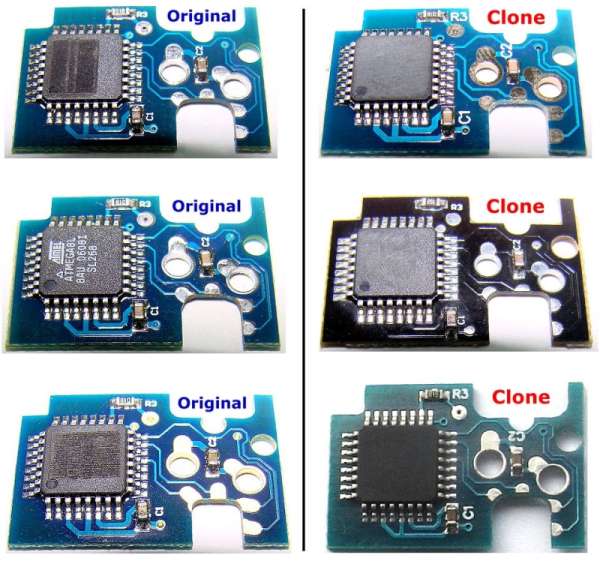
Clone identification:
Wiikey_clones.jpg
View attachment 368864
MCU: Ubicom/Scenix SX28AC (same chip used on the PS2 Magic chips).
View attachment 384225
FPGA: Actel ProASIC 3 A3P250

Clones:
View attachment 368976
View attachment 368977

View attachment 368978

V1.0-V1.2
MCU: ATMEL AT90S2312

V2.0
MCU: ATMEL ATMEGA8
View attachment 368979
MCU: ATMEL ATMEGA8
Clone of the WiiKey v1.
View attachment 368868
CPLD: Lattice MachXO LCMX0640C
Clone of a D2Lite.
View attachment 368869
MCU: ATMEL ATMEGA8
Possibly using WiiSKAS or WiiFree code judging by the pinout.
View attachment 384223
CPLD: Lattice MachXO LCMX0640C
Clone of a D2lite/WiiKey v2.
duowii_big.jpg

MCU: ATMEL ATMEGA8
View attachment 368972
CPLD: Lattice MachXO LCM0256C
Clone of the Wasabi.
View attachment 368983
FPGA: Actel ProASIC 3 A3P250
Clone of the WiiKey Fusion.
View attachment 368987
Clone of the DriveKey.
xenowii2-install-002.jpg

Clone of the DriveKey
Hi
This thread will help you identify what modchip you have installed in your Wii (including uncommon ones).
Updated: 20th July 2023

Original:
drivekey-mod-in-wii-v0-9395vxinsdv91.jpg

FPGA: Actel ProASIC 3 A3P250
View attachment 368991
V1.x:
FPGA: Actel ProASIC 3 A3P060

View attachment 368992
V1.3A:
FPGA: Actel ProASIC 3 A3P125

View attachment 368993
V1.5:
FPGA: Actel ProASIC 3 A3P125


View attachment 368994
V2.X:
FPGA: Actel ProASIC 3 A3P060

View attachment 368995
V3.0:
FPGA: Actel ProASIC 3 A3P125

View attachment 368997
V3 Pro:
FPGA: Actel ProASIC 3 A3P125
d2lite_big.jpg

CPLD: Lattice MachXO LCMX0640C
d2ckey_big.jpg

FPGA: Actel ProASIC 3 A3P060
d2pro_9wire_big.jpg

FPGA: Actel ProASIC3 A3P060
View attachment 368948
FPGA: Actel ProASIC 3 A3P060
View attachment 368946
MCU: ATMEL AT90S8515
View attachment 368862
MCU: Microchip 12F629
Comes with or without a Wiinja sticker.
View attachment 368980
FPGA: Actel ProASIC 3 A3P250
View attachment 368863
MCU: ATMEL ATMEGA8

Clone identification:
Wiikey_clones.jpg
View attachment 368864
MCU: Ubicom/Scenix SX28AC (same chip used on the PS2 Magic chips).
View attachment 384225
FPGA: Actel ProASIC 3 A3P250

Clones:
View attachment 368976
View attachment 368977

View attachment 368978

V1.0-V1.2
MCU: ATMEL AT90S2312

V2.0
MCU: ATMEL ATMEGA8
View attachment 368979
MCU: ATMEL ATMEGA8
Clone of the WiiKey v1.
View attachment 368868
CPLD: Lattice MachXO LCMX0640C
Clone of a D2Lite.
View attachment 368869
MCU: ATMEL ATMEGA8
Possibly using WiiSKAS or WiiFree code judging by the pinout.
View attachment 384223
CPLD: Lattice MachXO LCMX0640C
Clone of a D2lite/WiiKey v2.
duowii_big.jpg

MCU: ATMEL ATMEGA8
View attachment 368972
CPLD: Lattice MachXO LCM0256C
Clone of the Wasabi.
View attachment 368983
FPGA: Actel ProASIC 3 A3P250
Clone of the WiiKey Fusion.
View attachment 368987
Clone of the DriveKey.
xenowii2-install-002.jpg

Clone of the DriveKey
Hi there
I have a k-bridge modchip
Any guide for region options switches?
There is 2 switch 1 and 2
Please guide me for regions
 
DriveKey Configuration
Any guide for region options switches?
There is 2 switch 1 and 2
Please guide me for regions
region_table.png


Here is the region configuration figure which tells you what DIP switches to set for which console region you have.

For example: If you have an American US Wii system, set switch 1 to OFF and switch 2 to ON.

Once you have installed the DriveKey and power on the system, you'll need to configure the modchip to your needs, such as region free and update blocker.

  • Power on the Wii, make sure that there are no discs inserted. If so, then power off the Wii, eject the disc, then power it back on.
  • At the 'System Menu', press the 'Eject' button 3 times. After a short period of time, you should then see the GameCube disc icon as if a GameCube disc was inserted.
  • Select the GameCube icon then select 'Start'. You will then arrive at the configuration menu, to which you can then make any changes to the DriveKey's configuration to your liking. Select 'SAVE SETTINGS' once you have finished.

The list of options are as follows:

- Region Override - Fully region free playback of Wii games [ON/OFF] (Recommended: 'ON').
- Update Blocker - Block online/disc updates [ALL/IMPORT/OFF] (Recommended: 'ALL').
- Wii Disc Autoboot - Direct-boot the disc when inserted [ON/OFF] (Optional).
- Full GC Region Free - Fully region free playback of GameCube games [ON/OFF] (Recommended: 'ON').
 
  • Like
Reactions: Faruk1986
Thanks alot maaan tanxxx
Post automatically merged:

Any trick to use this modchip?
When I attach it to drive even with NeoGamma I couldn't run disk?
Without it I could run the games but when I attach it to drive nothing goes right.
No loading game in wii menu
No loading games with NeoGamma
cIOS already are correctly installed
I wish my chip isn't broke or something 😭
Even when it attached Eject button won't work!
Post automatically merged:

I wonder what's the cause of modchips corruption
This one is the second modchip that break
 
Last edited by Faruk1986,
I'll add them shortly.
chips.jpg


hi Master

I have these two mod-chips that used to be worked normally but for unknown reason both of them stoped working.
any Idea what could I do to bring them back to working stat?
any code or firmware to flash them?
I don't believe they have some physical issue
I'm sure their programed firmware must be currupt or erased
whats your opinion?
 
Last edited by Faruk1986,
No. Definitely not. If the jumper wires are exposed to the metal shielding, in many cases it could short out the chip. Removing a solder bridge isn't all that difficult. Add a small bit of flux to the pad/s and then swipe it away with the iron.

If you don't know how to solder correctly, watch a YouTube video.
Hi master
I got a new modchip but I couldn't determine which model is it
Number of wires are insane
 

Attachments

  • IMG_20250405_164741.jpg
    IMG_20250405_164741.jpg
    2.8 MB · Views: 38
Hello. I modded a Wii back when it first came out. I remember running a set of wires outside of the Wii. And telling my kids not to touch the wire. Any idea what mod i used?
 

Attachments

  • IMG-20250826-WA0063.jpg
    IMG-20250826-WA0063.jpg
    295.9 KB · Views: 26
1768347842736.png


I have the same modchip as faruk1986. I can't find much info online about it... got a Wii that I opened it up and I'm wondering if the installation was done correctly (will upload pictures later, right now it is being reviewed by a repair shop). Can the firmware in this thing be updated? It is most likely a clone of some modchip, but I can't quite figure out if it is a Wiikey 2 clone or d2ckey clone. Not sure if I can upgrade the firmware.

The reason I want to check if it is working properly is that my disc drive acts funny. Sometimes it reads discs properly, some other gives the "an error has occurred" when reading games from Disc Channel... behavior is a bit unreliable and not sure if maybe updating the firmware can fix it, or if maybe the wires inside are badly soldered... or if perhaps the chip itself is crap and it just fails like that. Can't find any guides in how the soldering should be done, also my Disc Drive is a D1 iirc, this chip says d2e... so not sure if it is even compatible.
 
Status
Not open for further replies.

Site & Scene News

Popular threads in this forum