Hacking USB Loader GX not initializing games

  • Thread starter Thread starter c4rbs
  • Start date Start date
  • Views Views 3,691
  • Replies Replies 15
  • Likes Likes 1

c4rbs

Member
Newcomer
Joined
Jan 17, 2017
Messages
24
Reaction score
9
Trophies
0
Age
24
XP
118
Country
Brazil
I've erased my external hd and i miss all my wii files (it was a long time ago). I don't remember exactly the usb loader folders and files.
I just did that:
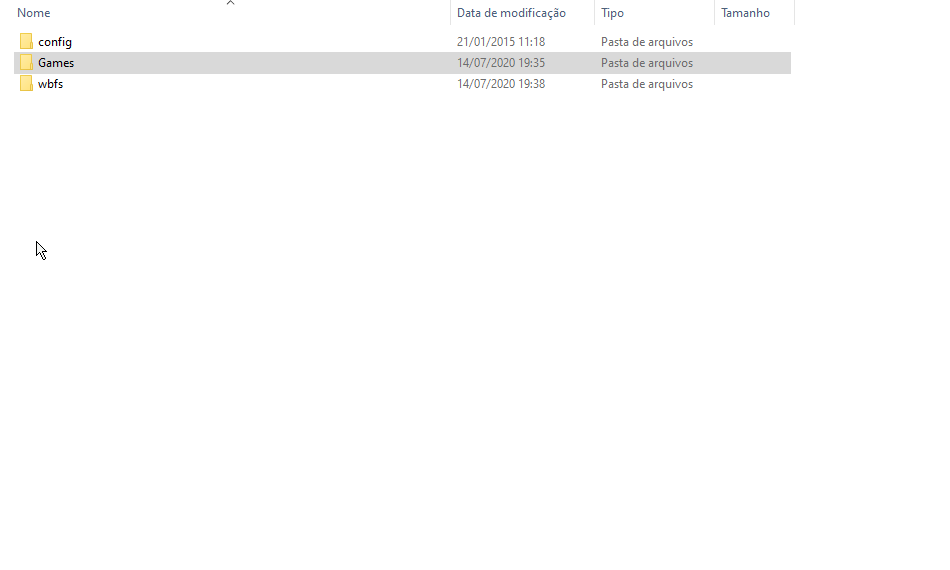
Ivgt7z.png

4I3Kqp.png


I still can open and acess the usb loader gx app, but when i start the game it just send me to the wii home, can anyone help me?
 
  • Like
Reactions: jeannotte
Hello.:)

I've erased my external hd and i miss all my wii files (it was a long time ago). I don't remember exactly the usb loader folders and files.
I just did that:
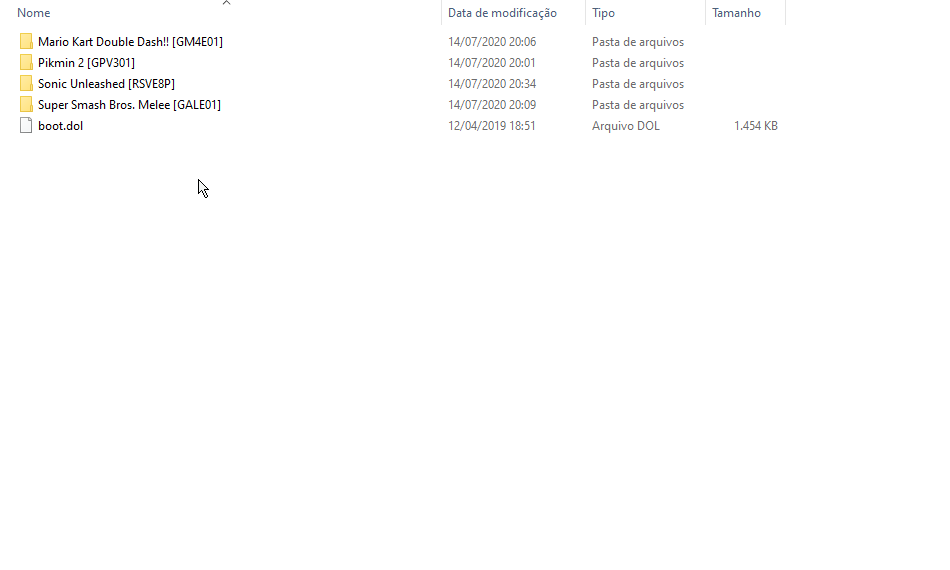
Ivgt7z.png

4I3Kqp.png


I still can open and acess the usb loader gx app, but when i start the game it just send me to the wii home, can anyone help me?

The Wii Games should be located in Subfolders (named with the ID) in "wbfs"
The GameCube Games are in the Folder "games" in Subfolders as shown on your 2.Screenshot.

Please look inside and check of the Content.

The "wbfs" / Subfolders should contain xxxxx.wbfs Files
The "games" Folder /Subfolders should contain game.iso Files (and disc2.iso if they are 2 Disc Games)

Please check also the Size of the Files.

Thank you.:)
 
  • Like
Reactions: jeannotte
Hello.:)


The Wii Games should be located in Subfolders (named with the ID) in "wbfs"
The GameCube Games are in the Folder "games" in Subfolders as shown on your 2.Screenshot.

Please look inside and check of the Content.

The "wbfs" / Subfolders should contain xxxxx.wbfs Files
The "games" Folder /Subfolders should contain game.iso Files (and disc2.iso if they are 2 Disc Games)

Please check also the Size of the Files.

Thank you.:)
Yeah, alredy did that and still nothing
Keep's sendind me to the menu

fKSpTL.png
 
Thank you.:)

Yeah, alredy did that and still nothing
Keep's sendind me to the menu

fKSpTL.png

Did you also checked the FILESIZE please ? :)

-------------------------------------------------------------------------------------------------------

By the Way:

Did you plugged your USB Device in the correct Port 0 please ? :)


kri1pk52t3s41.jpg
 
  • Like
Reactions: jeannotte
Thank you.:)


Did you also checked the FILESIZE please ? :)

-------------------------------------------------------------------------------------------------------

By the Way:

Did you plugged your USB Device in the correct Port 0 please ? :)


View attachment 217404
i've tryed the wii sports (300mb - .wbfs) and sonic unleashed (3gb - .iso). My HDD have 300GB, used to work before i format.
I try both plugs and the port 0 initialize the usb loader but returns to menu and the other port don't even open usb loader
 
Thank you.:)

i've tryed the wii sports (300mb - .wbfs) and sonic unleashed (3gb - .iso). My HDD have 300GB, used to work before i format.
I try both plugs and the port 0 initialize the usb loader but returns to menu and the other port don't even open usb loader

Which USBLoader GX Version did you use please ? Did you updated in the last Time ?
 
  • Like
Reactions: jeannotte
Never, but i checked in app and appers a message saying that is already updated to last version

I believe 1271 is the latest official build, but there's an unofficial one of 1272. iirc, both will say you have the latest version. however, use version 1271. you can tell when the app is booting up. it will say the version in the bottom corner.
 
i've just format my wii and installed homebrew channel, usb loader gx. pimpmywii and priiloader (not in that order)

but still when i try to initialize a game (tryed wii sports) appers a black screen and redirect to home menu.

usb loader v3.0 1772mod is the version
i've used .wbfs for wii and .iso for gamecube games (that don't even appers)

try another usb loader
you mean another version?
 
  • Like
Reactions: jeannotte
i've just format my wii and installed homebrew channel, usb loader gx. pimpmywii and priiloader (not in that order)

but still when i try to initialize a game (tryed wii sports) appers a black screen and redirect to home menu.

usb loader v3.0 1772mod is the version
i've used .wbfs for wii and .iso for gamecube games (that don't even appers)


you mean another version?
Hello,

Post a syscheck report, following this guide ==>https://gbatemp.net/threads/posting-a-system-check.300279/
 
  • Like
Reactions: Alexander1970
I believe 1271 is the latest official build, but there's an unofficial one of 1272. iirc, both will say you have the latest version. however, use version 1271.
The official version of 1272 has issues, so Cyan set the download link back to 1271. However, my modded version fixes them issues and more while also adding some new features.

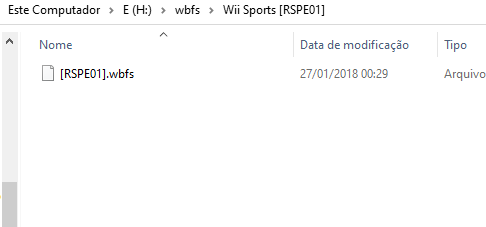
@c4rbs Assuming you've installed the cIOS correctly then I can see an issue.

fKSpTL.png


The brackets should only be used in your folder names, so you need to remove the brackets from your file names.
 
Last edited by blackb0x,
The official version of 1272 has issues, so Cyan set the download link back to 1271. However, my modded version fixes them issues and more while also adding some new features.

I can confim your r1272 Version works perfect.But I did not tried actual your new released Version.:)

Thank you.:)
 
  • Like
Reactions: blackb0x
The official version of 1272 has issues, so Cyan set the download link back to 1271. However, my modded version fixes them issues and more while also adding some new features.

@c4rbs Assuming you've installed the cIOS correctly then I can see an issue.

fKSpTL.png


The brackets should only be used in your folder names, so you need to remove the brackets from your file names.
i can't belive it, this actually works. thank you so much
 
  • Like
Reactions: Alexander1970

Site & Scene News

Popular threads in this forum