Hacking ULTIMATE System Menu 4.0 Guide

  • Thread starter Thread starter assassda
  • Start date Start date
  • Views Views 468,737
  • Replies Replies 1,666
Status
Not open for further replies.
Awesome guide assassda! Worked perfectly! I freak out a bit when the SYSTEM FILE CORRUPTED screen appeared, but installing Preloader again does the trick. This guide works people, but please follow the instructions very carefully and in the correct order. Screw something up and you could have yourself a bricked Wii.
 
While installing cIOS36 rev9, I get the following error:

Code:
Mounting SD card... OK!
Reading "IOS36-64-v1042.wad", please wait... ERROR! (ret = -1)

Press any button to restart the Wii...

What steps do I need to take to fix this?
 
Thanks for this guide, followed to the T, except I never got prompted to select No to IOS61/Yes IOS60/Yes Patch IOS60/No Shop Channel.
Also, I couldn't install preloader UNTIL I downloaded cIOSCorp and installed the IOS36.wad that was in there because it was giving me a trucha root error or something. Might wanna add that in the guide.
 
Would having a wiikey + wiiclip installed in my wii have any effect on my ability to install the preloader because, I, for the life of me cannot get the preloader installed? I get that ios36 fakesigning bug error. I'm thinking with a wiikey I wouldn't need the preloader but I don't know how else I would get the update blocking feature of the preloader.

Also is running wads off an sd card as simple as installing them via the wad manager and then moving them onto the sd card or no?
 
raphzthename said:
While installing cIOS36 rev9, I get the following error:

Code:
Mounting SD card... OK!
Reading "IOS36-64-v1042.wad", please wait... ERROR! (ret = -1)

Press any button to restart the Wii...

What steps do I need to take to fix this?

IOS36-64-v1042.wad need to be place in root of SD... plz read the manual carefully.
 
to crvyloOo, I can't get the preloader too since no-ip.com is blocked here in China, well later I got it using Tor.

the FAQ about "current IOS(36) has the fakesign bug fixed" while installing preloader is not perfectly accurate, take my practice as an example, I falsely updated to 3.4 using the official updater on the Madworld disc, fortunately I have waninkoko's cIOS36 installed already. after successfully installed step 4 and 5 and 6, I can already play VC wads on my SD, but preloader still gives that error.

i guess cIOS downgrader do not downgrade IOS36, after some study, I performed a straight install on the wad file i get in the 1st and 2nd step using wad manager, that finally makes the preloader installer happy.

hope that helps
laugh.gif
 
DaFees said:
Would having a wiikey + wiiclip installed in my wii have any effect on my ability to install the preloader because, I, for the life of me cannot get the preloader installed? I get that ios36 fakesigning bug error. I'm thinking with a wiikey I wouldn't need the preloader but I don't know how else I would get the update blocking feature of the preloader.

Also is running wads off an sd card as simple as installing them via the wad manager and then moving them onto the sd card or no?

wiikey also has an update blocking feature, check the config disc, well i turned both of them on
yay.gif


and for the IOS36 issue check my previous post on this thread

and yes running wads off an sd card is as simple as installing them via the wad manager and then moving them onto the sd card

I'm waiting for a new wad manager to install wads straight into sd card

smileipb2.png
 
So when i try to install preloader i get "current IOS(36) has the fakesign bug fixed". I tried what JimmyZ said and install the .wad from Step 1+2 and i keep getting ret-1.

EDIT: Nvm all i did was run IOS downgrader and made sure that IOS36 Downgraded properly.
 
JimmyZ said:
DaFees said:
Would having a wiikey + wiiclip installed in my wii have any effect on my ability to install the preloader because, I, for the life of me cannot get the preloader installed? I get that ios36 fakesigning bug error. I'm thinking with a wiikey I wouldn't need the preloader but I don't know how else I would get the update blocking feature of the preloader.

Also is running wads off an sd card as simple as installing them via the wad manager and then moving them onto the sd card or no?

wiikey also has an update blocking feature, check the config disc, well i turned both of them on
yay.gif


and for the IOS36 issue check my previous post on this thread

and yes running wads off an sd card is as simple as installing them via the wad manager and then moving them onto the sd card

I'm waiting for a new wad manager to install wads straight into sd card
smileipb2.png

Thank you very much!!! Your suggestion of running the ios36 wad from wad manager instead of that boot.dol file was exactly what I needed to do in order to install the preloader. Now it's late, and I've got things to do tomorrow. Soon I shall install cioscorp stuff and be on my way to disc channel like wads and some form of a loader.
 
Riley said:
So when i try to install preloader i get "current IOS(36) has the fakesign bug fixed". I tried what JimmyZ said and install the .wad from Step 1+2 and i keep getting ret-1.

EDIT: Nvm all i did was run IOS downgrader and made sure that IOS36 Downgraded properly.

where did you get that "ret-1"? please make yourself clear before asking questions.

got a peek into your previous posts, seems you mean the usb loader was not recognizing you usb stick, well that was not an IOS36 related problem, usb loader needs cIOS36 rev9 which installs as IOS249 on your wii as stated in it's document.

and try other usb drives/sticks
 
JimmyZ said:
Riley said:
So when i try to install preloader i get "current IOS(36) has the fakesign bug fixed". I tried what JimmyZ said and install the .wad from Step 1+2 and i keep getting ret-1.

EDIT: Nvm all i did was run IOS downgrader and made sure that IOS36 Downgraded properly.

where did you get that "ret-1"? please make yourself clear before asking questions.

got a peek into your previous posts, seems you mean the usb loader was not recognizing you usb stick, well that was not an IOS36 related problem, usb loader needs cIOS36 rev9 which installs as IOS249 on your wii as stated in it's document.

and try other usb drives/sticks

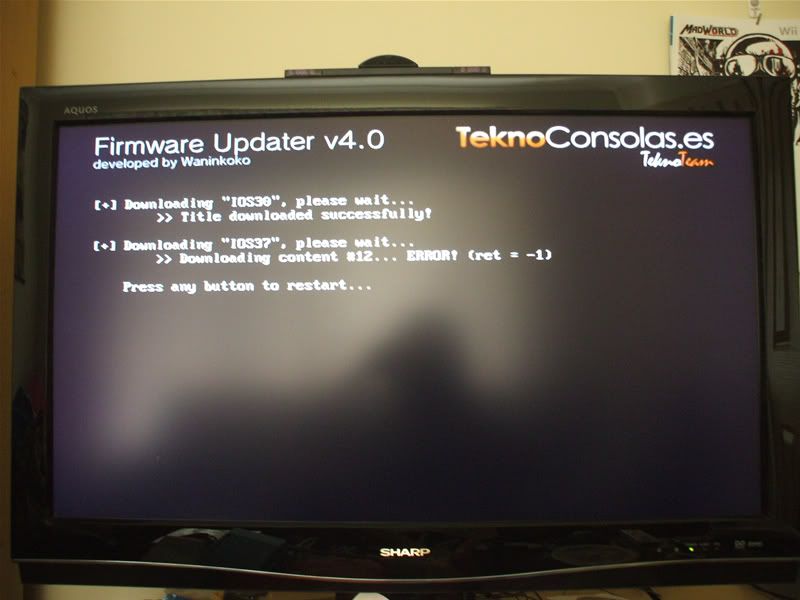
I get the same problem with the "ret = -1" but only with the step where I use the 4.0 Updater(Step 5)
I have done every step exactly but when its in the middle of downloading an ISO it will come up with the -1 error and then will go back to the Wii menu...

I have made sure I have enough space on the Wii and everything but its not working...
 
JimmyZ said:
i guess cIOS downgrader do not downgrade IOS36, after some study, I performed a straight install on the wad file i get in the 1st and 2nd step using wad manager, that finally makes the preloader installer happy.
Thanks for confirming this. I updated the FAQ

QUOTEI get the same problem with the "ret = -1" but only with the step where I use the 4.0 Updater(Step 5)
I have done every step exactly but when its in the middle of downloading an ISO it will come up with the -1 error and then will go back to the Wii menu...

I have made sure I have enough space on the Wii and everything but its not working...
sounds like an internet issue, clear your internet settings and reset them and try again. run it multiple times it might not work the 1st time
 
JJBro1 said:
what happens if we update through nintendo? I've heard alot of people are getting bricked with wanin's updater and that it doesn't come with all the ios's.

Use first WiiSCU, than Waninkoko Firmware Updater 4.0!
 
Macky could you give more detail? like a full screen dump, better you could remember what you've done to your wii
 
JimmyZ said:
Macky could you give more detail? like a full screen dump, better you could remember what you've done to your wii

Ok ive done everything EXACTLY how it says but now I cant go any further...

DSCF1452.jpg


Other things ive done with my Wii is installed the BackUp Loader (latest version) following the instructions on this site.
 
Status
Not open for further replies.

Site & Scene News

Popular threads in this forum