Tutorial  Updated

Tutorial: How to remove update messages

Many of you are asking how to remove update messages on the Switch.
That's why i will give you a YouTube tutorial on how to remove them.
This video isn't made by me, so credits to the author.

How is this achieved?
Your Switch, like everything else, has a built-in recovery mode ('safe mode').

To enter recovery mode you will have to press and hold both volume buttons and the power button while the Switch is turned off.
Press the power button to exit recovery mode.

EDIT: You dont have to reset anything.
Just entering and exiting recovery mode removes the messages.


This menu will give you three options:
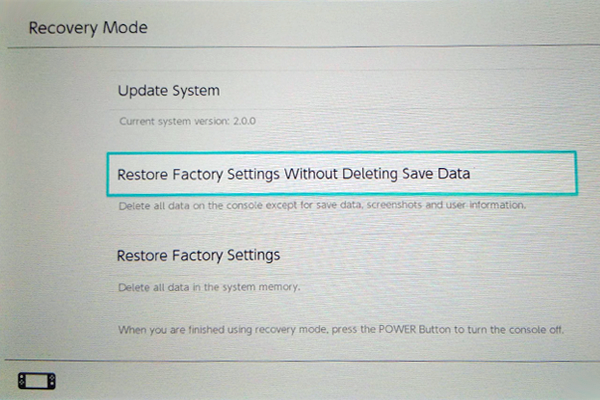
  1. Update
  2. Restore factory settings without deleting save data,screenshots and user info
  3. Reset everything. DON'T
fb6de6443b394bc1-600x400.png

(not my picture)


No need to do this anymore, see edit above.
The logic choice will be option 2.
Press that and nothing else.

Video link:


USE AT YOUR OWN RISK.
I am not responsible for any damage.
 
Last edited by thedetire,
Hello :)

I just went into the recovery mode (without selecting any option), then use the power button to turn off the console, then turn it on into the "standard" mode and no more boring nag update message ! :D
I don't know if i got luck or if this method work for everyone, I just wanted to share this little find.

Sorry about my bad english :P
 
  • Like
Reactions: peteruk
I'm on 2.0 with the Zelda DLC downloaded previously. After doing this it's not letting me play zelda unless I update the game. Guess I just lost all my save data.
 
Is it too much trouble to add the button combo to the OP? I have no bandwidth to be able to see a youtube video.
 
I just do this by putting my console in airplane mode, holding down the power button and fully turning it off. But to each their own.
 
When i insert a cart and go to start a game a nag says "a new update is available. it will be downloaded now." And gives me: Start software, Download or Cancel. Is that the nag? Because Safemode and powering back off doesnt get rid of it. Or does it somehow know there is a game update? thanks
 
  • Like
Reactions: Alex1234
When i insert a cart and go to start a game a nag says "a new update is available. it will be downloaded now." And gives me: Start software, Download or Cancel. Is that the nag? Because Safemode and powering back off doesnt get rid of it. Or does it somehow know there is a game update? thanks

That was the nag, I reinitialized my console keeping save data, as suggested originally before they said to just enter recovery and exit without doing anything. I think that wiped the DLC from my device and my game save needed that DLC and would no longer let me open the game until I downloaded that update. The DLC needs the system to be updated to be able to be downloaded. So to be able to play my game cart agian, I had to actually do a "no data save reinitialization". It sucks (lost like 40 hours of gameplay) but I'm at least able to play my game agian, but on the bright side, I have no original or secondary update nag/block anymore.

So, please don't do what I did, enter recovery, then just exit it.
 
Last edited by SNESFAN,
Thanks, it worked on my Switch 3.0.0! No more fear of accidentally updating the system while launching a game.:)

I also set DNS resolvers to 173.255.238.217 to block the update.
 
Volunteers? This has been known for a while lol

--------------------- MERGED ---------------------------

Do this:
Turn off wifi, delete all wireless settings
Go into recovery then reboot.

That should remove the nag

Has it? i dont need to delete any incoming updates lol!(i am already safely on 3.0 and my switch was cut off from the online world 2 months ago) i just wanted to ensure that it worked, just in case i ever am in this kind of situation.:)
 
It doesnt work for me. I have tried multiple times with DNS, all connections deleted, on flight mode, still every time I insert cart and press the game (MK8, SF2) it nags me. "a new update is available. it will be downloaded now." I'm on 3.0
 
just delete the wifi connections in settings, or turn on airplane mode
enter recovery and restart the machine

simple
 

Site & Scene News

Popular threads in this forum