Tutorial
Updated
Tutorial: How to remove update messages
Many of you are asking how to remove update messages on the Switch.
That's why i will give you a YouTube tutorial on how to remove them.
This video isn't made by me, so credits to the author.
How is this achieved?
Your Switch, like everything else, has a built-in recovery mode ('safe mode').
To enter recovery mode you will have to press and hold both volume buttons and the power button while the Switch is turned off.
Press the power button to exit recovery mode.
EDIT: You dont have to reset anything.
Just entering and exiting recovery mode removes the messages.
This menu will give you three options:
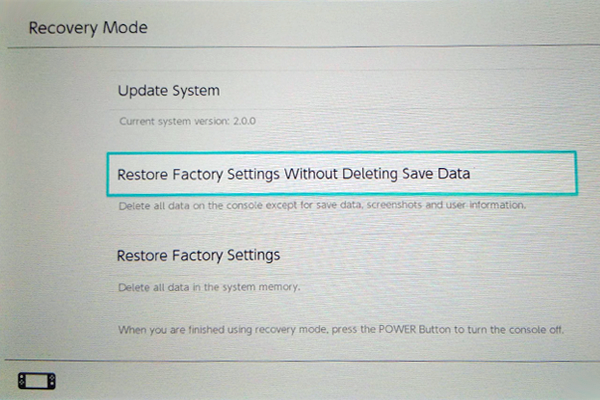
(not my picture)
No need to do this anymore, see edit above.
The logic choice will be option 2.
Press that and nothing else.
Video link:
USE AT YOUR OWN RISK.
I am not responsible for any damage.
That's why i will give you a YouTube tutorial on how to remove them.
This video isn't made by me, so credits to the author.
How is this achieved?
Your Switch, like everything else, has a built-in recovery mode ('safe mode').
To enter recovery mode you will have to press and hold both volume buttons and the power button while the Switch is turned off.
Press the power button to exit recovery mode.
EDIT: You dont have to reset anything.
Just entering and exiting recovery mode removes the messages.
This menu will give you three options:
- Update
- Restore factory settings without deleting save data,screenshots and user info
- Reset everything. DON'T
(not my picture)
No need to do this anymore, see edit above.
The logic choice will be option 2.
Press that and nothing else.
Video link:
USE AT YOUR OWN RISK.
I am not responsible for any damage.
Last edited by thedetire,