In this tutorial I will explain how to extract & rebuild CIAs
After spending an unhealthy amount of days reading information on this forum, I realised no-one talks about using NSUI to extract, edit and rebuild CIAs. So, I'm here to give a brief overview of how it is done because it's fairly straightforward.
What you will need:
This tool does what we want to do and has become a staple to the 3DS scene. It is worth knowing it exists and if you have an issue with the method explained below, go back and use this.
Method:
Open NSUI
FAQs
Q. My CIA won't extract, what do I do?
A. Try a different CIA or use the other tool in recommended reading.
Please note that I probably don't have the answer to any issues that may occur. I really just wanted to share this information.
Also Install CIA on 3DS is an option that exists, I've never used it so I didn't talk about it.
Special thanks to @Asdolo for making this tool.
After spending an unhealthy amount of days reading information on this forum, I realised no-one talks about using NSUI to extract, edit and rebuild CIAs. So, I'm here to give a brief overview of how it is done because it's fairly straightforward.
What you will need:
- The latest version of NSUI beta 28 – It’s the version I worked with so I can’t comment on previous versions.
This tool does what we want to do and has become a staple to the 3DS scene. It is worth knowing it exists and if you have an issue with the method explained below, go back and use this.
Method:
Open NSUI
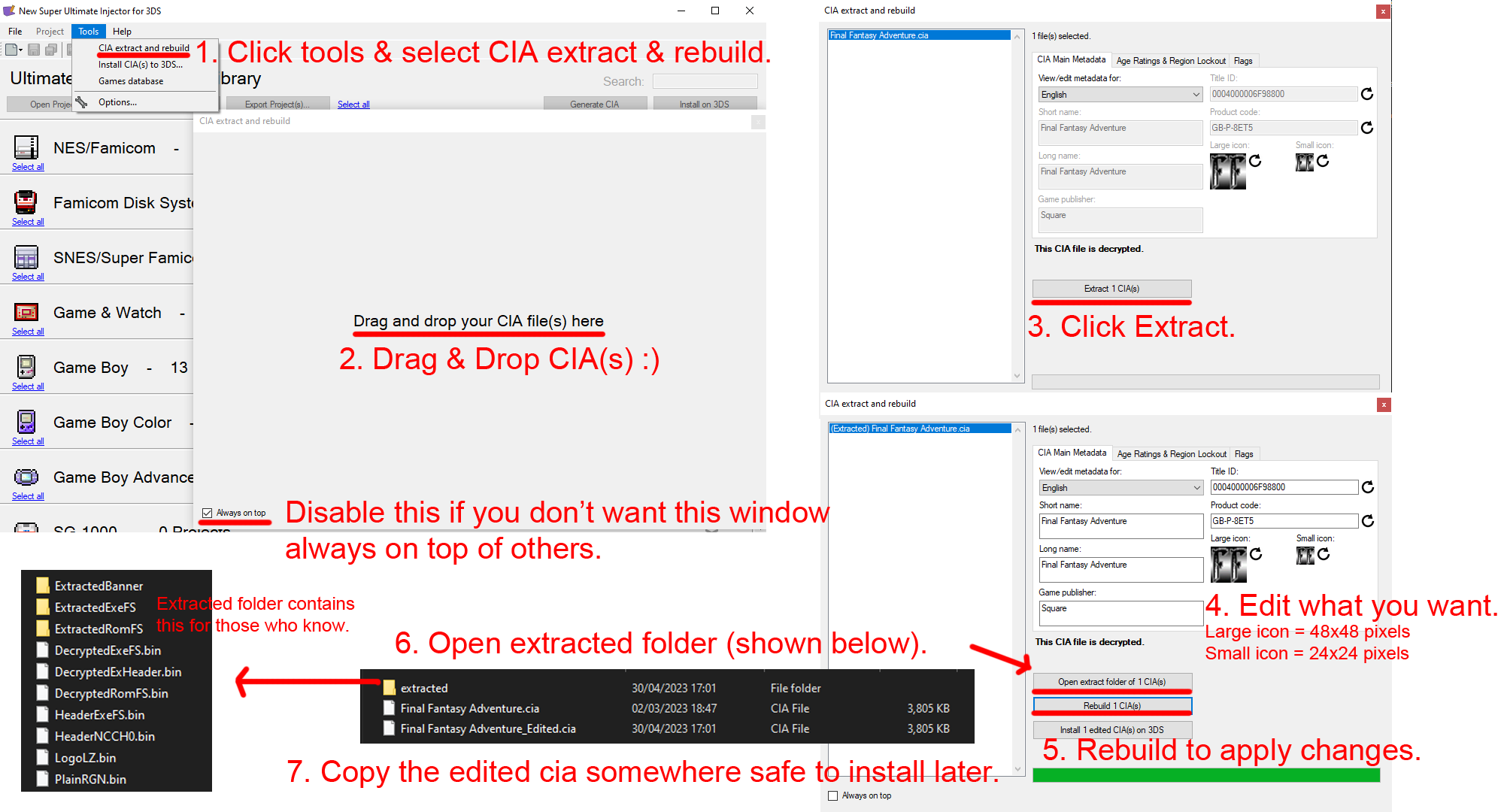
- 1. Click tools > select CIA & rebuild.
- 2. Drag & Drop CIA(s)

- 3. Click extract.
- 4. Edit what you want.
- 5. Rebuild to apply changes.
- 6. Open extracted folder.
- 7. Copy edited CIA somewhere.
FAQs
Q. My CIA won't extract, what do I do?
A. Try a different CIA or use the other tool in recommended reading.
Please note that I probably don't have the answer to any issues that may occur. I really just wanted to share this information.
Also Install CIA on 3DS is an option that exists, I've never used it so I didn't talk about it.
Special thanks to @Asdolo for making this tool.