Tutorial  Updated

Transfer Saves from PS1 to PS3

The purpose of this tutorial is to convert saves from a physical PS1 Memory Card to a virtual PS3 Internal Memory Card, using a Windows PC and a PS2 with FMCB, without a PS3 Memory Card Adapter or DexDrive.

In order to complete this tutorial, a PS2 needs to run uLaunchELF to copy the save from the PS1 Memory Card. A USB storage device is also needed to copy the save from the PS2 to the PC to the PS3.

PS1 Memory Card >> PS2 (FMCB) >> USB >> PC >> USB >> PS3 [Virtual Memory Card]

Tutorial: Create PS3 Internal Memory Card


0. Download


1. PS2, uLaunchELF
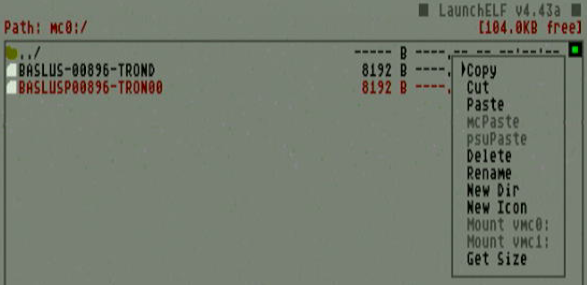
  • Insert USB into PS2
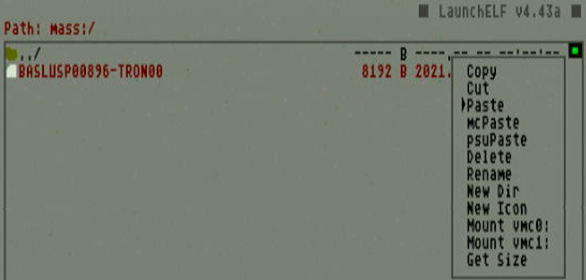
  • Copy RAW save file from PS1 Memory Card (mc0:/ or mc1:/ )
  • Paste RAW save file to USB (mass:/ )
copyRAW.png


pasteRAW.png


2. PC, MemcardRex
  • Insert USB into PC
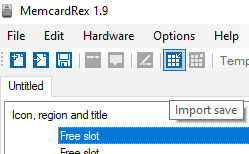
  • Import RAW save file
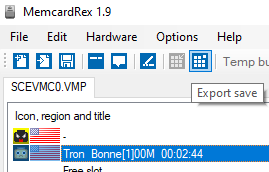
  • Export as .PSV single save
  • 1.png 2.png 3.png

import-png.211356
export-png.215270


3. PC
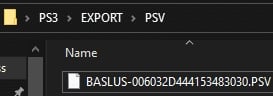
  • Move .PSV into "\PS3\EXPORT\PSV" folders
  • Copy "PS3" folder to USB root directory (USB:\PS3\EXPORT\PSV\filename.PSV)
folders.jpg


4. PS3, XMB
  • Insert USB into PS3
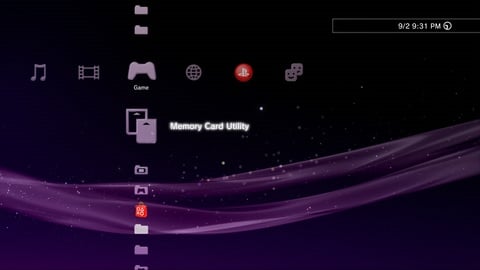
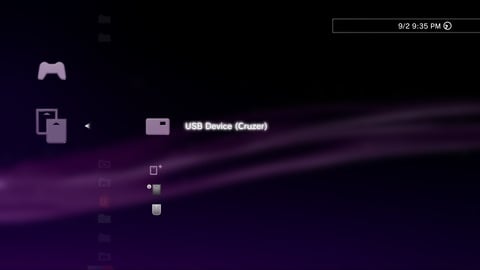
  • Select: Memory Card Utility >> USB Device >>
    b_triangle.gif
    : Options >> Copy >> (PS1) Internal Memory Card
PS3-MCutility.jpg


PS3-USB.jpg


PS3-PS1copy.jpg
 
Last edited by zfreeman,
Actually never mind, this tutorial is relevant even for Adrenaline PS1 saves to PS3 PS1 saves.
I just converted "SCEVMC0.VMP" from my VITA (ux0:/pspemu/PSP/SAVEDATA/"game_code") to .mcs using rex.....
and the rest is in this tutorial.

Thanks zfreeman! Now i can play Tomb Raider on my PS3 where i left off :)
 
Last edited by Deleted member 475203,
  • Like
Reactions: zfreeman
For whatever reason I cannot get this process to work for Gran Turismo 2. Whenever I try to do this process to GT2's save it comes up as corrupt on the PS3 side.

Any advice?
 
For whatever reason I cannot get this process to work for Gran Turismo 2. Whenever I try to do this process to GT2's save it comes up as corrupt on the PS3 side.

Any advice?
Just hex it in or I can do it for you. I'd need the save and your memory card image (vm1 in the vector folder on root).
 
Yes, make sure there's already a save on it. Does this memory card have multiple games' saves?
 
Welp, my PS3 decided to corrupt the whole PS1 memory card for some reason. Bizarre.

Here's the save, I guess I need to regain my progress (I started a new save that I think may have been further than this one but whatever).
 

Attachments

Yeah, that's all I uploaded. I wasn't uploading the entire memory card it came from, just the individual save.
 
Yeah, that's all I uploaded. I wasn't uploading the entire memory card it came from, just the individual save.
need the memory card image, because of the toc. I can already tell it's four blocks, but without the toc in the first block of the memory card, it will likely become corrupted.
 
alright, I just hexed it in. however, there's an awful lot of "blank" space in the save you uploaded, so I don't know how to check what's been unlocked. I'm sure you know what to do with this file:
 

Attachments

Should be barely any progress. IIRC I was at the beginning of the game on that save.

Also like I said my entire VMC on the PS3 got jacked up so I couldn't dump it (even though I actually didn't see how to dump it in the first place — thankfully it wasn't much data lost).

The process the first time I went smoothly, I just couldn't load the data in the game, which made me think there was something quirky about the GT2 save itself.
 
  • Like
Reactions: godreborn

Site & Scene News

Popular threads in this forum