Emulation Tokyo Mirage Sessions #FE stuck on beginning

  • Thread starter Thread starter Hotsuma
  • Start date Start date
  • Views Views 9,970
  • Replies Replies 7

Hotsuma

Active Member
Newcomer
Joined
Jan 19, 2017
Messages
29
Reaction score
5
Trophies
0
XP
216
Country
United States
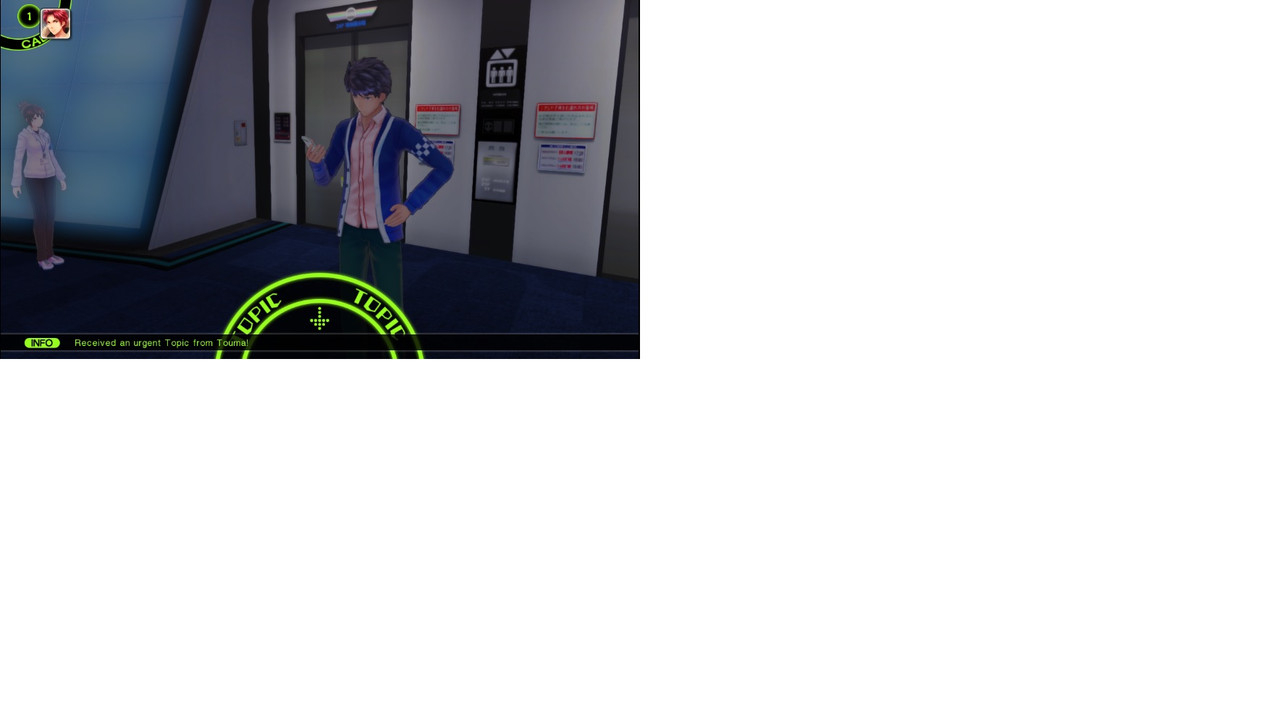
Noob question here. It loos like I'm stuck in the very beginning where Itsuki receives a message from Touma. It says to use my Wii U gamepad to reply to his message but I'm using a Switch controller on Cemu. Does this mean I can't go any further without an official Wii U gamepad?
Stuck.jpg
 
Last edited by Hotsuma,
I never used Cemu but if CEMU doesn't allow to toggle to the other screen then the programmers are doing it wrong.

You HAVE to accept and read the messages on the second screen.
 
1.In Input Settings=>Emulate Controller=>you have to choose "Wii U Gamepad"
2.You have to choose how you want to use the wii u gamepad screen...either by holding a button(which you set in "Show Screen") or Options=>Separate GamePad view,which opens another window that represents the Wii U GamePad screen

You control what you see on that screen by mouse clicking which emulates touching the screen
The game uses that screen for many things including those messages.
 
  • Like
Reactions: Hotsuma
1.In Input Settings=>Emulate Controller=>you have to choose "Wii U Gamepad"
2.You have to choose how you want to use the wii u gamepad screen...either by holding a button(which you set in "Show Screen") or Options=>Separate GamePad view,which opens another window that represents the Wii U GamePad screen

You control what you see on that screen by mouse clicking which emulates touching the screen
The game uses that screen for many things including those messages.

Got it. Thanks for the input.
 
I never used Cemu but if CEMU doesn't allow to toggle to the other screen then the programmers are doing it wrong.

You HAVE to accept and read the messages on the second screen.

Is there any way to send the screen to another computer or mobile? A bit annoying to alt-tab into the screen.
 

Site & Scene News

Popular threads in this forum