There is a problem with the USB storage device. Error code 160-4714

  • Thread starter Thread starter Al09rt45
  • Start date Start date
  • Views Views 13,563
  • Replies Replies 19

Al09rt45

Member
Newcomer
Joined
Feb 23, 2023
Messages
15
Reaction score
1
Trophies
0
XP
52
Country
Romania
After installing some homebrew apps from the appstore, when i got to the wii u menu, after a few seconds i got a message saying “There is a problem with the USB storage device.”
I’m using a 1TB external hard drive that worked fine until now.
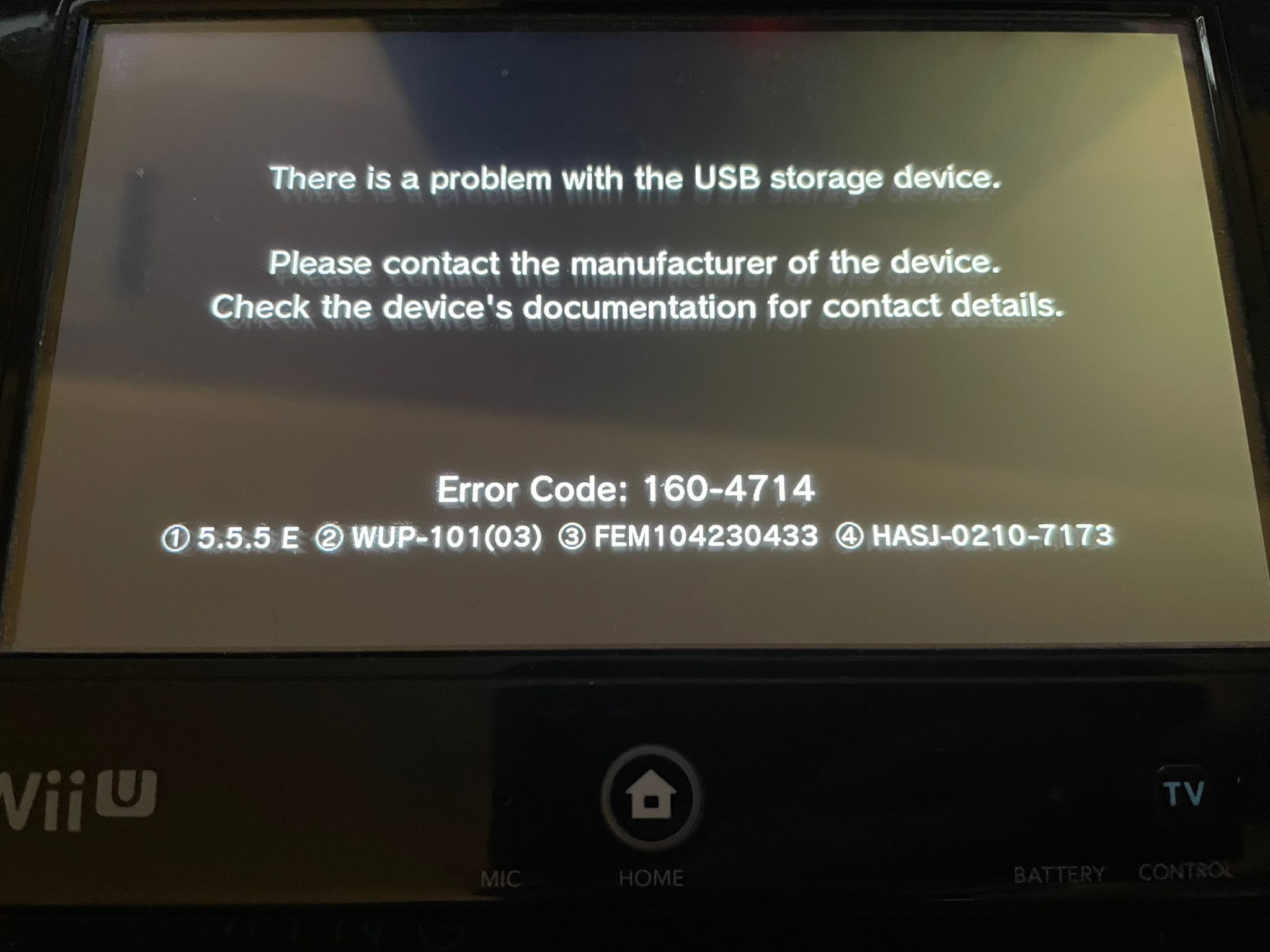
WhatsApp Image 2023-02-24 at 02.38.46.jpeg
 
I know it might sound silly, but try turning off the Wii U, unplugging and plugging the USB storage drive in your Wii U and then turn it back on, its possible that the connection just got loose or something simple like that.
 
I know it might sound silly, but try turning off the Wii U, unplugging and plugging the USB storage drive in your Wii U and then turn it back on, its possible that the connection just got loose or something simple like that.
Wow that actually worked. I thought it was something more serious and I was afraid to unplug the hard drive. Sorry for any problems i’ve caused with this dumb question
Post automatically merged:

I know it might sound silly, but try turning off the Wii U, unplugging and plugging the USB storage drive in your Wii U and then turn it back on, its possible that the connection just got loose or something simple like that.
It started happening again but this time it just straight up makes the screen black and gives the message and unplugging and plugging the hard drive doesnt work anymore
 
Last edited by Al09rt45,
Maybe the cable or USB port got damaged somehow? Try a different cable as well as using another USB port on the Wii U.
 
FYI, if you've been using the back port all these times and then it stopped working. Those ports might be on the way out. Because both front and back ports give out the same power unit.
Is there anything i can do about it
 
Is there anything i can do about it
If it's a hardware's fault then it depends. It could be the ports or it could the actual board itself. There's no way to tell without physically looking at it and check the output voltge etc. Anyway if the front 2 are working, you're good for now.
 
Error code 160-471 seems to indicate data corruption within your Wii U storage device. Simply sayed it seems to die, try a another drive. And the WiiU uses its own Filesystem so there is no recovery option available, only checking the s.m.a.r.t value by "chrystal disk info" if possible.
 
Error code 160-471 seems to indicate data corruption within your Wii U storage device. Simply sayed it seems to die, try a another drive. And the WiiU uses its own Filesystem so there is no recovery option available, only checking the s.m.a.r.t value by "chrystal disk info" if possible.
I think the drive may be the problem since a couple hours after using the front ports it gave the same error message. Does that mean that all the ports are dead or is it just the drive.
 
I think the drive may be the problem since a couple hours after using the front ports it gave the same error message. Does that mean that all the ports are dead or is it just the drive.
data corruption within your Wii U storage device. Simply sayed it seems to die, try a another drive.
 
The Wii U doesn't recognize the new hdd. It makes a weird high pitched *beep* sound every 5-7 seconds. I tried every port and different cables.
 
After installing some homebrew apps from the appstore, when i got to the wii u menu, after a few seconds i got a message saying “There is a problem with the USB storage device.”
I’m using a 1TB external hard drive that worked fine until now.

The only way is to take HDD out the case or not and run manufacturer's software to check for errors. This is the only way, windows scandisk will not tell anything about hardware failure in some cases. After this anyway your drive might take too much current, use Y cable or change the drive for something compatible. SSD might work well, should take less power in general.
 
windows scandisk will not tell anything about hardware failure in some cases
Windows checkdisk is for correcting filesystem errors and sector condition check.

The inbuild s.m.a.r.t technolgy in drives, which gives a overview by a lot of sensors gives good condition overview including hardware defects. A study in 2006 by google says, 64% of all failures with S.M.A.R.T. are predictable.
1677928821290.png
 
Windows checkdisk is for correcting filesystem errors and sector condition check.

The inbuild s.m.a.r.t technolgy in drives, which gives a overview by a lot of sensors gives good condition overview including hardware defects. A study in 2006 by google says, 64% of all failures with S.M.A.R.T. are predictable.

I had a case that SMART didn't show anything on MAxtor HDD, scandisk neither, but producer's diagnostics did. Usually SMART should show, usually
 
After installing some homebrew apps from the appstore, when i got to the wii u menu, after a few seconds i got a message saying “There is a problem with the USB storage device.”
I’m using a 1TB external hard drive that worked fine until now.View attachment 355139
Hi, I’m getting this error too. I’m just wondering, were you using a y cable or just a standard usb? I’ve ordered a y cable because it could be a power problem. If you were using a y cable then it could be the drive, I’m hoping it’s just not getting enough power.
 
Wow that actually worked. I thought it was something more serious and I was afraid to unplug the hard drive. Sorry for any problems i’ve caused with this dumb question
Post automatically merged:


It started happening again but this time it just straight up makes the screen black and gives the message and unplugging and plugging the hard drive doesnt work anymore
Hello, I don't know if you have found a solution, but if the problem continues, I think I have a solution, maybe it is because the hard drive is a USB 3.0 hard drive and not a 2.0, this is the one that is compatible with the console, that is If your hard drive is a USB 3.0 hard drive it is not compatible with the console, or well, if it is but it causes an error, the solution (according to me) is to buy a USB 3.0 to USB hard drive adapter 2.0 so that it can be compatible, the USB 3.0 hard drive has a lot of energy and the Wii U is not capable of giving it to work like a 2.0 hard drive and with the cable it could be the solution to that
Post automatically merged:

Wow that actually worked. I thought it was something more serious and I was afraid to unplug the hard drive. Sorry for any problems i’ve caused with this dumb question
Post automatically merged:


It started happening again but this time it just straight up makes the screen black and gives the message and unplugging and plugging the hard drive doesnt work anymore
Hello, I don't know if you have found a solution, but if the problem continues, I think I have a solution, maybe it is because the hard drive is a USB 3.0 hard drive and not a 2.0, this is the one that is compatible with the console, that is If your hard drive is a USB 3.0 hard drive it is not compatible with the console, or well, if it is but it causes an error, the solution (according to me) is to buy a USB 3.0 to USB hard drive adapter 2.0 so that it can be compatible, the USB 3.0 hard drive has a lot of energy and the Wii U is not capable of giving it to work like a 2.0 hard drive and with the cable it could be the solution to that
 

Site & Scene News

Popular threads in this forum