
Hacking Tegrarcmgui Driver Failed to Install

CremeBruleeeee

New Member
Newbie
Joined
Nov 26, 2021
Messages
4
Reaction score
0
Trophies
0
Age
25
XP
50
Country
United States
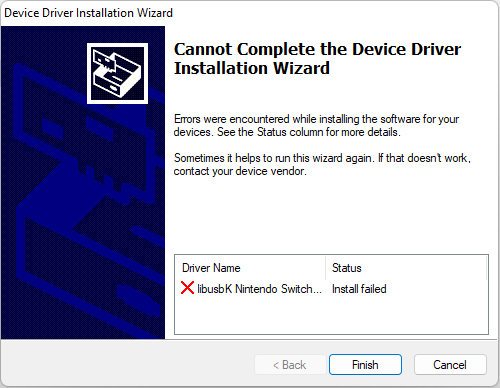
Tegrarcmgui has not been working for me. Whenever I connect my Switch that is in RCM mode, it tells me I need to download the drivers and shows "USB Driver K.O.". I tried to download the driver's needed and it keeps telling me that it failed to install those files. I have also used Zadig to try to install these files, which also failed. I have run both programs in administrator mode and it still does not work. I know that the cable is working and the Switch is not patched. I have tried many USB ports already and none has fixed the issue. I have used Tegrarcmgui before on this computer and has worked perfectly fine. I am not sure why this time around, it is refusing to .
Screenshot 2021-11-26 104315.png

Screenshot 2021-11-26 104608.png

Screenshot 2021-11-26 104331.png
 
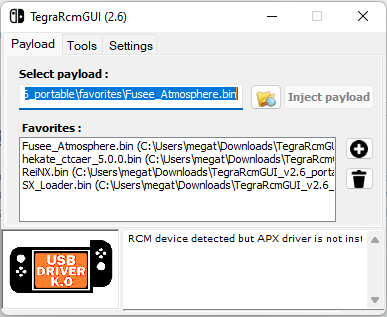
Tegrarcmgui has not been working for me. Whenever I connect my Switch that is in RCM mode, it tells me I need to download the drivers and shows "USB Driver K.O.". I tried to download the driver's needed and it keeps telling me that it failed to install those files. I have also used Zadig to try to install these files, which also failed. I have run both programs in administrator mode and it still does not work. I know that the cable is working and the Switch is not patched. I have tried many USB ports already and none has fixed the issue. I have used Tegrarcmgui before on this computer and has worked perfectly fine. I am not sure why this time around, it is refusing to .
View attachment 287126
View attachment 287128
View attachment 287127
Facing the same issue right now. Did you finally work it out?
 
I;ve had issues in the past with drivers like this, mainly for psvita, my solution was to delete every usb driver that wasn't being used by my main devices, mouse keyboard, gamepads etc. and start again.
 
advance reboot option 7 , disable driver signature .https://thegeekpage.com/how-to-boot-into-advanced-startup-mode-in-windows-11/


install , reboot normally .
 
  1. Run Hardware and Devices troubleshooter.
  2. Update your drivers
  3. Run DISM tool.
  4. Run an SFC scan.
  5. Perform a Clean Boot.
  6. Perform a System Reset.
This may be help you out in fixing the issue
 

Site & Scene News

Popular threads in this forum