
As I didn't find the information somewhere else on GBAtemp.
---
Another day, another release by your friends from Team Xecuter.
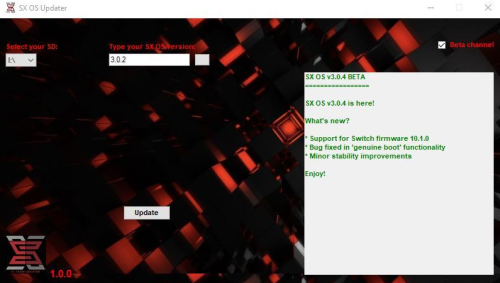
This time we bring you a simple app for the PC, that allows you to update 'offline' our SX OS, it works just like our Switch OTA Updater, but runs on your PC, and is useful for those having issues accessing our SX Portal website, or trouble downloading and unpacking files.
To use:
–< Team Xecuter – Pushing the limits of every Switch in 2020 and beyond! >–
---
Another day, another release by your friends from Team Xecuter.
This time we bring you a simple app for the PC, that allows you to update 'offline' our SX OS, it works just like our Switch OTA Updater, but runs on your PC, and is useful for those having issues accessing our SX Portal website, or trouble downloading and unpacking files.
To use:
- Insert an SDCard for your Switch Console into your PC.
- Start the software, and select the Device Letter in the dropbox menu.
- If you have SX OS, the update status will be checked and the Changelog displayed,
(You can also select between Stable (or) Beta versions by checking the checkbox). - Otherwise, if your SDCard has no SX OS, you will instead be prompted to install SX OS.
- Click Update (or) Install to start the process.
–< Team Xecuter – Pushing the limits of every Switch in 2020 and beyond! >–
Last edited by linuxares,