Homebrew svdt: save data explorer/manager

  • Thread starter Thread starter meladroit
  • Start date Start date
  • Views Views 364,177
  • Replies Replies 953
  • Likes Likes 44
It seems like this and Save Manager do not work with Samurai Warriors Chronicles 3.

When I selected SW Chronicles 3, it gives me a black screen on the top and a red screen on the bottom.

I have to hard reset the system as a result.
 
Emergency mode is for games like SSB on old 3ds, due to the enhanced new 3ds mode the memory is cleared when booting those, so we can't get any screen output, that's why emergency mode makes a backup on holding L and restores whatever is on /svdt_inject when holding R.

It does the same as pressing the A and B buttons on save_manager.

Asr support is enabled by default on emergency mode. In normal mode you are asked if you want to enable it.
Do you think you could give stupid people like me some very spesific instructions on how to do this? I cannot for the life of my create a useable backup of my SSB save. I have downloaded the latest files as of today (16.09.15).
 
I am trying to launch svdt, but it gives me an error saying "Target title selector"

n19yKr6.jpg

Anyone know what I am doing wrong?
 
im having trouble using this idk how to back up and restore using this its much more confuseing then sdm but this seems better can you tell me how do i back up and restore with this
 
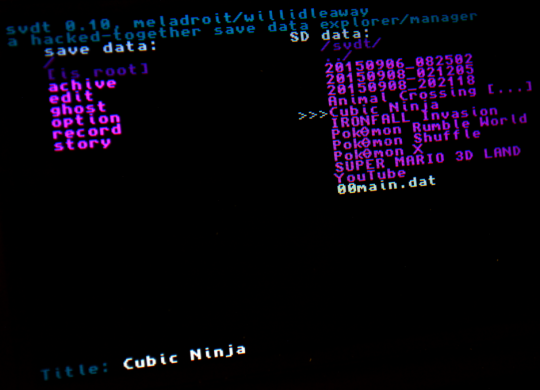
the title is still cubic ninja,like this
tumblr_nujwj4DGIY1tre0pho1_540.png

D-PAD just change the dir,sorry for my noob,maybe i misunderstanding something。
I just need to change the dir of game save path then press A?(for cia game)
 
do you think is will work on new and upcoming games i hope to use it for super mystery dungeon because the game probbley only lets you have one file
 
Whenever I try to start svdt I just get this on my screen:
3dsxl.JPG


I am using TubeHax's homebrew launcher and the target is Monster Hunter 4 Ultimate. The same thing happens when I use profi200's save_manager. Anything I can do to fix this?
 
  • Like
Reactions: Something whatever
Whenever I try to start svdt I just get this on my screen:
3dsxl.JPG


I am using TubeHax's homebrew launcher and the target is Monster Hunter 4 Ultimate. The same thing happens when I use profi200's save_manager. Anything I can do to fix this?
It's because you are using an extended memory game on an o3DS. Try running svdt in emergency mode.
 
I wonder how people can read and write in a forum, yet they seem to don't know how to read at all:

https://github.com/meladroit/svdt
https://github.com/meladroit/svdt/wiki/List-of-problematic-(and-non-problematic)-games

It is also on the first post:

Emergency operations:
svdt offers some basic functionality for some games that don't allow it to fully initialise. (Your mileage may vary, but Animal Crossing: New Leaf is a common example for many users. These operations also don't work for some games like Kirby 3DX, which causes the homebrew launcher to hang before it can start svdt.)
  • At startup, svdt will automatically back up save data to a time-stamped folder in sd:/svdt/ (unless you hold down the left shoulder button, which skips this step).
  • At startup, if you hold down the right shoulder button, svdt will inject save data from sd:/svdt_inject/ after the automatic backup finishes.
 
I wonder how people can read and write in a forum, yet they seem to don't know how to read at all:

https://github.com/meladroit/svdt
https://github.com/meladroit/svdt/wiki/List-of-problematic-(and-non-problematic)-games

It is also on the first post:
On the list of games that won't let svdt start at all, Pokemon Mystery Dungeon and Mario & Luigi both work fine for me on my N3DS XL. Only Kirby gives me issues.
I have a digital copy of Mystery Dungeon and a physical copy of Mario & Luigi.
 
I'm trying to inject an old MH4U .sav with SVDT, but whenever I hold the R shoulder button, it brings up a screen that tells me to select a game, and when I choose Mh4u, nothing happens. Am I doing something wrong? I have a folder named svdt_inject at my root.
 
I've finally switched to svdt yesterday (I've been so busy until now!).

It obviously works better than profi2000's tool (except for ACNL, which is already documented, hoping you can fix it guys!) but I've come here to complain about the GUI. :P

IMHO, the bottom screen shows up too much text.
May I suggest a redesign for the help screen?
Code:
svdt Help screen
----------------
[LEFT]  switch to game's save
[RIGHT]  switch to SD
[UP/DOWN] navigate through files
[A]  open folder
[Y]  copy selected file from/to save/SD
[Y on /]  copy all files from/to save/SD
[X]  delete selected file
[SELECT]  show this help screen
[START]  exit
----------------
I'm already used to the controls, but I must admit first boot was chaotic.

Some user prompts can be shortened too.


Good job everyone involved!
 
Last edited by marc_max,
And the Select button changes sorting AND reprints instructions. It would be good to have these functions on separate buttons.
 
And the Select button changes sorting AND reprints instructions. It would be good to have these functions on separate buttons.

There's no more buttons, and why? If you want to change sorting for some reason, press select. If you want to view instructions and not change sorting, press select two times.
Once you use it a couple of times, you don't really need instructions. The buttons are the same as in CTRXplorer, so no confusion can happen either.
 
  • Like
Reactions: SomeGamer

Site & Scene News

Popular threads in this forum