
Hacking Stuck while installing boot9strap with DSiware method

  • Thread starter Thread starter slugbaby
  • Start date Start date
  • Views Views 8,571
  • Replies Replies 17

slugbaby

Member
Newcomer
Joined
Apr 16, 2018
Messages
8
Reaction score
3
Trophies
0
Age
32
XP
95
Country
United States
I'm on a New Nintendo 3DS version 11.6.

I'm using 3ds.hacks.guide, and I've followed the steps of the Seedminer guide, patched and re-imported the dsiware game, put the prep files on the SD card. Everything was going well but I can't seem to get through section IV, "Installing boot9strap and configuring Luma3DS". I launch b9stool, dump F0F1, then select "install boot9strap" and wait for it to say "done". The guide says to power off the 3DS and when I turn it back on, it should automatically launch the Luma3DS configuration menu. But no matter what I do, it will only boot to the regular home menu. I've tried replacing the prep files with fresh ones and restoring the F0F1 (a handful of times now), and I've tried holding start and/or select while booting. I've also tried forcing power off by holding the power button. I can't seem to figure out what I'm doing wrong, I've double and triple checked and I'm sure I've followed all the steps exactly, unless there's something I'm missing? Should I try using safeb9sinstaller instead? I'd really appreciate any help with this, there must be something I'm doing wrong here but I can't figure out what it is.
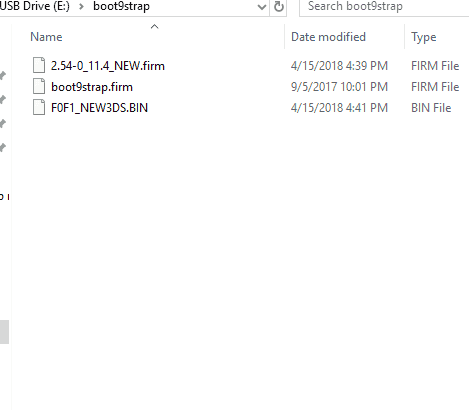
Here's some screenshots of the root of my SD card and my boot9strap folder:
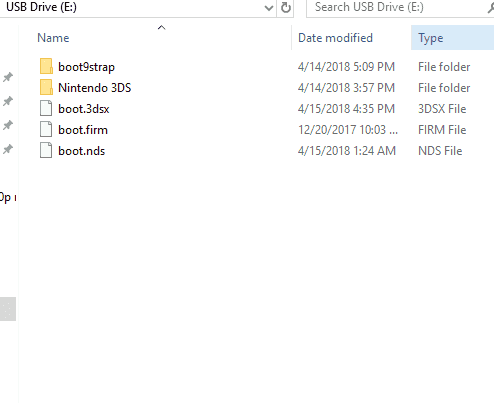
sd card root.PNG


boot9strapfolder.PNG
 
I'm on a New Nintendo 3DS version 11.6.

I'm using 3ds.hacks.guide, and I've followed the steps of the Seedminer guide, patched and re-imported the dsiware game, put the prep files on the SD card. Everything was going well but I can't seem to get through section IV, "Installing boot9strap and configuring Luma3DS". I launch b9stool, dump F0F1, then select "install boot9strap" and wait for it to say "done". The guide says to power off the 3DS and when I turn it back on, it should automatically launch the Luma3DS configuration menu. But no matter what I do, it will only boot to the regular home menu. I've tried replacing the prep files with fresh ones and restoring the F0F1 (a handful of times now), and I've tried holding start and/or select while booting. I've also tried forcing power off by holding the power button. I can't seem to figure out what I'm doing wrong, I've double and triple checked and I'm sure I've followed all the steps exactly, unless there's something I'm missing? Should I try using safeb9sinstaller instead? I'd really appreciate any help with this, there must be something I'm doing wrong here but I can't figure out what it is.
Here's some screenshots of the root of my SD card and my boot9strap folder:

View attachment 120539

View attachment 120538
Try this
https://github.com/zoogie/b9sTool/releases/tag/3.0.0

I hope you haven't copied over the original dump of F0F1.
 
Try this


I hope you haven't copied over the original dump of F0F1.

So I tried using that version of boot.nds instead, but I still get the home menu when I power back on after installing boot9strap.

How do I know if I copied over F0F1? I restored and dumped F0F1 a few times in B9stool, but "F0F1_New3DS.bin" is still in my boot9strap folder.
 
Clearly this means B9S isn't installed. WhWhen you attempt to install did it give any kind of error?
 
Clearly this means B9S isn't installed. WhWhen you attempt to install did it give any kind of error?

Nope, no errors. It appears to install B9S and says "done", but when I reboot it's not installed at all, as far as I can tell.
 
So I tried using that version of boot.nds instead, but I still get the home menu when I power back on after installing boot9strap.

How do I know if I copied over F0F1? I restored and dumped F0F1 a few times in B9stool, but "F0F1_New3DS.bin" is still in my boot9strap folder.
That answers my question. You've overwritten the clean F0F1 with the corrupted one by dumping more than once.
 
That answers my question. You've overwritten the clean F0F1 with the corrupted one by dumping more than once.

Oh, okay, my mistake. Is there a way for me to fix that? Do you think that's whats causing B9H to not install?
 
Oh, okay, my mistake. Is there a way for me to fix that? Do you think that's whats causing B9H to not install?
Somehow the Firm0 got corrupted when b9stool tried to install b9s. Unfortunately, this exploit relies on 'known plaintext' to do its thing. Once corruption occurs, Firm0 becomes 'unknown plaintext' and we can't install anything there (and the 3ds skips it too and launches Firm1 instead).

Two ways to fix this:
1. [safe] Get an ntrboot flashcard ($10-$20) with a 2-3 week wait (modchipsdirect is about a week for USA, but $20 cheapest).
2. [risky, unless #1 for a backup] Try to install b9s to Firm1 - I can help you with that in PMs if you want.
The issue here is that if it doesn't work your system will be temporarily bricked until you do #1.
 
Last edited by zoogie,
Somehow the Firm0 got corrupted when b9stool tried to install b9s. Unfortunately, this exploit relies on 'known plaintext' to do its thing. Once corruption occurs, Firm0 becomes 'unknown plaintext' and we can't install anything there (and the 3ds skips it too and launches Firm1 instead).

Two ways to fix this:
1. [safe] Get an ntrboot flashcard ($10-$20) with a 2-3 week wait (modchipsdirect is about a week for USA, but $20 cheapest).
2. [risky, unless #1 for a backup] Try to install b9s to Firm1 - I can help you with that in PMs if you want.
The issue here is that if it doesn't work your system will be temporarily bricked until you do #1.

Well then, I guess I'm gonna go the flashcard route, I think it will be worth the wait. So, My Firm0 is corrupted forever now? Should I be concerned about this causing me problems in the future?
 
Well then, I guess I'm gonna go the flashcard route, I think it will be worth the wait. So, My Firm0 is corrupted forever now? Should I be concerned about this causing me problems in the future?
No, ntrboot gives you arm9 control so it can repair the damaged firm and replace it with b9s.
 
So I tried using that version of boot.nds instead, but I still get the home menu when I power back on after installing boot9strap.

How do I know if I copied over F0F1? I restored and dumped F0F1 a few times in B9stool, but "F0F1_New3DS.bin" is still in my boot9strap folder.
Just making sure. Does the Luma config show up when you hold Select on boot?
 
3. [safe] System Recovery. Forgot about this trick. :)

Make sure your internet is connected, then turn the 3ds off.

Hold LT+RT+Up+A then hold start. You should boot straight into recovery mode.
Go through the process as to do a system update (I know you're on the latest already - doesn't matter).
After the system says you're on the latest and turns off, your Firm0 should be repaired.

Go to your boot9strap folder and make a copy in place (Ctrl-C then Ctrl-V).

Go back to b9sTool and dump F0F1 again. SAVE it this time! I would make a label on the filename so it can't be erased.
Go ahead and try to install boot9strap again. Use the version 3.0.0 I linked you.

Keep a backup of your corrupted F0F1, I would like to examine where it got corrupted if you don't mind. I'm the original coder of dgTool/b9sTool so that interests me.
 
3. [safe] System Recovery. Forgot about this trick. :)

Make sure your internet is connected, then turn the 3ds off.

Hold LT+RT+Up+A then hold start. You should boot straight into recovery mode.
Go through the process as to do a system update (I know you're on the latest already - doesn't matter).
After the system says you're on the latest and turns off, your Firm0 should be repaired.

Go to your boot9strap folder and make a copy in place (Ctrl-C then Ctrl-V).

Go back to b9sTool and dump F0F1 again. SAVE it this time! I would make a label on the filename so it can't be erased.
Go ahead and try to install boot9strap again. Use the version 3.0.0 I linked you.

Keep a backup of your corrupted F0F1, I would like to examine where it got corrupted if you don't mind. I'm the original coder of dgTool/b9sTool so that interests me.

I did the recovery mode system update and tried again, but I still only boot to the home menu. I think I followed your instructions right, the only part I'm not clear on is "Go to your boot9strap folder and make a copy in place"; should I be making a copy of the boot9strap folder or F0F1_New3DS.bin?
 
  • Like
Reactions: Marenthyu
I did the recovery mode system update and tried again, but I still only boot to the home menu. I think I followed your instructions right, the only part I'm not clear on is "Go to your boot9strap folder and make a copy in place"; should I be making a copy of the boot9strap folder or F0F1_New3DS.bin?
The F0F1 file is what you want to keep save, but it doesnt hurt if you have the full folder as it includes the file ;)
 
3. [safe] System Recovery. Forgot about this trick. :)

Make sure your internet is connected, then turn the 3ds off.

Hold LT+RT+Up+A then hold start. You should boot straight into recovery mode.
Go through the process as to do a system update (I know you're on the latest already - doesn't matter).
After the system says you're on the latest and turns off, your Firm0 should be repaired.

Go to your boot9strap folder and make a copy in place (Ctrl-C then Ctrl-V).

Go back to b9sTool and dump F0F1 again. SAVE it this time! I would make a label on the filename so it can't be erased.
Go ahead and try to install boot9strap again. Use the version 3.0.0 I linked you.

Keep a backup of your corrupted F0F1, I would like to examine where it got corrupted if you don't mind. I'm the original coder of dgTool/b9sTool so that interests me.
I was having the same problem as slugbaby and I almost gave up on CFW. Thanks Zoogie :) This worked for me!
 
  • Like
Reactions: zoogie
I was having the same problem as slugbaby and I almost gave up on CFW. Thanks Zoogie :) This worked for me!

I have the same problem but this procedure don't work for me. I flash the file 2.54-0_11.4_OLD.firm on my 2ds 11.8
I think that I corrupted the firm0.

What I can do?
 

Site & Scene News

Popular threads in this forum
