

Strange problem with Gba Sp

  • Thread starter Thread starter Jirobasus
  • Start date Start date
  • Views Views 2,844
  • Replies Replies 7

Jirobasus

New Member
Newbie
Joined
Feb 12, 2024
Messages
3
Reaction score
1
Trophies
0
Age
21
XP
28
Country
Russia
Hello, guys

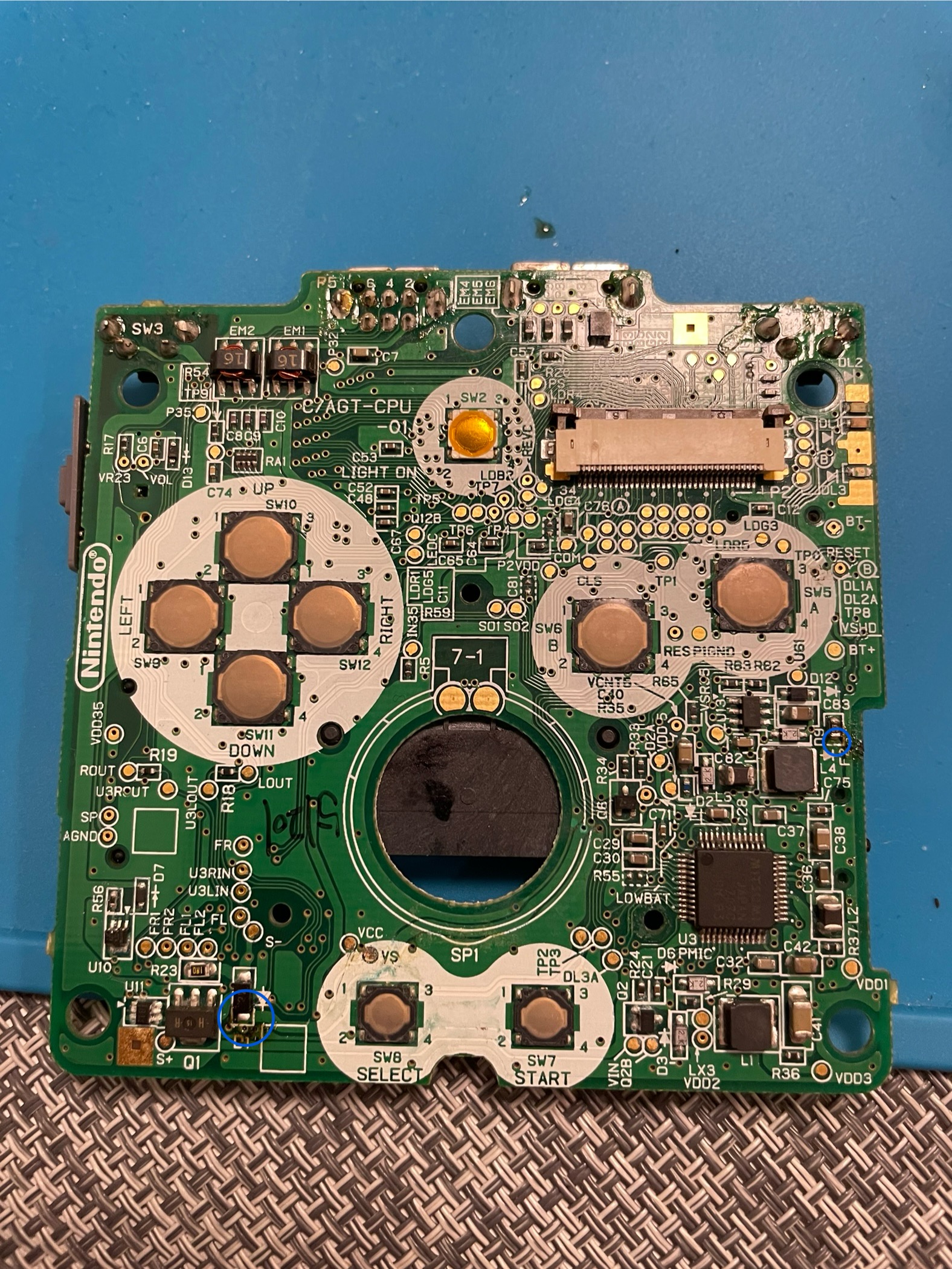
I got this gba sp in the current condition, there was a wire connected from F2 to D1, overall it is working fine with the wire connected, but it turns on quite rarely and turns off with a slight touch to the power switch.

A wire was connected in points marked blue:
IMG_7462.jpeg


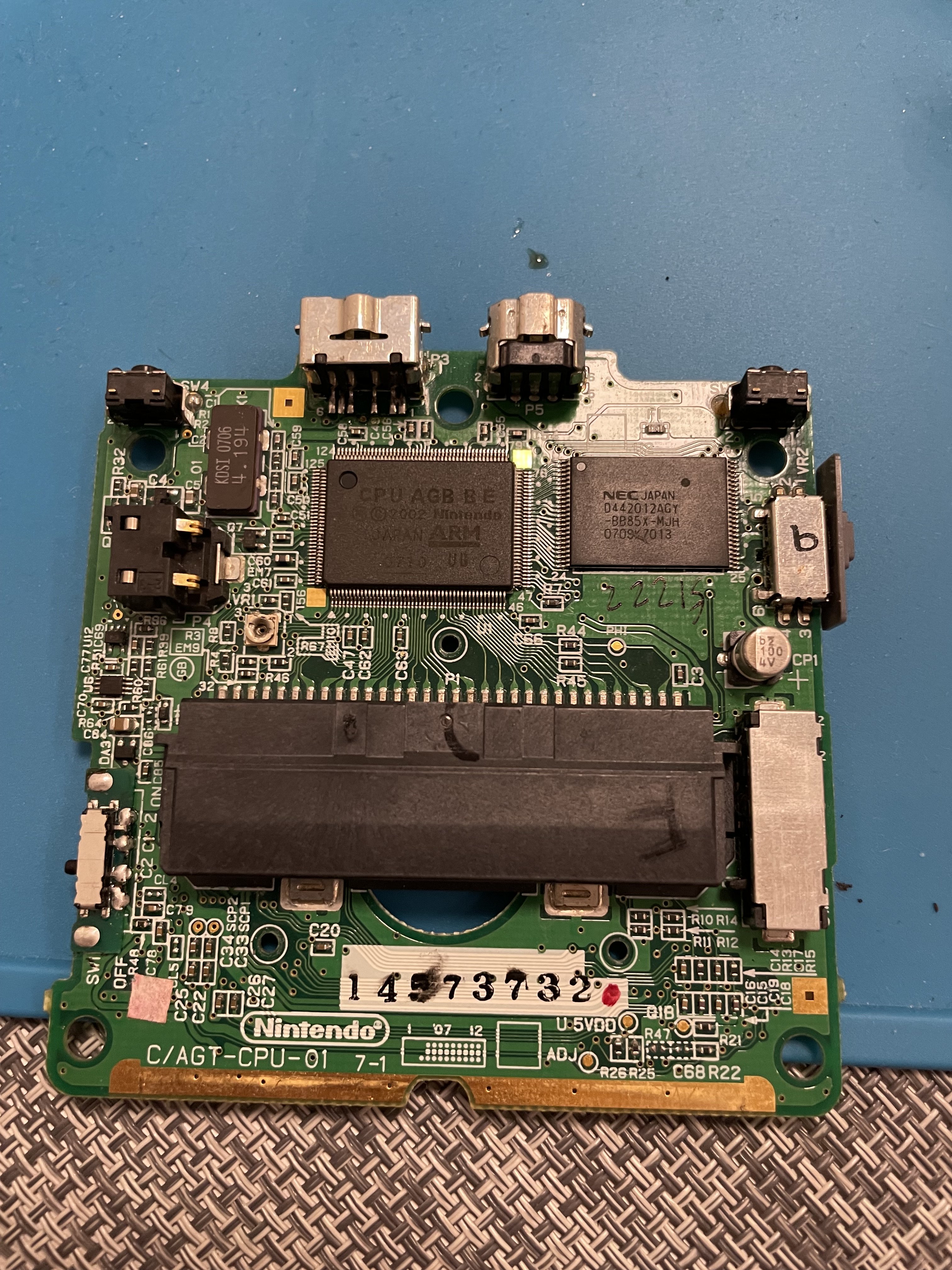
Photo of the motherboard from other side:
IMG_7463.jpeg


I replaced a power switch, because it was looking very bad inside, but the issue persists, so the problem must be in something else.

With wire desoldered, issue with power switch also persists, but also there is no image on the screen, just a white screen, sound works though.

Please, give me some suggestions what to do, I have absolutely no clue right now.
 
I think a trace somewhere is broken. So who ever done that, did for it solves the problem. So why don't you just put the wire back. Maybe you can do a more tidy version.
 
I think a trace somewhere is broken. So who ever done that, did for it solves the problem. So why don't you just put the wire back. Maybe you can do a more tidy version.
As I said, it only solves the no picture problem, but it still impossible to use it because it turns off with a slight touch to a power switch, so I need to solve that problem firstly
 
Do you have a Multimeter? If so, I think you just need to check capacitors. I think one of them is messed up. You might need to replace it.

Also, the right blue circle in the surrounding middle looks a bit dirty and solder has gone everywhere. Can you take a better picture of that location? I think past person did a quick bodge job.
 
If the console turns off with the lightest touch of the power switch, it could mean it's shorted or maybe it's shorted AND grounded to your battery.
Maybe it's the battery itself that it's grounded, so touching the power button shuts it off (but wouldn't turn on at all if this was the case).
As Flame said, you need a multimeter to check points and see if your ON/OFF switch is grounded or nor or if there's a broken trace somewhere.

If this didn't happened before you removed the cable bridging F2 to D1, put it back,
 
  • Like
Reactions: Flame
Do you have a Multimeter? If so, I think you just need to check capacitors. I think one of them is messed up. You might need to replace it.

Also, the right blue circle in the surrounding middle looks a bit dirty and solder has gone everywhere. Can you take a better picture of that location? I think past person did a quick bodge job.
Will check the capacitors, thank you. It’s just a flux there, didn’t clean the board after desoldering the wire last time.
Post automatically merged:

If the console turns off with the lightest touch of the power switch, it could mean it's shorted or maybe it's shorted AND grounded to your battery.
Maybe it's the battery itself that it's grounded, so touching the power button shuts it off (but wouldn't turn on at all if this was the case).
As Flame said, you need a multimeter to check points and see if your ON/OFF switch is grounded or nor or if there's a broken trace somewhere.

If this didn't happened before you removed the cable bridging F2 to D1, put it back,
Will try, thank you. It did happen even with the wire connected.
 
  • Like
Reactions: Flame
Will check the capacitors, thank you. It’s just a flux there, didn’t clean the board after desoldering the wire last time.
Post automatically merged:


Will try, thank you. It did happen even with the wire connected.
I'm not an expert, but F2 seems to ve close to a Inductor labeled as L4. So I'm assuming it's part of a "power rail".

D1 is close to a chip that seems to be labeled as H15R/Q1, which is a Transistor.

My guess is that either Q1 or L4 are faulty, and the cable is there to restore either a broken trace between these two, or to simply bypass some filtering.

Unfortunately, in this case you need 2 things:
To desolder these integrated and check with Multimeter if they're broken (although not 100% reliable, you could check for continuity in Q1 and L4, and then check if any of these are grounded) and the second thing you need is a proper GBASP documentation to check wether or not these two chips are meant to communicate with each other and see to which part of the system they're attached to (maybe the screen? maybe some voltage filtering/regulating? maybe audio?).

But my guess is that they're related to the battery, and they're filtering the voltage.

Another alternative and less intrusive (but much less accurate) is to measure both Q1 and L4 with the system ON and check the Voltage both output. 1.5V, 3V, 5V, etc. are considered normal readings meaning both chips are working.
Fluctuations or rapidly changing values indicates both chips are malfunctioning (and even this could indicate that it might not be the chips entirely but maybe a capacitor around the chip that's not filtering the voltage) and if you get values OTHER than 1.5V, 3V or 5V (for instance 1.26V or 4.80V or 2.6V, etc.) means the same, that something in the rail is faulty.
 
Take the metal cover off of the power switch and clean it out. The contacts get filthy over time and the power switch gets sensitive as a result. One of mine will show a red power light if I don't turn it on firmly enough, so I know it needs cleaned. I just haven't yet.
 
  • Like
Reactions: Ozito

Site & Scene News

Popular threads in this forum

