Gaming Steam How and What Is It?

  • Thread starter Thread starter ponygals
  • Start date Start date
  • Views Views 3,143
  • Replies Replies 26
For steam to work properly. what type of laptop or desktop is best recommended to play the steam games on? I have an HP dv7-7020us and I have played some games on it, Dungeons and Dragons, Lord of the Rings online, Never Winter online, IMVU, some games on emulators too. All the games ran fine, even browser based games. But steam games, I am not sure if my laptop can handle those, types. What do you think?
Every game has different system requirements and it's always listed on the store page. Some games might require something more heavy duty while others could run on a toaster. You're going to have problems with newer games and even older games at high and medium settings running off of an integrated gpu, especially a slightly older one like the HD4000

Edit: Here's Skyrim's requirements for example
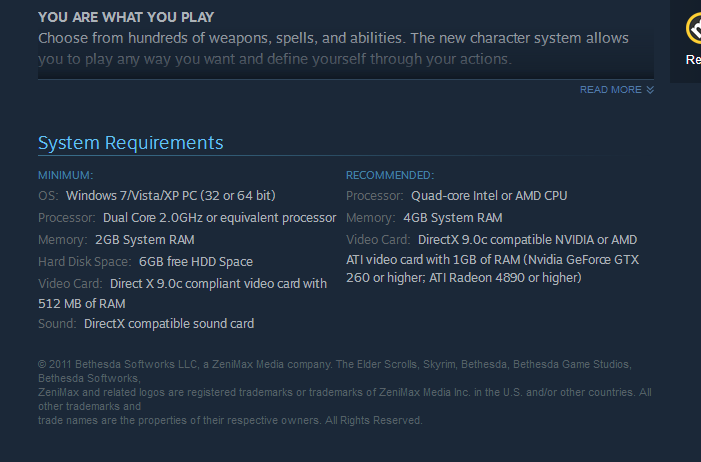
317492df13ceaff10b504568343d8c89.png
 
Last edited by Docmudkipz,
When it comes to this gaming program, is there a way to download the program, and whatever game you want that is free or available or paid for, and have that game inside of the main program instead of downloading the game, and have the steam icon and the game icon, having both take up so much space? Can't I just have steam be the main box and have all my games stored within it, and when I click on the game it opens up from Steam only, and not having to click on its own desktop icon and open up that way?
 
When it comes to this gaming program, is there a way to download the program, and whatever game you want that is free or available or paid for, and have that game inside of the main program instead of downloading the game, and have the steam icon and the game icon, having both take up so much space? Can't I just have steam be the main box and have all my games stored within it, and when I click on the game it opens up from Steam only, and not having to click on its own desktop icon and open up that way?
You can add non steam games to the game menu
 
When it comes to this gaming program, is there a way to download the program, and whatever game you want that is free or available or paid for, and have that game inside of the main program instead of downloading the game, and have the steam icon and the game icon, having both take up so much space? Can't I just have steam be the main box and have all my games stored within it, and when I click on the game it opens up from Steam only, and not having to click on its own desktop icon and open up that way?
Steam works like that.
Just download it and try it.
It is a community/market place.
Sure it will be faster if you just download it and try it.
 
@ponygals what everyone here says covers most of it. I have a feeling that you're coming from console gaming and would like to stick your feet into the Steam waters. Dont feel weird, I was the same way. Still am. A easy transition would be to make a decent gaming PC, grab some XBox 360 controllers and use Steam on your PC (connected to a TV) in "Big Picture" mode. In case you're unfamiliar, Big Picture gives Steam a game console style menu and makes it all worth it! My "Steam Machine" never sees the Windows desktop unless I "play" my desktop shortcut. When you turn on my PC, you see the login screen, a window for Steam starting and then Steam in Big Picture mode. Then I grab my wireless 360 controller and have fun. I'm currently working on a Nintendo Switch style setup with my gaming tablet. Trust me, PC gaming will change your gaming life :D
 
Oh I see. Do you think there is a portable black box that has Steam, and other services like SlingTV, Roku, YouTube TV etc. All on 1 device instead of using this item, that item, and that other item in different things.
 

Site & Scene News

Popular threads in this forum