

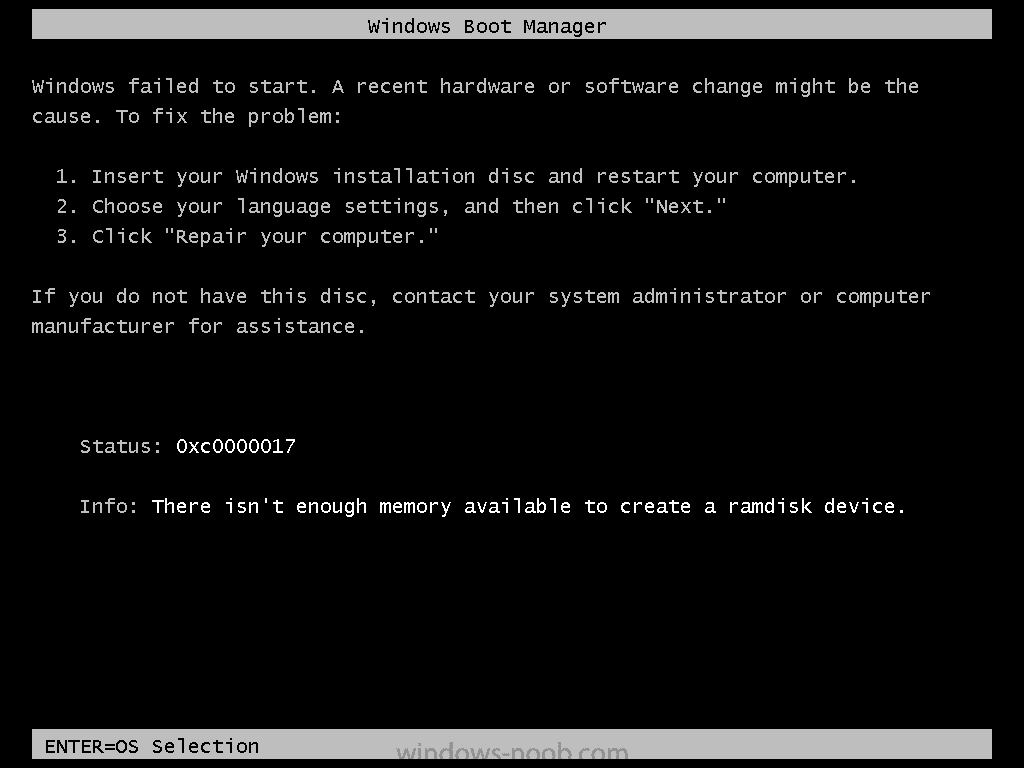
Status: 0xc0000017 - There isn’t enough memory to create a ramdisk device

Status
Not open for further replies.

Jayro

MediCat USB Dev
OP
Developer
Joined
Jul 23, 2012
Messages
11,956
Trophies
4
Location
WA State
Website
ko-fi.com
XP
14,689
Country
United States
I keep getting this error code when I boot my laptop to any kind of Windows-based Preinstall Environment (WinPE) from USB stick:
02_06.png


I have tried all the obvious stuff, ike different USB sticks, different booting methods, YUMI, Rufus, Windows DVD Tool, etc. I even checked the .wim file's scratch space in DISM, and it's set to 512MB. My laptop has 8GB of RAM installed. Memtest x86 passes everything fine, so my RAM sticks are good. The laptop in question is an HP Envy m4-1015dx my friend gave me. It boots Linux distros just fine, but halts on any kind of Windows PE loading. I have the boot mode set to Legacy/BIOS. (UEFI mode booting fails too, not even recognizing the USB stick as bootable media, but that's probably it's own issue.) The laptop has the latest BIOS/UEFI update installed.

I'm completely at a loss here, I've Google'd this issue to death before coming here, and nothing they recommend works. The computer just acts like there isn't enough RAM, and gives up FOR NO REASON. 8GB should be enough to boot even the largest WinPE images without a hitch, and my ISO files boot fine from Virtual PC's and other machines.

Now, having read everything above, is there anything else I can try to get this working?

 

endoverend

AKA zooksman
Member
Joined
Jun 6, 2013
Messages
2,846
Trophies
0
Website
zooksman.com
XP
2,879
Country
United States
Try to see how much RAM you have as listed by your BIOS settings. If it's some low number, it may be a weird problem with your BIOS. I would also try removing the CMOS battery for a few minutes.
 

endoverend

AKA zooksman
Member
Joined
Jun 6, 2013
Messages
2,846
Trophies
0
Website
zooksman.com
XP
2,879
Country
United States
Weird possible solution, try disabling "hybrid graphics" in your BIOS (not sure what that is, but it fixed it for someone). Typically you get this error when you don't give enough RAM to a VM but that obviously isn't the case.

Also, try to set boot mode to UEFI Native without CSM. I've also read this could be a driver problem. Try to create a PE image with only the bare necessary drivers.
 
Last edited by endoverend,

migles

All my gbatemp friends are now mods, except for me
Member
Joined
Sep 19, 2013
Messages
8,034
Trophies
0
Location
Earth-chan
XP
5,264
Country
China
my guess it has too much memory xD
but seriously, can you put only 1gb of ram?
i had bought a new 32gb usb pen drive.. if i use it to install windows it says it couldn't find a suitable HDD to install windows.... no matter how i partition the hard drive..
the HDD is there, it can be partition, but i have no idea why if i have that 32 gb pen it says it can't install on the hdd (that was 500gb)
but if i use a 8gb one problem is solved...

however, if i try to install any type of linux OS it does fine...

what i mean is.. with very recent hardware, old software complain about it...
 

cracker

Nyah!
Member
Joined
Aug 24, 2005
Messages
3,618
Trophies
1
XP
2,191
Country
United States
What are you using to create the image or is it prebuilt? It sounds like something might not be built right by the PE builder. Try another image like BartPE and see if that boots up just to try to isolate where the error is occurring.

Edit: Also turn off BIOS shadowing/shadow RAM/BIOS caching if you can.
 

Jayro

MediCat USB Dev
OP
Developer
Joined
Jul 23, 2012
Messages
11,956
Trophies
4
Location
WA State
Website
ko-fi.com
XP
14,689
Country
United States
I have tried many different Windows-based ISOs, and tried booting them in all different configurations, like flat-file, ISO boot from Grub4DOS, etc... I don't have hybrid graphics, and I'm using Gandalf's Windows 8.1 PE on a 16GB Sandisk USB stick. (It's not a U3 stick, if anyone is wondering). My BIOS has no options for any kind of shadowing, or graphics, or CSM. The ISO images I've tested are all good, they boot on every other machine but mine.
 

Jayro

MediCat USB Dev
OP
Developer
Joined
Jul 23, 2012
Messages
11,956
Trophies
4
Location
WA State
Website
ko-fi.com
XP
14,689
Country
United States
Have you tried only one stick of RAM at a time? Try moving the RAM sticks around in the slots.
I'll try that some other day, there's no fast access to the ram, I have to take the laptop apart to access it. Meanwhile, these are my boot options in the bios, and only legacy mode boots my USB sticks:

14355178090970.jpg
 

narencs

New Member
Newbie
Joined
Apr 30, 2021
Messages
1
Trophies
0
Age
47
XP
22
Country
Antarctica
Do this.
Enable Legacy in BIOS
Format USB in NTFS
Use PE X86 (Not X64) to boot.

--------------------- MERGED ---------------------------

Do this
Enable Legacy in bios
Format USB in NTFS
Use x86 PE to boot (not x64)
 
Status
Not open for further replies.
General chit-chat
Help Users
    Skelletonike @ Skelletonike: wth happened during lunch break?

