Hacking Softmodding vs. Hardmodding

  • Thread starter Thread starter Zowayix
  • Start date Start date
  • Views Views 9,418
  • Replies Replies 70
afif95 said:
4)Chip = Almost 100% Compatibility (Due to games that need certain IOSes)
Softmod = Almost 100% Compatibility (Due to old games which cannot be run)
Both = 100% Compatibility (Old games will run and you can easily run games that need certain IOSes)

Thats only if the Wii is staying at 3.2 firmware.

But if people who wish to be hardmodded and dont care about homebrew and such, they can just update from the discs or network and would still be able to run backups at 6X speed. This would result in 100% compatibility from games from the same region.

With softmods, if you update you would lose the ability to read backups and this is the main difference between hardmods and softmods.

P.S.

About being told not to update: I dont know what retailer announces this but updating does no harm to modchips. If a retailer stated this, then its a terrible retailer and should be put out of business.

P.P.S.

Both Hardmods and Softmods have risks.

*Main risk with a Softmod - Wii does not work properly, does not turn on, etc. Most extreme solution: Buy a new Wii.

*Main risk with a Hardmod - DVD drive does not work properly. Most extreme solution: Buy a new dvd drive.

If something goes wrong, a hardmod is cheaper to fix than a softmod would be.

With the new Wiis that are shipping out, the ones with the new BOOT1, these Wiis cannot be softmodded. They can only be Hardmodded.

 
Hardmod advantages
1. Will continue to work even if you accidentally update your system menu
2. 6x speed
3. Your only hope in certain bricks

Softmod advantages
1. Cheap
2. You don't have to open up your wii

Hardmod disadvantages
1. A greater tendency for semi-bricks...

Softmod disadvantages
1. You have to watch out for updates... say nintendo released system menu 3.5 and your little brother updated the wii... anytime you can say goodbye to it


And.... the notable social difference is that,
A hardmodder always suggests his client to always update the system menu (because of semi-brick stuff)
A softmodder on the other hand always suggests his client not to update... (see softmod disadvantages)
 
Softmod advantages
1. Free
2. You will not need to worry if you want to open your Wii because if you do then it will void your warrant.

QUOTE said:
Softmod disadvantages
1. You have to watch out for updates... say nintendo released system menu 3.5 and your little brother updated the wii... anytime you can say goodbye to it

No, not if you use starfall with downgrade to 3.2 then you will be fine. Softmod rules!!!!!!!!!!!!
biggrin.gif
 
I have not hardmodded my Wii, but I have had great success with the softmod. I suppose the downside to the softmod is needing Twilight Princess, which in retail stores is still going for at least $50 and used at EB Games/Gamestop for at least $40. Now, I went the Kijiji way and got it for $25, I think. You can also rent it, since once HBC is on there, you don't really need it any more. And once you install preloader, you can pretty much do anything. I have heard reports of certain games not working with softmod, but I haven't found any Wii games that don't (I haven't tried Madworld yet), but I have found some GC games that aren't perfect. That may be because I had them on GC multi-discs.

As previously stated, it is *possible* to brick with softmodding, but if you are careful and research and follow instructions, it's just about impossible now. There are many things (like preloader) that make things either *brickproof* or easily repairable.

I do think that hardmod is one of the only options for new Wii's (different boot0), and I think the flat drive cable chips only work. Also, the FlatMii or WiiZii ideas to be able to stream ISO's are a cool idea. If they can figure out how to do an ISO loader over the newly developed USB2, those won't be as important either.

All in all, the Wii has really had some cool advances in the last 6 months, getting it much closer to the moddability of the XBox1, one of the greatest mods, I think. If I had more TV's, that thing would still be kicking it as a media center, but the 360 is doing a good job for the plasma.

In short, I like the softmod, but I have no opinion of the hardmod since I have not done it.
 
Well IDK about you, but I bought my Wii hardmodded and the retailer really said that I shouldn't update, at ALL.

So, I guess, he should be out of business :/
 
afif95 said:
No it isn't. Probably it is known to kill wiis to retards like you.

Stop flaming Softmii and stop trolling the GBATemp.net Forums.

---------------------------------------------------------------

To Topic Creator, you've create triple/double threads. I answered in one of them and I shall repeat it again:

Read the Homebrew Starter's Guide. Good Luck!
wink.gif


EDIT: To be frank, having both would be the best combo. Reasons:

1)Certain games needs IOSes to run. And if you're one of those who got their Wii chipped from a retailer, you are told to NOT update your Wii, hence, you are not able to run certain games and result to sending your Wii back to the retailer and pay them for something that is supposed to be FREE.

2)Old games like Red Steel can't be run on Softmod alone (Correct me if I'm wrong).

3)6x speed on backups. Probably not major but if you play Wario Land or some other games, they will stutter/slow-down due to the 3x speed of backup running (If you're heading for Softmod only that is).

4)Chip = Almost 100% Compatibility (Due to games that need certain IOSes)
Softmod = Almost 100% Compatibility (Due to old games which cannot be run)
Both = 100% Compatibility (Old games will run and you can easily run games that need certain IOSes)

wow your a bully! calling me a retard its a fact what i said as for you keep on bullying like a big man you are
 
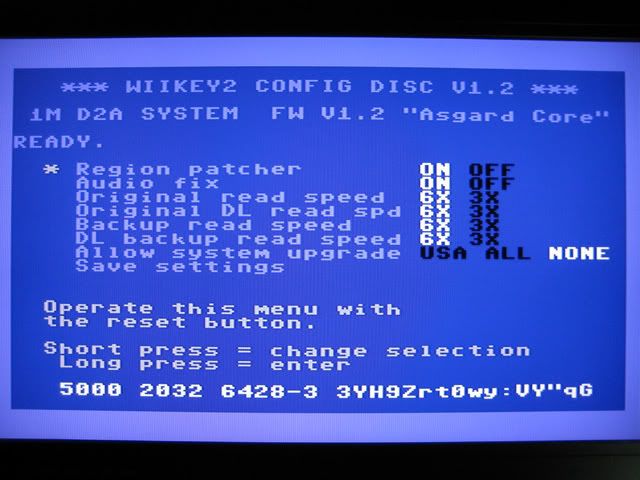
With a Wiikey 2, you would never run into a Semi-Brick issue if you were to just disable updates from the disc channel from the Config Disc. You can also set it so that it only allows updates from your region while blocking all others.

This has effectively stopped the Semi-Brick issue.

Config Settings:

090121-WiiKeyConfig.jpg
 
QUOTE said:
I have heard reports of certain games not working with softmod

I have a certain games and works fine on my downgrade 3.2u with starfall. No problem at all!
wink.gif


I prefer softmodding but I can't say anything about the hardmod because I dont have one and I don't care. Softmodding rocks, indeed! Thanks to Wiigator and Softchip teams.
 
RockmanForte said:
Softmod advantages
1. Free
2. You will not need to worry if you want to open your Wii because if you do then it will void your warrant.

QUOTE said:
Softmod disadvantages
1. You have to watch out for updates... say nintendo released system menu 3.5 and your little brother updated the wii... anytime you can say goodbye to it

No, not if you use starfall with downgrade to 3.2 then you will be fine. Softmod rules!!!!!!!!!!!!
biggrin.gif

What about online updates? And I said in general, not everyone will care or even know what will updates effects will be to his/her wii... And this is the most trickiest part with the softmod business... it should have a highly return rate...
 
swf3 said:
afif95 said:
No it isn't. Probably it is known to kill wiis to retards like you.

Stop flaming Softmii and stop trolling the GBATemp.net Forums.

---------------------------------------------------------------

To Topic Creator, you've create triple/double threads. I answered in one of them and I shall repeat it again:

Read the Homebrew Starter's Guide. Good Luck!
wink.gif


EDIT: To be frank, having both would be the best combo. Reasons:

1)Certain games needs IOSes to run. And if you're one of those who got their Wii chipped from a retailer, you are told to NOT update your Wii, hence, you are not able to run certain games and result to sending your Wii back to the retailer and pay them for something that is supposed to be FREE.

2)Old games like Red Steel can't be run on Softmod alone (Correct me if I'm wrong).

3)6x speed on backups. Probably not major but if you play Wario Land or some other games, they will stutter/slow-down due to the 3x speed of backup running (If you're heading for Softmod only that is).

4)Chip = Almost 100% Compatibility (Due to games that need certain IOSes)
Softmod = Almost 100% Compatibility (Due to old games which cannot be run)
Both = 100% Compatibility (Old games will run and you can easily run games that need certain IOSes)

wow your a bully! calling me a retard its a fact what i said as for you keep on bullying like a big man you are

First of all, it's "you're" not "your". Bully is never mine (Except for the game) and will never be. I'm not gay.

Second, it's not a fact that Softmii is known to brick Wiis. You made a mistake and bricked your Wii, not Softmii.

Third (Question for GBATempers), am I a bully? Or a big man for that matter (Whatever the hell "Big Man" means)
 
In some games, you can really notice that softmod is slower.
In mario galaxy for example, the movies really stutter. And Bully, which has loading times itself, is incredibly slow through softmod
 
RockmanForte said:
WiiCrazy said:
What about online updates?

What do you mean ?

He meant about your "Starfall" solution to blocking updates in 3.2 as Starfall does not have the ability to block online updates.

Whenever a user sets up WiFi on his/her Wii, right after making a successful connection, it asks if the user would like to perform a Wii update now. No homebrew app can block this, so if the user was to accidentally select "Yes" to update the Wii, then they will have to perform the whole downgrade process. This downgrade process might see some trouble in the near future when firmware 3.5 gets released.

A hardmodded Wii doesnt need to worry about any kind of updates at all.
 
With preloader, you can disable updates from discs, and if you turn off WiiConnect24 updates, you really have to go deep into the settings to run an update. There should be no reason at all that an update is inadvertantly run.
 
True... but I dont care about the Shop channel and a few things unless I see something which I am interesting in it but I am hardcore of games so I dont need them at all.
 
drmarvin said:
With preloader, you can disable updates from discs, and if you turn off WiiConnect24 updates, you really have to go deep into the settings to run an update. There should be no reason at all that an update is inadvertantly run.

Bold: Why would we? There's no auto update code even in 3.4.
 
afif95 said:
drmarvin said:
With preloader, you can disable updates from discs, and if you turn off WiiConnect24 updates, you really have to go deep into the settings to run an update. There should be no reason at all that an update is inadvertantly run.

Bold: Why would we? There's no auto update code even in 3.4.

Correct. The TOS rearrangement was just to clarify an already existing statement, something which was proven by the fact that the line has not changed in TOS contracts for other countries. Team Twiizers have stated already that they have not found any evidence for autoupdating in any System Menu, including 3.4.
 
swf3 said:
afif95 said:
No it isn't. Probably it is known to kill wiis to retards like you.

Stop flaming Softmii and stop trolling the GBATemp.net Forums.

---------------------------------------------------------------

To Topic Creator, you've create triple/double threads. I answered in one of them and I shall repeat it again:

Read the Homebrew Starter's Guide. Good Luck!
wink.gif


EDIT: To be frank, having both would be the best combo. Reasons:

1)Certain games needs IOSes to run. And if you're one of those who got their Wii chipped from a retailer, you are told to NOT update your Wii, hence, you are not able to run certain games and result to sending your Wii back to the retailer and pay them for something that is supposed to be FREE.

2)Old games like Red Steel can't be run on Softmod alone (Correct me if I'm wrong).

3)6x speed on backups. Probably not major but if you play Wario Land or some other games, they will stutter/slow-down due to the 3x speed of backup running (If you're heading for Softmod only that is).

4)Chip = Almost 100% Compatibility (Due to games that need certain IOSes)
Softmod = Almost 100% Compatibility (Due to old games which cannot be run)
Both = 100% Compatibility (Old games will run and you can easily run games that need certain IOSes)

wow your a bully! calling me a retard its a fact what i said as for you keep on bullying like a big man you are


man ...
he is right
you ARE a retard

just funking stop blaming softmii for your incompetence you dumb ass, I'm sick and tired of you troll posts
 

Site & Scene News

Popular threads in this forum