
Hacking Question Smashed the stack with a 0x7000 byte SETUP request

  • Thread starter Thread starter BurakC
  • Start date Start date
  • Views Views 24,828
  • Replies Replies 21

BurakC

Member
Newcomer
Joined
Dec 28, 2020
Messages
8
Reaction score
0
Trophies
0
Age
44
XP
107
Country
Turkey
Hi, I've updated the Nintendo Switch 11.0.1 and I've updated to the Atmosphere 0.16.2 version.

In RCM mode ,I got the messages to the below in Tegrarcmgui 2.6;

Switched to high buffer
Smashing the stack!
Smashed the stack with a 0x7000 byte SETUP request!
Payload successfully injected
RCM device disconnected

Sometimes my Nintendo Switch gets black screen after Atmosphere logo appeares and sometimes it loads Atmosphere correctly. Could you help me what is the problem ?
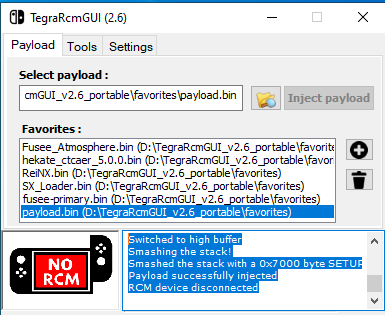
upload_2020-12-28_22-37-3.png
 
You should use the most updated version of Fusee-Primary, it looks for for the files on your SD card after you inject it, perhaps switch from exFAT to FAT32 if you are on exFAT.
 
Last edited by Hayato213,
I purchased used device and it contains sd card that is exFAT formatted. Thanks for your advice.
 
Naber lan,

you are using all of the wrong files, basically you injected the payload from Tegra. Tegra's own payloads are older versions.

you'll have to download atmosphere/hekate or whatever all yourself (github/google)


the crashing could also be because you're running exfat. you probably don't have the exfat 'driver' on your nintendo switch, but even if you do or did; you should just stop and instead reformat your sd card to FAT32. (Because exfat is buggy on switch. your sd card files will keep getting corrupted)


if your SD card is a biiiigboiii you'll have to format via a different program, windows can't format bigger cards to FAT32.

I saw this recommended and I used it myself:

partitionwizard (google it, i can't post links)


IDK if this is safe, I ignored any image/popup on site because I'm paranoid and just installed the free variant.

After choosing FAT32 etc you'll have to press apply and it'll format.
 
Last edited by iridescent,
xD never thought that i see another Turkish person here on GBATEMP
Several actually, I just made this acc to reply to the dude

What's even weirder is that I'm re-learning how to hack my switch (since kosmos died) at the same time as this dude + I have the same name as him IRL too

Is he me?
 
Naber lan,

you are using all of the wrong files, basically you injected the payload from Tegra. Tegra's own payloads are older versions.

you'll have to download atmosphere/hekate or whatever all yourself (github/google)


the crashing could also be because you're running exfat. you probably don't have the exfat 'driver' on your nintendo switch, but even if you do or did; you should just stop and instead reformat your sd card to FAT32. (Because exfat is buggy on switch. your sd card files will keep getting corrupted)


if your SD card is a biiiigboiii you'll have to format via a different program, windows can't format bigger cards to FAT32.

I saw this recommended and I used it myself:

partitionwizard (google it, i can't post links)


IDK if this is safe, I ignored any image/popup on site because I'm paranoid and just installed the free variant.

After choosing FAT32 etc you'll have to press apply and it'll format.
Honestly I'd rather recommend GUIFormat.
 
Naber lan,

you are using all of the wrong files, basically you injected the payload from Tegra. Tegra's own payloads are older versions.

you'll have to download atmosphere/hekate or whatever all yourself (github/google)


the crashing could also be because you're running exfat. you probably don't have the exfat 'driver' on your nintendo switch, but even if you do or did; you should just stop and instead reformat your sd card to FAT32. (Because exfat is buggy on switch. your sd card files will keep getting corrupted)


if your SD card is a biiiigboiii you'll have to format via a different program, windows can't format bigger cards to FAT32.

I saw this recommended and I used it myself:

partitionwizard (google it, i can't post links)


IDK if this is safe, I ignored any image/popup on site because I'm paranoid and just installed the free variant.

After choosing FAT32 etc you'll have to press apply and it'll format.

İyiyim lan sen nasılsın,

I'have formatted the sd card with different program via rufus and sd car formatter program. But, the result is the same. I can try to use partitionwizard . Thanks for your advice.
 
Hello -
i am getting the below error message. And when it loads, the CFW is missing

"Switched to high buffer
Smashing the stack!
Smashed the stack with a 0x7000 byte SETUP request!
Payload successfully injected
RCM device disconnected"

Could anyone support to correct this?

this is what i have in the hekate_ipl.ini:
[config]
autoboot=0
autoboot_list=0
bootwait=3
backlight=162
noticker=0
autohosoff=0
autonogc=1
updater2p=1
bootprotect=0

{DeepSea}
{Github: https://github.com/orgs/Team-Neptune/}

{--- Custom Firmware ---}
[CFW (SYSNAND)]
emummc_force_disable=1
fss0=atmosphere/package3
atmosphere=1
logopath=bootloader/bootlogo.bmp
icon=bootloader/res/icon_payload.bmp
{}

[CFW (EMUMMC)]
emummcforce=1
fss0=atmosphere/package3
atmosphere=1
logopath=bootloader/bootlogo.bmp
icon=bootloader/res/icon_payload.bmp
{}

{--- Stock ---}
[Stock (SYSNAND)]
emummc_force_disable=1
fss0=atmosphere/package3
stock=1
icon=bootloader/res/icon_switch.bmp
{}
 

Site & Scene News

Popular threads in this forum



