Gaming Share your Home Menu screenshots

  • Thread starter Thread starter Lycan911
  • Start date Start date
  • Views Views 53,295
  • Replies Replies 277
  • Likes Likes 5

should this thread get stickied?

  • yes

    Votes: 12 60.0%
  • no, doesn't need to

    Votes: 8 40.0%

  • Total voters
    20
Ok i need those badges they look so good

Here?

eShop.png

Games.png

System_Apps.png

Utilities.png

Virtual_Console.png


They're just the DS/DS lite menu images scaled down and colored differently.
 
It's been a year and a New 3DS - here it is now. The duplicate icons on the last picture are leftovers from a region change I can't figure out how to get rid of and the folders are SNES, DSiWare, Sega 3D Games and 3D NES games. 64GB sd card makes it really easy to just fill your home menu like mad.

icIyt1E.jpg

M5vU0xw.jpg

PwwFg2c.jpg
 
  • Like
Reactions: Lycan911
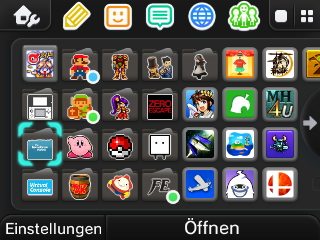
Decided to switch to the all-folders style.

af32b84c592d94186643ab310a8f3b5c.jpg


Cartridge: R4 Dual Core 2015
"?" folder: Homebrew
GBC folder: Virtual Console games
Pikachu folder: Pokémon games
Master Sword folder: Zelda games
Mario folder: Mario games
Musical note folder: Rhythm games
Capsules folder: Puzzle games
Takumi folder: RPGs
Bob-omb folder: Time killers
Arcade machine folder: Visual novels, videos, manga
Game&Watch folder: DSiWare
Settings folder: Bunch of system apps and misc. stuff

As you can see I had to wing it with some stickers because I don't want to use custom ones, so that's the best I could do for now haha
 
This is probably one of my favorite themes, Shadow is one of my favorite video game characters of ALL TIME!
HNI_0071.JPG

I keep my home menu organized because I have a 64gb sd card, and things would get really crazy if I didn't.
 
  • Like
Reactions: Lycan911

Site & Scene News

Popular threads in this forum