Hacking [Release] Virtual Console Creator

  • Thread starter Thread starter fiveighteen
  • Start date Start date
  • Views Views 110,132
  • Replies Replies 134
  • Likes Likes 54
Just curious... is it not possible to inject Wii games into the Wii VC or is it just that no one has tried?

I'm not talking about VC on vWii but rather the Wii games that are downloadable from the Wii U eShop

it's not like there aren't base games to work with...
Well...unfortunately, no. While we have found a way to inject VC on both Wii U mode and vWii, we can't inject digital Wii games.
 
Well...unfortunately, no. While we have found a way to inject VC on both Wii U mode and vWii, we can't inject digital Wii games.
It was a little difficult to word the question thanks to how Nintendo named the systems but I was actually talking about injecting digital Wii games. (Metroid Prime Trilogy, Super Mario Galaxy, etc)

The vWii side is pretty much covered already as far as injecting VC goes since you can just make your own WAD

Too bad it's not possible... you could in theory have a small loader for GameCube games and just skip USB Loader GX altogether for Wii games if you had the ability to inject custom code that runs in vWii mode...
 
Last edited by DanTheMan827,
What is the best base to use for NES. Can't seem to find one big enough??
Bases Loaded is 320KB.

yes it should, see: http://www.textfiles.com/games/CONSOLES/swc.txt there are the specs of differences between sfc (non headered roms) and smc/swc (SuperMagiCom or SuperWildCard headered roms).
Thanks for this!

can i inject a ds pokemon hacked rom to a regular pokemon rom?
It certainly won't hurt to try, but from what I've seen, a lot of modded roms don't work.

Just curious... is it not possible to inject Wii games into the Wii VC or is it just that no one has tried?

I'm not talking about VC on vWii but rather the Wii games that are downloadable from the Wii U eShop

it's not like there aren't base games to work with...
I get what you're saying, but I don't think it's possible since launching a Wii game kicks it over and loads on the vWii side of things. Makes it a lot more complicated; it's not just an emulator like VC.
 
What is the best base to use for NES. Can't seem to find one big enough??
If bases loaded is suppose to 320kb, why is mine 32kb? I must be noting understanding something. I am using a loadiine ready new bases loaded as base and then tried my bases loaded rom, said rom was 512kb and base was 32kb, no good?
 
If bases loaded is suppose to 320kb, why is mine 32kb? I must be noting understanding something. I am using a loadiine ready new bases loaded as base and then tried my bases loaded rom, said rom was 512kb and base was 32kb, no good?
I think I am prob using a DDD dump for my base. Need to wuphax I assume?
 
Could you make a full tutorial? I don't know what I should do for the most part. Like in Base Games. What am I supposed to do there? Do I put a virtual console that I dumped off the Wii U in there?
 
If bases loaded is suppose to 320kb, why is mine 32kb? I must be noting understanding something. I am using a loadiine ready new bases loaded as base and then tried my bases loaded rom, said rom was 512kb and base was 32kb, no good?
Could be a problem with dumping. If you want to make sure it's right, download the ROM of the game you're trying to dump and compare them.

Could you make a full tutorial? I don't know what I should do for the most part. Like in Base Games. What am I supposed to do there? Do I put a virtual console that I dumped off the Wii U in there?
The first time VCC.exe is ran, it creates a few folders for you (in the same folder VCC.exe is in, so I recommend putting it in it's own folder). One of the created folders is called "Base Games" - Yes, put one of your official dumped games in there, or a "Loadiine-ready" one if you prefer to download them from the internet, with [ID6] and all.
 
Can these be turned into NUS games for CFW or do we need to sign the images or whatever.

I tried manually doing it the old way and packing it into a NUS installed it fine but got error on loading the game in cfw.
 
Could be a problem with dumping. If you want to make sure it's right, download the ROM of the game you're trying to dump and compare them.

The first time VCC.exe is ran, it creates a few folders for you (in the same folder VCC.exe is in, so I recommend putting it in it's own folder). One of the created folders is called "Base Games" - Yes, put one of your official dumped games in there, or a "Loadiine-ready" one if you prefer to download them from the internet, with [ID6] and all.
Ah. Thank you. It should be pretty easy from here.
 
  • Like
Reactions: fiveighteen
Can these be turned into NUS games for CFW or do we need to sign the images or whatever.

I tried manually doing it the old way and packing it into a NUS installed it fine but got error on loading the game in cfw.
It should work exactly as any other official VC game in the same format. The game you tried could be incompatible.
 
It should work exactly as any other official VC game in the same format. The game you tried could be incompatible.
Nah it wasnt, it only woudnt boot if i canged the tga files like i used to for loadiine.
If i left them as mario golf the game would boot and play perfectly.
 
Nah it wasnt, it only woudnt boot if i canged the tga files like i used to for loadiine.
If i left them as mario golf the game would boot and play perfectly.
Hmm. I guess there's more to it that I wasn't aware of. I haven't messed with CFW/redNAND/coldboothax yet. Sorry for the misinformation.
 
Is there a way to inject for example, DS games directly on rednand like a channel? How could i do this? I want to inject all DS Castlevanias and dont need to use loadiine for it. Please, explain me how
 
Is there a way to inject for example, DS games directly on rednand like a channel? How could i do this? I want to inject all DS Castlevanias and dont need to use loadiine for it. Please, explain me how
You need to find or create your own NUS versions... check that iso site theres a bunch there
 
You need to find or create your own NUS versions... check that iso site theres a bunch there

I checked the site, in fact there are only a few games.

I just wanted to inject mine... isnt there a tool to make wupinstaller install that games?


Enviado do meu iPhone usando Tapatalk
 
I checked the site, in fact there are only a few games.

I just wanted to inject mine... isnt there a tool to make wupinstaller install that games?


Enviado do meu iPhone usando Tapatalk
Wup installer will install them if they are packed correctly and you use cfw/iosuhax first. As for injecting them... thats what this is for.
 
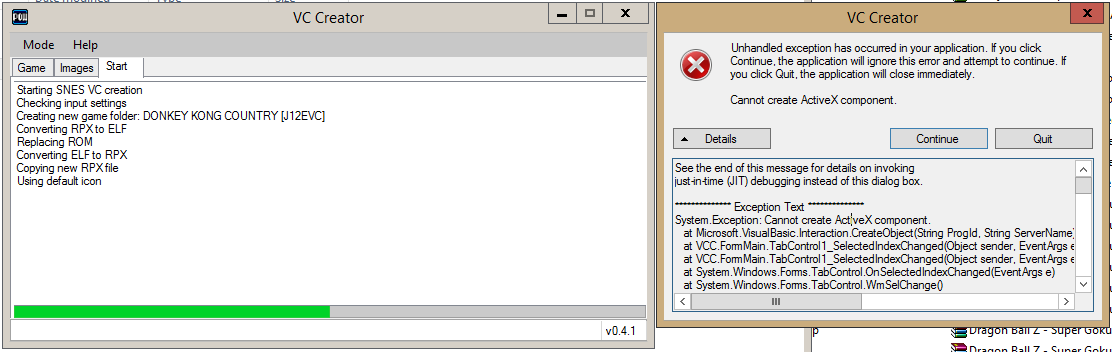
Yep, ActiveX error here as well.
Below is a full log:
428c6ad87afaad8c57b4328a0b1a0479.png

See the end of this message for details on invoking
just-in-time (JIT) debugging instead of this dialog box.

************** Exception Text **************
System.Exception: Cannot create ActiveX component.
at Microsoft.VisualBasic.Interaction.CreateObject(String ProgId, String ServerName)
at VCC.FormMain.TabControl1_SelectedIndexChanged(Object sender, EventArgs e)
at System.Windows.Forms.TabControl.OnSelectedIndexChanged(EventArgs e)
at System.Windows.Forms.TabControl.WmSelChange()
at System.Windows.Forms.TabControl.WndProc(Message& m)
at System.Windows.Forms.Control.ControlNativeWindow.OnMessage(Message& m)
at System.Windows.Forms.Control.ControlNativeWindow.WndProc(Message& m)
at System.Windows.Forms.NativeWindow.Callback(IntPtr hWnd, Int32 msg, IntPtr wparam, IntPtr lparam)


************** Loaded Assemblies **************
mscorlib
Assembly Version: 4.0.0.0
Win32 Version: 4.0.30319.34209 built by: FX452RTMGDR
CodeBase: file:///C:/Windows/Microsoft.NET/Framework/v4.0.30319/mscorlib.dll
----------------------------------------
VCC
Assembly Version: 0.4.1.0
Win32 Version: 0.4.1
CodeBase: file:///C:/Temp/vcc/VCC.exe
----------------------------------------
Microsoft.VisualBasic
Assembly Version: 10.0.0.0
Win32 Version: 12.0.20806.33440 built by: FX45W81RTMREL
CodeBase: file:///C:/Windows/Microsoft.Net/assembly/GAC_MSIL/Microsoft.VisualBasic/v4.0_10.0.0.0__b03f5f7f11d50a3a/Microsoft.VisualBasic.dll
----------------------------------------
System
Assembly Version: 4.0.0.0
Win32 Version: 4.0.30319.36350 built by: FX452RTMLDR
CodeBase: file:///C:/Windows/Microsoft.Net/assembly/GAC_MSIL/System/v4.0_4.0.0.0__b77a5c561934e089/System.dll
----------------------------------------
System.Core
Assembly Version: 4.0.0.0
Win32 Version: 4.0.30319.34209 built by: FX452RTMGDR
CodeBase: file:///C:/Windows/Microsoft.Net/assembly/GAC_MSIL/System.Core/v4.0_4.0.0.0__b77a5c561934e089/System.Core.dll
----------------------------------------
System.Windows.Forms
Assembly Version: 4.0.0.0
Win32 Version: 4.0.30319.34250 built by: FX452RTMGDR
CodeBase: file:///C:/Windows/Microsoft.Net/assembly/GAC_MSIL/System.Windows.Forms/v4.0_4.0.0.0__b77a5c561934e089/System.Windows.Forms.dll
----------------------------------------
System.Drawing
Assembly Version: 4.0.0.0
Win32 Version: 4.0.30319.36337 built by: FX452RTMLDR
CodeBase: file:///C:/Windows/Microsoft.Net/assembly/GAC_MSIL/System.Drawing/v4.0_4.0.0.0__b03f5f7f11d50a3a/System.Drawing.dll
----------------------------------------
System.Runtime.Remoting
Assembly Version: 4.0.0.0
Win32 Version: 4.0.30319.34243 built by: FX452RTMGDR
CodeBase: file:///C:/Windows/Microsoft.Net/assembly/GAC_MSIL/System.Runtime.Remoting/v4.0_4.0.0.0__b77a5c561934e089/System.Runtime.Remoting.dll
----------------------------------------
System.Configuration
Assembly Version: 4.0.0.0
Win32 Version: 4.0.30319.34209 built by: FX452RTMGDR
CodeBase: file:///C:/Windows/Microsoft.Net/assembly/GAC_MSIL/System.Configuration/v4.0_4.0.0.0__b03f5f7f11d50a3a/System.Configuration.dll
----------------------------------------
System.Xml
Assembly Version: 4.0.0.0
Win32 Version: 4.0.30319.34281 built by: FX452RTMGDR
CodeBase: file:///C:/Windows/Microsoft.Net/assembly/GAC_MSIL/System.Xml/v4.0_4.0.0.0__b77a5c561934e089/System.Xml.dll
----------------------------------------
System.IO.Compression.FileSystem
Assembly Version: 4.0.0.0
Win32 Version: 4.0.30319.33440
CodeBase: file:///C:/Windows/Microsoft.Net/assembly/GAC_MSIL/System.IO.Compression.FileSystem/v4.0_4.0.0.0__b77a5c561934e089/System.IO.Compression.FileSystem.dll
----------------------------------------
System.IO.Compression
Assembly Version: 4.0.0.0
Win32 Version: 4.0.30319.34209
CodeBase: file:///C:/Windows/Microsoft.Net/assembly/GAC_MSIL/System.IO.Compression/v4.0_4.0.0.0__b77a5c561934e089/System.IO.Compression.dll
----------------------------------------

************** JIT Debugging **************
To enable just-in-time (JIT) debugging, the .config file for this
application or computer (machine.config) must have the
jitDebugging value set in the system.windows.forms section.
The application must also be compiled with debugging
enabled.

For example:

<configuration>
<system.windows.forms jitDebugging="true" />
</configuration>

When JIT debugging is enabled, any unhandled exception
will be sent to the JIT debugger registered on the computer
rather than be handled by this dialog box.

@fiveighteen if there is anything I can do to assist in resolving that issue, then let me know.
 
  • Like
Reactions: CatmanFan

Site & Scene News

Popular threads in this forum