FYI nobody is dropping or "picking up" 32 bit Windows compatibility in this thread, AFAIK TWLTool 1.6 code is fairly portable, it's just there's only a Windows 64 bit binary in the OP.
Isn't one example enough to disprove your point about all hardware being able to run 64 bit? Or are you saying people deserve insults for not ditching 32bit windows in favour of 64bit linux?
I've only ever used twltool 1.6, it has a brilliant addition that it checks that the keys you have given are correct. Which was useful when I was getting the wrong CID from fwtool using an original sudokuhax v2 installation in conjunction with homebrew channel circa 2011 (I figured out later that if I use hbmenu instead then it works).
So you accept there is no real reason twltool needs 64 bit, but people just have to endure a barrage of insults if they ask for a binary.
Isn't one example enough to disprove your point about all hardware being able to run 64 bit? Or are you saying people deserve insults for not ditching 32bit windows in favour of 64bit linux?
I've only ever used twltool 1.6, it has a brilliant addition that it checks that the keys you have given are correct. Which was useful when I was getting the wrong CID from fwtool using an original sudokuhax v2 installation in conjunction with homebrew channel circa 2011 (I figured out later that if I use hbmenu instead then it works).
Original fwtool from Wintermute dumps CID directly from EMMC registers, there is a fork(the fork also enables NAND writes) which reads CID from RAM which is not very reliable, anyway no harm could be done even without the check, the "decrypted" NAND contains invalid data thus couldn't be mounted, you'll notice that by then.
Original fwtool from Wintermute doesn't have the option to dump CID, there is a fork(the fork also enables NAND writes) which reads CID from RAM which is not very reliable, anyway no harm could be done even without the check, the "decrypted" NAND contains invalid data thus couldn't be mounted, you'll notice that by then.
Oops I should have set a watch on that repo, should I submit a SHA1 PR now? I see the dsi-updates branch has been merged in libnds.
I heard some times the RAM address containing Console ID got polluted, so generating that footer might not always possible? generating the footer sometimes doesn't exactly sounds like a good idea.
I got a Netbook for Christmas in 2013... Pretty weird that the Atom chip inside it was 64-bit capable, but purposely crippled to 32-bit for some reason. And it didn't even utilize PAE, so I was stuck with 3.5GB of RAM out of a 4GB stick, and that really sucked. But now, 5 years later, 32-bit just seems silly. I've even dropped 32-bit with MediCat USB about a year ago or so, since it's designed for current bleeding-edge PCs.
TWLTOOL: DSi Research and Hacking Multitool
Hey all! Here's the newest thing I've been working on. TWLTool is the culmination of a ton of research into the DSi (TWL) platform,
initially started on the 3DS (TWL_FIRM) and eventually moved over to real hardware.
TWLTool has a good handful of features, most of which are brand new for public tools:
NAND decryption/re-encryption
Given only a consoleID (obtainable from any DSi export) and NAND CID (available from certain SD readers or included savegame hax)
you can now completely decrypt and modify your DSi's NAND contents! This is useful for a ton of things, see below.
SRL de/encryption
Allows decrypting of the DSi-specific regions of DSi-exclusive and enhanced games/titles.
boot2 decryption
Decrypts the second-stage bootloader directly from a DSi NAND image, or from a TWL_FIRM boot2 image. This will output an arm7.bin
and arm9.bin, ready for whatever analysis you want.
More!
eventually.
Guides and such Basic NAND decryption
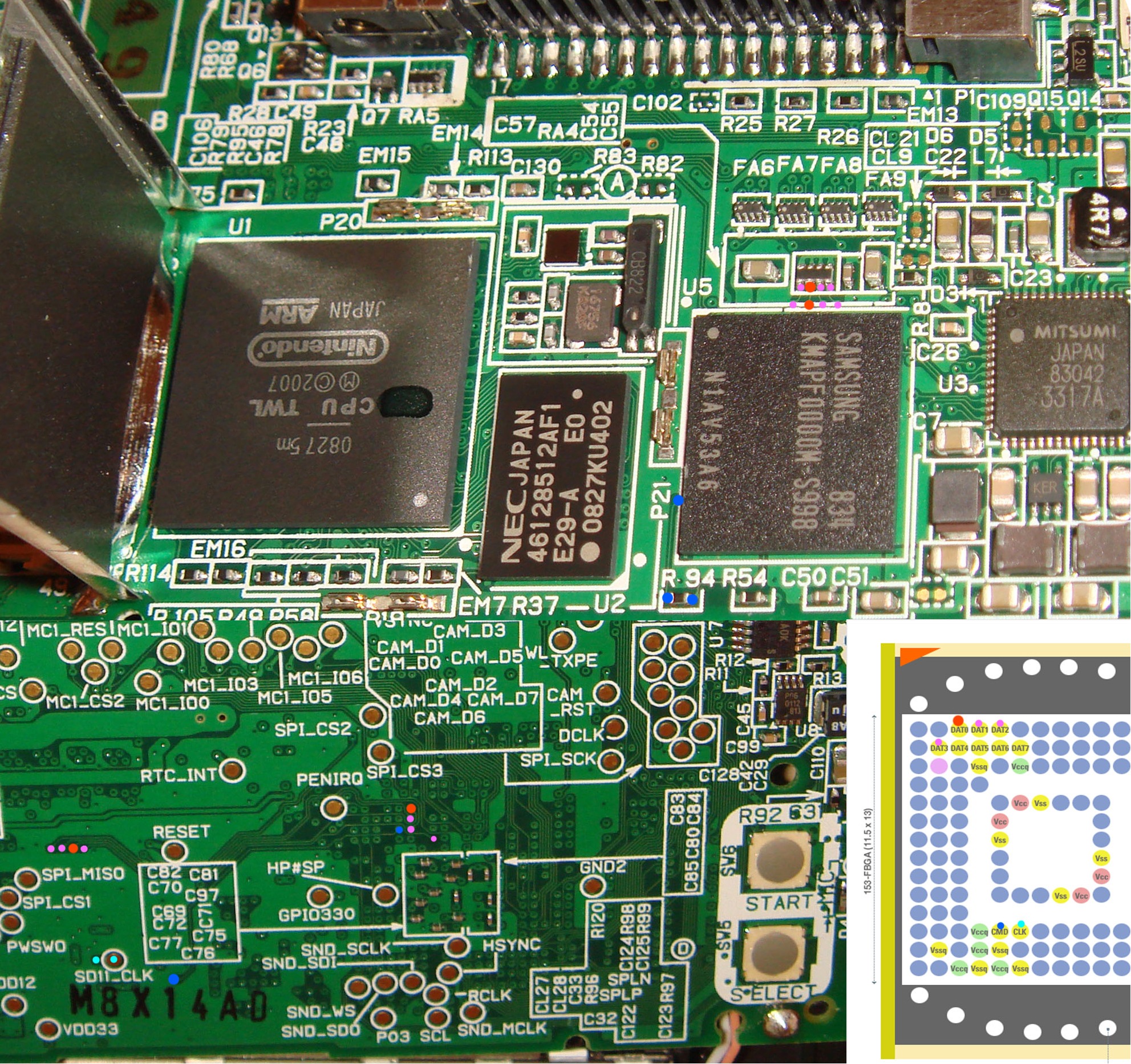
DSi NAND images can be dumped with the following hardware pinouts (also available in the release zips):
DSi:
Once you've got that, you should grab your ConsoleID from a DSiWare export. Simply copy any game to your SD card and use dsi_srl_extractor with the option --basename=[name].
Open [name].footer up in a hex editor and search for 'Root-CA00000001-MS00000008-TW[somenumber]-[anothernumber] .
The number after the dash is your ConsoleID. It'll start with 08201 on DSi, 08202 on rev2 DSi, and 08A20 on DSi XL.
Finally, you'll need to dump your CID from your NAND.
This cannot be done with USB readers, but can be done with low-level SD readers like the Raspberry Pi (If someone can find an easy guide for this I'll link it here) or through a hacked save for the game The Biggest Loser.
To run the hacked save, you'll need some way to restore a savegame onto a cart. This can be done through the Gateway 3DS menu, or SavSender for the original DS. You'll know the save worked if the game boots to a black screen with awful MIDI menu music.
After running the hacked save, dump the savegame off your cart. Your CID will be at 0x800, ready to copy-paste into TWLTool.
Once you've got all of this (and reliable backups!!) usage is simple:
TWLTool nandcrypt --cid [16-byte-long hex cid] --consoleid [8-byte-long consoleID] --in [filename] (--out [filename])
The exact same process is repeated to re-encrypt. Just run your decrypted NAND through the file again.
From this point, you can actually mount your NAND and explore the files on it, as well as pull off a ton of useful hacks. For NAND mounting on Windows, I recommend OSFMount.
Title downgrading
It's possible to downgrade bits and pieces - or your entire system - once you've managed to decrypt your nand. The basic process is as follows:
-Grab title and TMD from NUSDownloader (or elsewhere). Update your database too.
Be sure to decrypt the title! NUSDownloader needs the DSi common key in a file named 'dsikey.bin' to do so.
-Delete the existing title and TMD from the /title folder on your NAND. Replace them with your downloaded ones, being sure to rename the tmd to 'title.tmd'. (do NOT rename the .app!)
-Re-encrypt nand and flash it to your system. Done!
Re-enable classic DSiWarehax installation by downgrading System Settings
By downgrading System Settings to v512 (I think!! If I'm wrong, tell me which it actually is and I'll update this), your system will be able to import DSiWare exploits signed by any system.
This will let you run all the old DSiWarehax on any system, even on 1.4.5.
Direct DSiWarehax injection (without settings downgrade)
Arguably the better, and more future-proof, option: By injecting one of the included DSiWarehax saves to your NAND, you'll instantly have hax without any dependence on Team Twiizers servers or settings downgrades.
To do so, rename a save to public.sav and move it to the appropriate /title/00030004/xxxxxxxx/data/ folder. Done.
Flashcart re-enabling
Downgrading the flashcart whitelist and/or menu will re-enable previously-blocked DSi-compatible flashcarts.
More!
The sheer shittiness of my eMMC reading/writing setup means I haven't fully explored all the possibilities of my own tool. There's
certainly a ton more possible, if you're willing to dig a bit.
SPECIAL THANKS
Martin Korth, for the invaluable documentation on his resource GBATEK (http://problemkaputt.de/gbatek.htm). I wouldn't have been inspired to make this tool without having seen all his documentation on the system.
CaitSith2, for the source to his tool dsi_srl_extractor. The DSi-oriented crypto libs from that program drive this one, and this program wouldn't have been possible without such a robust backend.
Team Twiizers, for the actual savegame hax which drove me to build nand crypto tools.
Yellows8, for occasionally dropping hints in random corners of the internet over the last 6 years, as well as (vaguely related) all his 3DS documentation. "Hey ninty/someone with sd_key."
Neimod and 3DSGuy, for making CTRTOOL. I borrow some utils and such from there.
Dazzozo and Shiny Quagsire; for moral support, tons of help with documentation, and salt.
Changelog:
v1.6 - 5/25/2016
-CID and consoleID can now be loaded from files (just pass a filename instead of a hex ID)
-TWL decryption now decrypts MBR and partitions (copying the rest) instead of annhilating unencrypted parts
-3DS consoleID bruteforce is slightly faster and supports exporing ID to file on completion
-System file crypto should support 3DS now
v1.5 - 5/23/2016
-Add support for dev.kp, ticket, etc decryption (ES block crypto with system (not TAD) key)
v1.1 - 7/24/2015
-Initial(ish) release
DOWNLOADS - v1.6, 5/25/2016
For the sake of making sure this tool stays available, I've both attached it to this post and made it available on Mega and Mediafire. MEGA MEDIAFIRE
TWLTOOL: DSi Research and Hacking Multitool
Hey all! Here's the newest thing I've been working on. TWLTool is the culmination of a ton of research into the DSi (TWL) platform,
initially started on the 3DS (TWL_FIRM) and eventually moved over to real hardware.
TWLTool has a good handful of features, most of which are brand new for public tools:
NAND decryption/re-encryption
Given only a consoleID (obtainable from any DSi export) and NAND CID (available from certain SD readers or included savegame hax)
you can now completely decrypt and modify your DSi's NAND contents! This is useful for a ton of things, see below.
SRL de/encryption
Allows decrypting of the DSi-specific regions of DSi-exclusive and enhanced games/titles.
boot2 decryption
Decrypts the second-stage bootloader directly from a DSi NAND image, or from a TWL_FIRM boot2 image. This will output an arm7.bin
and arm9.bin, ready for whatever analysis you want.
More!
eventually.
Guides and such Basic NAND decryption
DSi NAND images can be dumped with the following hardware pinouts (also available in the release zips):
DSi:
Once you've got that, you should grab your ConsoleID from a DSiWare export. Simply copy any game to your SD card and use dsi_srl_extractor with the option --basename=[name].
Open [name].footer up in a hex editor and search for 'Root-CA00000001-MS00000008-TW[somenumber]-[anothernumber] .
The number after the dash is your ConsoleID. It'll start with 08201 on DSi, 08202 on rev2 DSi, and 08A20 on DSi XL.
Finally, you'll need to dump your CID from your NAND.
This cannot be done with USB readers, but can be done with low-level SD readers like the Raspberry Pi (If someone can find an easy guide for this I'll link it here) or through a hacked save for the game The Biggest Loser.
To run the hacked save, you'll need some way to restore a savegame onto a cart. This can be done through the Gateway 3DS menu, or SavSender for the original DS. You'll know the save worked if the game boots to a black screen with awful MIDI menu music.
After running the hacked save, dump the savegame off your cart. Your CID will be at 0x800, ready to copy-paste into TWLTool.
Once you've got all of this (and reliable backups!!) usage is simple:
TWLTool nandcrypt --cid [16-byte-long hex cid] --consoleid [8-byte-long consoleID] --in [filename] (--out [filename])
The exact same process is repeated to re-encrypt. Just run your decrypted NAND through the file again.
From this point, you can actually mount your NAND and explore the files on it, as well as pull off a ton of useful hacks. For NAND mounting on Windows, I recommend OSFMount.
Title downgrading
It's possible to downgrade bits and pieces - or your entire system - once you've managed to decrypt your nand. The basic process is as follows:
-Grab title and TMD from NUSDownloader (or elsewhere). Update your database too.
Be sure to decrypt the title! NUSDownloader needs the DSi common key in a file named 'dsikey.bin' to do so.
-Delete the existing title and TMD from the /title folder on your NAND. Replace them with your downloaded ones, being sure to rename the tmd to 'title.tmd'. (do NOT rename the .app!)
-Re-encrypt nand and flash it to your system. Done!
Re-enable classic DSiWarehax installation by downgrading System Settings
By downgrading System Settings to v512 (I think!! If I'm wrong, tell me which it actually is and I'll update this), your system will be able to import DSiWare exploits signed by any system.
This will let you run all the old DSiWarehax on any system, even on 1.4.5.
Direct DSiWarehax injection (without settings downgrade)
Arguably the better, and more future-proof, option: By injecting one of the included DSiWarehax saves to your NAND, you'll instantly have hax without any dependence on Team Twiizers servers or settings downgrades.
To do so, rename a save to public.sav and move it to the appropriate /title/00030004/xxxxxxxx/data/ folder. Done.
Flashcart re-enabling
Downgrading the flashcart whitelist and/or menu will re-enable previously-blocked DSi-compatible flashcarts.
More!
The sheer shittiness of my eMMC reading/writing setup means I haven't fully explored all the possibilities of my own tool. There's
certainly a ton more possible, if you're willing to dig a bit.
SPECIAL THANKS
Martin Korth, for the invaluable documentation on his resource GBATEK (http://problemkaputt.de/gbatek.htm). I wouldn't have been inspired to make this tool without having seen all his documentation on the system.
CaitSith2, for the source to his tool dsi_srl_extractor. The DSi-oriented crypto libs from that program drive this one, and this program wouldn't have been possible without such a robust backend.
Team Twiizers, for the actual savegame hax which drove me to build nand crypto tools.
Yellows8, for occasionally dropping hints in random corners of the internet over the last 6 years, as well as (vaguely related) all his 3DS documentation. "Hey ninty/someone with sd_key."
Neimod and 3DSGuy, for making CTRTOOL. I borrow some utils and such from there.
Dazzozo and Shiny Quagsire; for moral support, tons of help with documentation, and salt.
Changelog:
v1.6 - 5/25/2016
-CID and consoleID can now be loaded from files (just pass a filename instead of a hex ID)
-TWL decryption now decrypts MBR and partitions (copying the rest) instead of annhilating unencrypted parts
-3DS consoleID bruteforce is slightly faster and supports exporing ID to file on completion
-System file crypto should support 3DS now
v1.5 - 5/23/2016
-Add support for dev.kp, ticket, etc decryption (ES block crypto with system (not TAD) key)
v1.1 - 7/24/2015
-Initial(ish) release
DOWNLOADS - v1.6, 5/25/2016
For the sake of making sure this tool stays available, I've both attached it to this post and made it available on Mega and Mediafire. MEGA MEDIAFIRE
It’s about that time of year again where I check in with the community to see if we can get the front page aligned with what people are interested in knowing and what...
WiiCompiled is a new project that lets PC gamers play Mario Kart Wii natively on PC without emulation. Using static recompliation to convert the code into native PC...
The long awaited Grand Theft Auto VI Extended Look gameplay trailer has finally dropped on YouTube. As you all know, it had dropped 6 hours earlier on Netflix, and...
Though we knew all the way back in May that this was coming, the exact numbers remained a mystery for prospective Nintendo gamers in the UK. If you happen to have...
Thanks to the recent decomplication efforts; The Minish Cap 3DS brings the Game Boy Advance classic Zelda title to your 3DS.
The port takes full advantage of the 3DS...
After being announced last week, the first of two broadcasts is set to go live later today with a stark focus on The Legend of Zelda and its 40th anniversary...
In the wake of Sony's shift to a digital-only ecosystem within the next year, Xbox have today announced a surprising scheme. Aiming to offer physical buyers the same...
It is with a heavy heart that I announce the departure of our beloved Chary from the position of Chief Editor. Chary took over early 2021 and has done a wonderful job...
To celebrate its 25th anniversary, XBOX has launched pre-orders for the XBOX 25th Anniversary Collection. For the occasion, the trailer below was aired.
This...
GBAtemp is and always has been an independent community. Since 2002 our staff have voluntarily kept the site running, added new forums, features, provided constant...
It’s about that time of year again where I check in with the community to see if we can get the front page aligned with what people are interested in knowing and what...
After being announced last week, the first of two broadcasts is set to go live later today with a stark focus on The Legend of Zelda and its 40th anniversary...
It's been something of a quiet week in the gaming space, with the deluge of big hitters trying to find their place before GTA 6 launches really kicking off next week...
Though we knew all the way back in May that this was coming, the exact numbers remained a mystery for prospective Nintendo gamers in the UK. If you happen to have...
In the wake of Sony's shift to a digital-only ecosystem within the next year, Xbox have today announced a surprising scheme. Aiming to offer physical buyers the same...
The long awaited Grand Theft Auto VI Extended Look gameplay trailer has finally dropped on YouTube. As you all know, it had dropped 6 hours earlier on Netflix, and...
It is with a heavy heart that I announce the departure of our beloved Chary from the position of Chief Editor. Chary took over early 2021 and has done a wonderful job...
The second of a two-part special, a more traditional Nintendo Direct is set to air today. Unlike the Zelda Direct the contents of this one is still relatively up in...
Announced a few days ago, Nintendo of America have today launched their Customer Appreciation Sale. Featuring 30% discounts across a wide range of popular first-party...
A few days ago Chary stepped down as Chief Editor after 5 wonderful years, and everyone guessed the seat wouldn't stay empty for very long. Back in 2021 I proudly...