
Hacking [Question] Setup with RxTools failed, what to do?

  • Thread starter Thread starter Traiver
  • Start date Start date
  • Views Views 2,639
  • Replies Replies 18
  • Likes Likes 1

Traiver

Developer
Developer
Joined
Aug 1, 2014
Messages
1,326
Reaction score
1,499
Trophies
2
Location
???
XP
3,184
Country
United States
Hey guys,

I owned a old 3DS XL SSB Edition with firmware 8.1 last week and I want to set it up with rxtools.
I downloaded the latest nightly build but now I'm at a point with an error and I dont know what to do. I never used rxTools before, so any help would be useful for me.
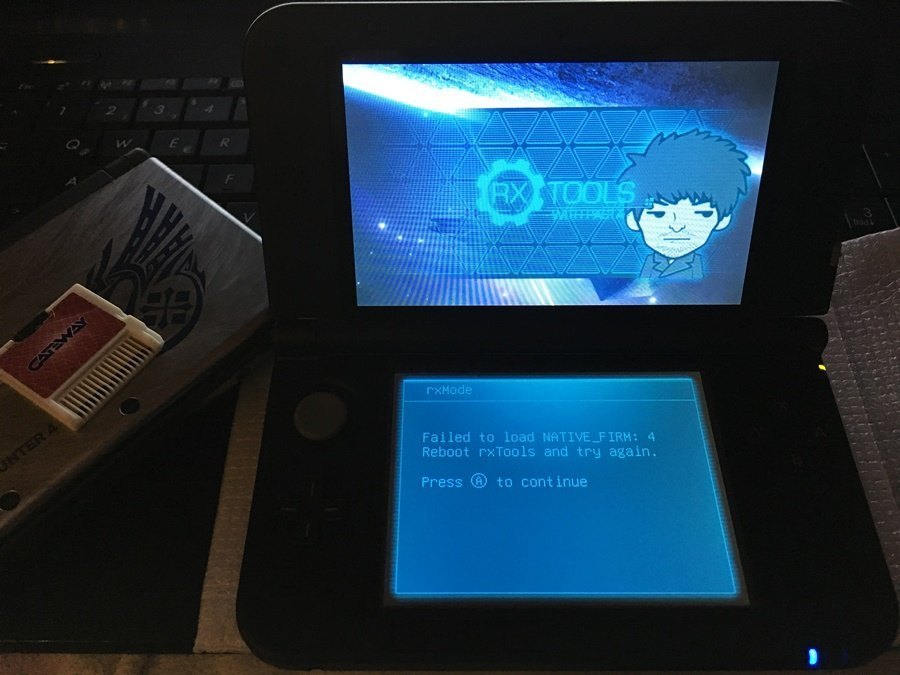
IMG_0452.JPG


Thanks in advance for any help.
 
  • Like
Reactions: XRaidersP
each version has it's own location of firm(s). if you are using latest nightly, it no longer uses single firmware.bin and not to be placed on root.
follow this (page 28) https://docs.google.com/document/d/1vLSLAvFW_4UekzJnKCjz_ce7AWYmjp5Cq2LxfQ9cDr0/edit#
There are three files, I put the firm folder into the rxTools folder like the guide says but when I open the page on the webbrowser, it takes me back to the homemenu with an error. RxTools is not loading up anymore.

Edit: Finally I installed rxTools. What guide doesnt said is, that you must put the three files into the root of your SD Card, too.
 
Last edited by Traiver,
  • Like
Reactions: XRaidersP
There are three files, I put the firm folder into the rxTools folder like the guide says but when I open the page on the webbrowser, it takes me back to the homemenu with an error. RxTools is not loading up anymore.

Edit: Finally I installed rxTools. What guide doesnt said is, that you must put the three files into the root of your SD Card, too.
there should be four along with the cetk... and i don't have them on the root. well anyway, if it already works for you that way, i guess we use different build.
 
there should be four along with the cetk... and i don't have them on the root. well anyway, if it already works for you that way, i guess we use different build.
Yes, I think so.. The next thing I'll do is upgrade my o3DS from 8.1 sysnand to 9.0 sysnand for coldboot directly when you're turning your 3DS on. How did I do that?
 
  • Like
Reactions: XRaidersP
you need to get sysupdater n the update pack from iso site, use them in devmode (if you use them in sysnand rxmode you'll brick your 3ds) to update. it's simple process but dangerous. keep your sysnand back up.
 
Last edited by honyo29,
Yes, I think so.. The next thing I'll do is upgrade my o3DS from 8.1 sysnand to 9.0 sysnand for coldboot directly when you're turning your 3DS on. How did I do that?
1. Download sysupdater from https://github.com/profi200/sysUpdater/releases
2. Download a 9.0/9.2 upgrade pack from that ISO site (they are no longer downloadable from NUS) and place all the CIA files on your SD card in an "updates" directory.
3. Inject FBI to your sysNAND using rxTools if you don't already have a CIA manager on your sysNAND. Alternatively use that Gateway that's in your picture to install a CIA manager, I find that way easier since you can just load a CIA manager in .3ds format and use it to install a .cia one.
4. Launch rxTools in Pasta Mode (it's under the Advanced menu), this will load sysNAND with only signature check patches activated.
5. Use FBI (or other CIA manager) to install sysupdater
6. Launch sysupdater, pick the update option and follow the instructions.
VERY IMPORTANT! If you launch rxTools normally and not in Pasta Mode then sysupdater will brick your 3DS.
 
Last edited by The Real Jdbye,
1. Download sysupdater from https://github.com/profi200/sysUpdater/releases
2. Download a 9.0/9.2 upgrade pack from that ISO site (they are no longer downloadable from NUS) and place all the CIA files on your SD card in an "updates" directory.
3. Inject FBI to your sysNAND using rxTools if you don't already have a CIA manager on your sysNAND. Alternatively use that Gateway that's in your picture to install a CIA manager, I find that way easier since you can just load a CIA manager in .3ds format and use it to install a .cia one.
4. Launch rxTools in Pasta Mode (it's under the Advanced menu), this will load sysNAND with only signature check patches activated.
5. Use FBI (or other CIA manager) to install sysupdater
6. Launch sysupdater, pick the update option and follow the instructions.
VERY IMPORTANT! If you launch rxTools normally and not in Pasta Mode then sysupdater will brick your 3DS.
I'm stuck at the point with installing FBI with rxTools. It says:

Backing up Health & Safety info...
Injecting FBI to Health & Safety info...
Error opening 0:fbi_inject.tmd!
A continue
 
  • Like
Reactions: XRaidersP
I'm stuck at the point with installing FBI with rxTools. It says:

Backing up Health & Safety info...
Injecting FBI to Health & Safety info...
Error opening 0:fbi_inject.tmd!
A continue
I can't really help you with that part as I have always used my Gateway to install a CIA manager, it's much easier, and FBI injection doesn't work for a lot of people. I recommend you go that route instead.
 
I can't really help you with that part as I have always used my Gateway to install a CIA manager, it's much easier, and FBI injection doesn't work for a lot of people. I recommend you go that route instead.
Okay. So what do I do next with my Gateway card to install FBI or DevMenu on my sysnand?
 
Last edited by Traiver,
  • Like
Reactions: XRaidersP
I usually use Ninjhax + Pasta + FBI.3dsx to install FBI.cia

In 8.1 you can use browserhax + Pasta + FBI. It shouldn't take you more than 5 minutes to set it up.

I don't know why you are trying to do FBI injection having so many better and easier choices.
 
I usually use Ninjhax + Pasta + FBI.3dsx to install FBI.cia

In 8.1 you can use browserhax + Pasta + FBI. It shouldn't take you more than 5 minutes to set it up.

I don't know why you are trying to do FBI injection having so many better and easier choices.
Okay then, how do I install it via browserhax and Pasta?
 
  • Like
Reactions: XRaidersP
Okay then, how do I install it via browserhax and Pasta?

PastaCFW is a CFW that boots into your sysnand. You can launch it from Ninjhax 1.1 as if it was a homebrew app.

Oops sorry, I think browserhax works in 9.0 or above... You can always use the gateway card, I don't know the specifics about it.

I think you can remove the SD card so Gateway mode boots in sysnand, then use FBI.3DS from the red card to install FBI.CIA
 
Got it! I installed it via the rxTools injector. I put 2 files, named "fbi_inject.app" and "fbi_inject.tmd" on my root of the SD card, then installed it via rxtools and now FBI runs in sysnand.

I already installed the update via sysUpdater and now I'm on 9.0.0-20E.
 
  • Like
Reactions: XRaidersP
as someone with gw redcart , you really love to waste your time with injection. anyway, enjoy your coldboot cfw! cheers!
 

Site & Scene News

Popular threads in this forum