
ROM Hack Suggestion Pokemon Quest editor?

  • Thread starter Thread starter justinbug2
  • Start date Start date
  • Views Views 95,231
  • Replies Replies 316
This is little updated Guide for everyone who wants a quick update about how and with which tools can you edtit Pokemon Quest.
Friendly Reminder: This complete editing is still Work in Progress and changes could happen.

I AM NOT RESPONSIBLE IF YOU DAMAGE YOUR SAVE!! ALWAS HAVE A BACKUP!

This complete Guide here is based on this thread and this: https://github.com/Thealexbarney/PqSave

Tools you need for save edit Pokemon Quest
:
  • Your Savegame extracted with "CHECKPOINT" Homebrew. Its the "user" file with 512 KB size.
  • Download all needed Files from https://github.com/Thealexbarney/PqSave Instructions and FAQ/Tutorial are also on Github. For everyone who wants to try by itself
  • A Hex viewer or Editor - I personally prefer "010 Editor" or "Notepad++"
After you extracted the Github Files you should have a folder named:
PqSave:
1.PNG


In PqSave you have a folder called Scripts:
2.PNG


If you open this you will see some files:
3.PNG


Put your save "
4.PNG
" into this Folder.
Now drag the "user" File on the file "export_to_json.bat" and you should get a new file named 6.PNG . Open this File with an editor Notepad++ or 010 Editor or even the text editor.
Now you can see a lot of things. Search for your Pokemon. The name of all Pokemons will show up like this:
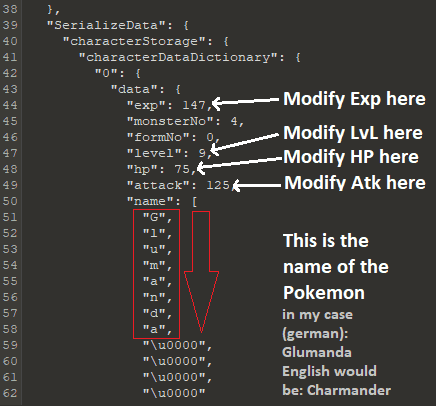
5.png


For Editing your Tickets just scroll down or search for "tickets" You will find this line and can edit it:
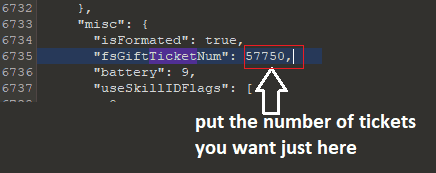
17.PNG


After you done with editing. Save the File. And drag and drop it into the file "import_from_json.bat" and it should convert it back to "user_new" - just rename it to user and restore this save with CHECKPOINT Homebrew.
Done. Worked for me and I think for many others.
 
Last edited by Frexxos,
This is little updated Guide for everyone who wants a quick update about how and with which tools can you edtit Pokemon Quest.
Friendly Reminder: This complete editing is still Work in Progress and changes could happen.

I AM NOT RESPONSIBLE IF YOU DAMAGE YOUR SAVE!! ALWAS HAVE A BACKUP!

This complete Guide here is based on this thread and this: https://github.com/Thealexbarney/PqSave

Tools you need for save edit Pokemon Quest
:
  • Your Savegame extracted with "CHECKPOINT" Homebrew. Its the "user" file with 512 KB size.
  • Download all needed Files from https://github.com/Thealexbarney/PqSave Instructions and FAQ/Tutorial are also on Github. For everyone who wants to try by itself
  • A Hex viewer - I personally prefer "010 Editor"
After you extracted the Github Files you should have a folder named:
PqSave:
View attachment 130479

In PqSave you have a folder called Scripts:
View attachment 130480

If you open this you will see some files:
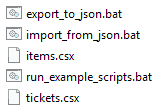
View attachment 130481

Put your save "View attachment 130482 " into this Folder.
Now drag the "user" File on the file "export_to_json.bat" and you should get a new file named View attachment 130488 . Open this File with an editor Notepad++ or 010 Editor or even the text editor.
Now you can see a lot of things. Search for your Pokemon. The name of all Pokemons will show up like this:
View attachment 130487

After you done with editing. Save the File. And drag and drop it into the file "import_from_json.bat" and it should convert it back to "user_new" - just rename it to user and restore this save with CHECKPOINT Homebrew.
Done. Worked for me and I think for many others.

Thank you to
WOW THANKS FOR TAKING THE TIME! Is it possible to make pokemon shiny
 
When I try to export to json, it says it's not a valid command. What am I doing wrong?
 
You... covered the folder contents with your command window. We can't see what files you have. By the sounds of it though, you're missing the PqSave.exe file in that folder.

lol sorry about that. Indeed, I don't have anything called pqsave.exe. I downloaded it from the link he gave but this file wasn't there. Where can I get it?
 
lol sorry about that. Indeed, I don't have anything called pqsave.exe. I downloaded it from the link he gave but this file wasn't there. Where can I get it?
The link given leads to the source files that you compile. Did you download the source files or did you click the Releases tab and download the already compiled and ready to use ZIP file?
 
  • Like
Reactions: Gomyde
The link given leads to the source files that you compile. Did you download the source files or did you click the Releases tab and download the already compiled and ready to use ZIP file?

That's it. I downloaded the source files. Stupid me lol. Thanks a lot man <3
 
someone knows how to make a pokemon shiny?
At the moment the only reliable way I know is to get a shiny Pokémon (a legit one), edit its number and then evolve it to fix the weird attack animation (you don't want a Charizard to shoot bubbles).

Of course this only works for Pokémon that can evolve.
 
I wasn't able to re-import the save back to switch usong checkpoint.
Pokémon Quest now loads forever, and never starts.

I've tried to edit the save file on a macOS, and I'm on v5.1.0
 
Last edited by igor1201,
I wasn't able to re-import the save back to switch usong checkpoint.
Pokémon Quest now loads forever, and never starts.

I've tried to edit the save file on a macOS, and I'm on v5.1.0

Having this same issue. macOS and Switch 5.1.0.

Wonder if it's the 5.1.0 firmware?
 
I'm on 5.1 and everything is fine - what did you guys edit?

I feel like it's the MacOS version that might be the problem, I'm on a PC, using Windows 10 and everything's peachy.
 
Last edited by Sopheroo,
Got a shiny Tangela for comparison.

Code:
0F 00 00 00 6A 01 00 00 02 00 00 00 14 00 00 00 61 01 00 00 62 01 00 00 4D 01 00 00 0C 00 00 00 3C 00 00 00 40 00 00 00 42 00 00 00 43 00 00 00 45 00 00 00 49 00 00 00 4D 00 00 00 69 00 00 00 6A 00 00 00 6E 00 00 00 72 00 00 00 48 01 00 00 4C 01 00 00 00 00 00 00 72 00 00 11 00 DE 01 00 00 8C 01 00 00 0C 00 00 00 54 00 61 00 6E 00 67 00 65 00 6C 00 61 00 00 00 00 00 00 00 00 00 00 00 04 09 4A E2 8D 00 66 ED A1 D6 00 00 00 07 00 00 00 28 00 00 00 2A 00 00 00 40 00 00 00 5C 00 00 00 5D 00 00 00 61 00 00 00 65 00 00 00 72 00 00 00 78 00 09 00 00 00 FF FF FF FF FF FF FF FF FF FF FF FF FF FF FF FF FF FF 0C 00 00 00 FF FF FF FF FF FF FF FF FF FF FF FF FF FF FF FF FF FF FF FF FF FF FF FF 02 00 00 80 3E 01 01 00 00 09 00 00 00 00 01 01 01 00 02 00 01 00 64 00 00 00 04 00 00 00 18 00 00 00 2B 00 00 00 3E 00 00 00 51 00 00 00 13 00 00 00 01 00 00 00 10 00 00 00 11 00 00 00 FF 16 00 13 00 00 00 01 00 00 00 10 00 00 00 11 00 00 00 00 B6 00 13 00 00 00 01 00 00 00 10 00 00 00 11 00 00 00 FF FF FF 13 00 00 00 01 00 00 00 10 00 00 00 11 00 00 00 FF FF FF 00 00 00 00 01 00 5C 66 46 D1 34 C7 D5 08 11 00 00 00 FF FF FF FF
Would it be possible for you to upload your user or user.json file with the shiny Tangela in it so I can compare it with mine? (I have a shiny Cubone) The PqSave has a json converter. (https://github.com/Thealexbarney/PqSave)
 
could someone edit my save to give maxed items and tickets please
Yes.
For reference, this is all you have to do in the future once you download the files from here (https://github.com/Thealexbarney/PqSave) and put them all in a folder. A command window will show up telling you the scripts were applied and a user_modified file will be generated.

ILqjlgV.gif


Just take user_modified, rename it to user and replace your current save/user file with it in the Checkpoint folder.
 

Attachments

Site & Scene News

Popular threads in this forum