- Joined
- Jan 26, 2008
- Messages
- 2,131
- Reaction score
- 5
- Trophies
- 1
- Age
- 36
- Location
- Seoul.. (in Korea)
- Website
- Visit site
- XP
- 211
- Country

It has been tested on an actual DS, so I'm sure it's not the emulator's fault.
All I have done was edit the image:
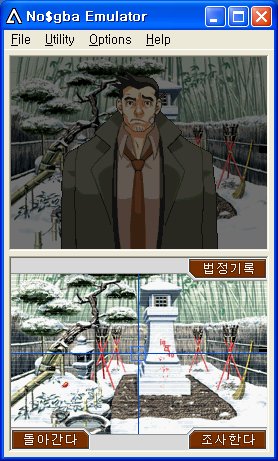
It works fine.
but when I pause the game and go back...
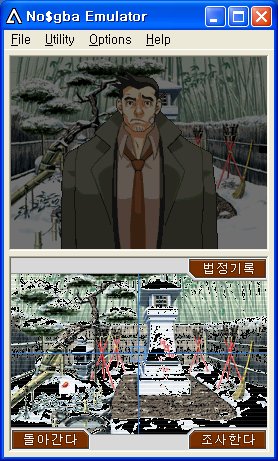
It's an LZ77 compressed image but I've recompressed it back after editing.
There was no weird process; it was just a extract -> decompress -> edit -> recompress -> insert
It happens on ALL of the images.
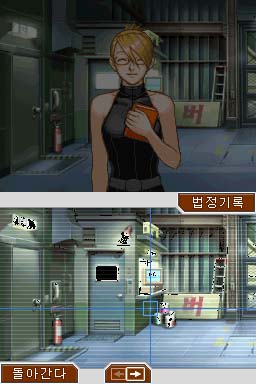
but when I do something else and go back to the screen, it's normal again.
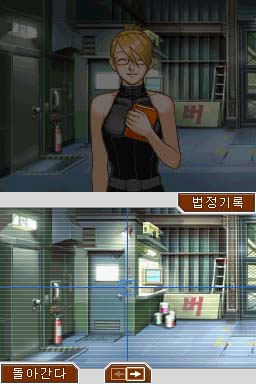
another example:
http://mfiles.naver.net/66b453889dccab1d33...%BF%F8%BA%BB.lz
this is the original file.
The file is set up in this way:
0000 ~ 0004 = Magic stamp
0004 ~ 0008 = Palette pointer
0008 ~ 000C = ??
000C ~ 003C = Pointer information. Needs editing after image is edited.
003C ~ 023C = Palette. This is the palette of all 6 sub images.
and then comes the 6 strips of LZ77 compressed images.
As you can see in the 3rd screen, both top screen and the bottom screen uses the same picture. So I don't think it's the edit that went wrong, because if I used the wrong palette, all of the same color would be shown as black.
And now here is the edited file:
http://mfiles.naver.net/64b6518a9fcea91e39...%BC%F6%C1%A4.lz
can someone take a look to see if it's the editing that went wrong, or if something else could have happened?
All I have done was edit the image:
It works fine.
but when I pause the game and go back...
It's an LZ77 compressed image but I've recompressed it back after editing.
There was no weird process; it was just a extract -> decompress -> edit -> recompress -> insert
It happens on ALL of the images.
but when I do something else and go back to the screen, it's normal again.
another example:
http://mfiles.naver.net/66b453889dccab1d33...%BF%F8%BA%BB.lz
this is the original file.
The file is set up in this way:
0000 ~ 0004 = Magic stamp
0004 ~ 0008 = Palette pointer
0008 ~ 000C = ??
000C ~ 003C = Pointer information. Needs editing after image is edited.
003C ~ 023C = Palette. This is the palette of all 6 sub images.
and then comes the 6 strips of LZ77 compressed images.
As you can see in the 3rd screen, both top screen and the bottom screen uses the same picture. So I don't think it's the edit that went wrong, because if I used the wrong palette, all of the same color would be shown as black.
And now here is the edited file:
http://mfiles.naver.net/64b6518a9fcea91e39...%BC%F6%C1%A4.lz
can someone take a look to see if it's the editing that went wrong, or if something else could have happened?