Hacking Nintendont Themes and Custom Mods

  • Thread starter Thread starter AbdallahTerro
  • Start date Start date
  • Views Views 443,097
  • Replies Replies 2,649
  • Likes Likes 30
in case anyone was wondering about that modded libFAT
http://gbatemp.net/threads/ustealth-compatible-libfat-mod.365714/

And there were a lot of logos on this thread
http://gbatemp.net/threads/nintendont-looking-for-a-logo.353275/
of which I will make a special mention of the ones I cooked up
Okay, I'll stop after this but the white background was bugging me so I made a couple more.
nintenbubles-png.4045

nintenbubles-png.4046

I love paint
nintendont-png.4043
although the dimentions might need some adjusting. havent double checked that yet
 
  • Like
Reactions: Margen67
Ok, after 3 days fighting with devkitPro and libfat xD, I finally got the thing compiled with both, USB controllers and UStealth support.

This is just a static background that only display the nintendont version, and system (Wii/Wii U), I like to keep it simple because it last only a few seconds between the USBloader and the app itself. It "should" indicate problems, exceptions, errors in maroon color, I haven't tested it deeper, I haven't experienced any exception so far.

IMPORTANT: I did this mod to use ONLY with USB loaders, you can't use it directly through HBC because there's not GUI to access, all the options are loaded by the USB Loader beforehand. So far I only tested it with USBLoaderGX, it should work with other loaders too.

5dw1g8.jpg


Download

Thanks goes to:
-@fix94 for new rev233, the source now worked without problems with libfatmod and updated devkitPro
-@Maxternal for his libfatmod library for UStealth support
-@JayJay123 original creator of UStealth
-@cyan for keeping ULGX constantly compatible with nintendont
-@AbdallahTerro for his mod tutorial
-@JoostinOnline for open the avenue for custom backgrounds
 
Ok, after 3 days fighting with devkitPro and libfat xD, I finally got the thing compiled with both, USB controllers and UStealth support.

This is just a static background that only display the nintendont version, and system (Wii/Wii U), I like to keep it simple because it last only a few seconds between the USBloader and the app itself. It "should" indicate problems, exceptions, errors in maroon color, I haven't tested it deeper, I haven't experienced any exception so far.

IMPORTANT: I did this mod to use ONLY with USB loaders, you can't use it directly through HBC because there's not GUI to access, all the options are loaded by the USB Loader beforehand. So far I only tested it with USBLoaderGX, it should work with other loaders too.


Download

Thanks goes to:
-@fix94 for new rev233, the source now worked without problems with libfatmod and updated devkitPro
-@Maxternal for his libfatmod library for UStealth support
-@JayJay original creator of UStealth
-@cyan for keep ULGX constantly compatible with nintendont
-@AbdallahTerro for his mod tutorial
-@JoostinOnline for open the avenue for custom backgrounds


Needs a loading bar at the bottom:grog:
 
so the ustealth libfat mod zipped file has many folders, I believe you only copied the libogc folder didn't you? did you replace any files in nintendont folder too?

yep, only the libogc one, I didn't change anything in nintendont folder, just the main.c and menu, but only to edit text.
 
If you use this and enable SCREENSHOT in global.h, it will take a screenshot (native resolution) when STATUS_LOADING reaches 8. You can move the code I added around, but make sure it's after STATUS_LOADING reaches 3, and before GRRLIB_Render().
Code:
PrintFormat(DEFAULT_SIZE, 0xFFFFFF00, MENU_POS_X + 50*1, MENU_POS_Y + 20*19, "||||||||||||||||||");
UpdateScreen();
bool screenshot_taken = false;
while(1)
{
    DCInvalidateRange( (void*)0x90004100, 0x20 );
    if( STATUS_LOADING == 0xdeadbeef )
        break;
 
    PrintFormat(DEFAULT_SIZE, 0xFFFFFF00, MENU_POS_X + 50*1, MENU_POS_Y + 20*19, "||||||||||||||||||");
    if(STATUS_LOADING == 0)
        PrintFormat(DEFAULT_SIZE, 0xFFFFFF00, MENU_POS_X + 90*1, MENU_POS_Y + 20*19, "|||||||||");
    if(STATUS_LOADING > 0 && STATUS_LOADING < 20)
        PrintFormat(DEFAULT_SIZE, 0xFFFFFF00, MENU_POS_X + 110*1, MENU_POS_Y + 20*19, "|||||||||");
    if(STATUS_LOADING == 2)
        PrintFormat(DEFAULT_SIZE, 0xFFFFFF00, MENU_POS_X + 130*1, MENU_POS_Y + 20*19, "|||||||||");
    if(STATUS_LOADING > 2 && STATUS_LOADING < 20)
        PrintFormat(DEFAULT_SIZE, 0xFFFFFF00, MENU_POS_X + 150*1, MENU_POS_Y + 20*19, "|||||||||");
    if(STATUS_LOADING == 3)
        PrintFormat(DEFAULT_SIZE, 0xFFFFFF00, MENU_POS_X + 170*1, MENU_POS_Y + 20*19, "|||||||||");
    if(STATUS_LOADING > 3 && STATUS_LOADING < 20)
        PrintFormat(DEFAULT_SIZE, 0xFFFFFF00, MENU_POS_X + 190*1, MENU_POS_Y + 20*19, "|||||||||");
    if(STATUS_LOADING == 4)
        PrintFormat(DEFAULT_SIZE, 0xFFFFFF00, MENU_POS_X + 210*1, MENU_POS_Y + 20*19, "|||||||||");
    if(STATUS_LOADING > 4 && STATUS_LOADING < 20)
        PrintFormat(DEFAULT_SIZE, 0xFFFFFF00, MENU_POS_X + 230*1, MENU_POS_Y + 20*19, "|||||||||");
    if(STATUS_LOADING == 5)
        PrintFormat(DEFAULT_SIZE, 0xFFFFFF00, MENU_POS_X + 250*1, MENU_POS_Y + 20*19, "|||||||||");
    if(STATUS_LOADING > 5 && STATUS_LOADING < 20)
        PrintFormat(DEFAULT_SIZE, 0xFFFFFF00, MENU_POS_X + 270*1, MENU_POS_Y + 20*19, "|||||||||");
    if(STATUS_LOADING == 6)
        PrintFormat(DEFAULT_SIZE, 0xFFFFFF00, MENU_POS_X + 290*1, MENU_POS_Y + 20*19, "|||||||||");
    if(STATUS_LOADING > 6 && STATUS_LOADING < 20)
        PrintFormat(DEFAULT_SIZE, 0xFFFFFF00, MENU_POS_X + 310*1, MENU_POS_Y + 20*19, "|||||||||");
    if(STATUS_LOADING == 7)
        PrintFormat(DEFAULT_SIZE, 0xFFFFFF00, MENU_POS_X + 330*1, MENU_POS_Y + 20*19, "|||||||||");
    if(STATUS_LOADING > 7 && STATUS_LOADING < 20)
        PrintFormat(DEFAULT_SIZE, 0xFFFFFF00, MENU_POS_X + 350*1, MENU_POS_Y + 20*19, "|||||||||");
    if(STATUS_LOADING == 8) {
        PrintFormat(DEFAULT_SIZE, 0xFFFFFF00, MENU_POS_X + 370*1, MENU_POS_Y + 20*19, "|||||||||");
        if (!screenshot_taken) {
            #ifdef SCREENSHOT
            gprintf("Screenshot %s\r\n", GRRLIB_ScrShot("Screenshot.png") ? "taken" : "failed");
            #else
            gprintf("Screenshot function disabled\r\n");
            #endif
            screenshot_taken = true;
        }
    }
    if(STATUS_LOADING > 8 && STATUS_LOADING < 20)
        PrintFormat(DEFAULT_SIZE, 0xFFFFFF00, MENU_POS_X + 390*1, MENU_POS_Y + 20*19, "|||||||||");
    if(STATUS_LOADING == 9)
        PrintFormat(DEFAULT_SIZE, 0xFFFFFF00, MENU_POS_X + 410*1, MENU_POS_Y + 20*19, "|||||||||");
    if(STATUS_LOADING > 9 && STATUS_LOADING < 20)
        PrintFormat(DEFAULT_SIZE, 0xFFFFFF00, MENU_POS_X + 430*1, MENU_POS_Y + 20*19, "|||||||||");
    if(STATUS_LOADING == 10)
        PrintFormat(DEFAULT_SIZE, 0xFFFFFF00, MENU_POS_X + 450*1, MENU_POS_Y + 20*19, "|||||||||");
    if(STATUS_LOADING > 10 && STATUS_LOADING < 20)
        PrintFormat(DEFAULT_SIZE, 0xFFFFFF00, MENU_POS_X + 470*1, MENU_POS_Y + 20*19, "|||||||||");
    FPAD_Update();
    GRRLIB_Screen2Texture(0, 0, screen_buffer, GX_FALSE); // Copy all status messages
    GRRLIB_Render();
    GRRLIB_DrawImg(0, 0, background, 0, 1, 1, 0xFFFFFFFF);
    PrintInfo();
}
 
//gprintf("Nintendont at your service!\r\n");
 
GRRLIB_DrawImg(0, 0, screen_buffer, 0, 1, 1, 0xFFFFFFFF); // Draw all status messages
PrintFormat(DEFAULT_SIZE, 0xFFFFFF00, MENU_POS_X + 490*1, MENU_POS_Y + 20*19, "|||||||||");
GRRLIB_Render();

 
no biggie as long as you are on the right track, I commented the screenshot stuff for now
Just add this to 255.
Code:
#ifdef SCREENSHOT
GRRLIB_DrawImg(0, 0, background, 0, 1, 1, 0xFFFFFFFF);
PrintFormat(22, WHITE, MENU_POS_X + 50*1, MENU_POS_Y + 50*1, "Nintendont Loader v%d.%d (%s)", NIN_VERSION>>16, NIN_VERSION&0xFFFF, IsWiiU() ? "Wii U" : "Wii");
PrintFormat(14, WHITE, MENU_POS_X + 200*1, MENU_POS_Y + 40*2, "Custom Nunchuck Mod by Abz");
/*Whatever other text you want to show up*/
PrintFormat(DEFAULT_SIZE, WHITE, MENU_POS_X + 50*1, MENU_POS_Y + 20*19, "||||||||||||||||||||||||||||||||||||");
// Double because sometimes the screenshot removes a pixel from last thing drawn
PrintFormat(DEFAULT_SIZE, WHITE, MENU_POS_X + 50*1, MENU_POS_Y + 20*19, "||||||||||||||||||||||||||||||||||||");
GRRLIB_ScrShot("LoadingScreenshot.png");
GRRLIB_DrawImg(0, 0, background, 0, 1, 1, 0xFFFFFFFF);
#endif
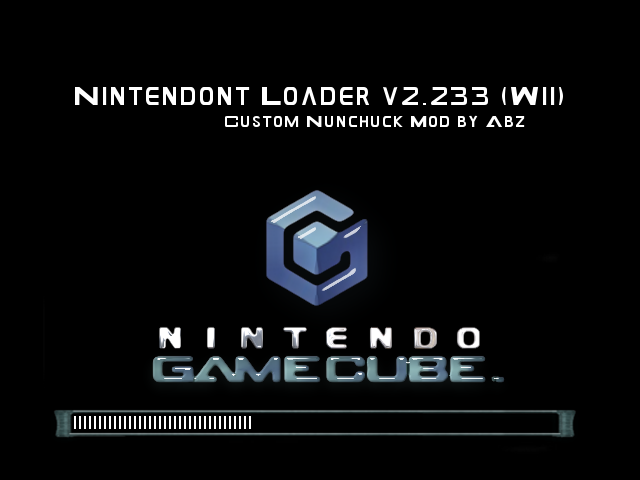
You'll get this:
LoadingScreenshot.png~original

It will never actually show up on the screen.
 
  • Like
Reactions: AbdallahTerro
Just add this to 255.
Code:
#ifdef SCREENSHOT
GRRLIB_DrawImg(0, 0, background, 0, 1, 1, 0xFFFFFFFF);
PrintFormat(22, WHITE, MENU_POS_X + 50*1, MENU_POS_Y + 50*1, "Nintendont Loader v%d.%d (%s)", NIN_VERSION>>16, NIN_VERSION&0xFFFF, IsWiiU() ? "Wii U" : "Wii");
PrintFormat(14, WHITE, MENU_POS_X + 200*1, MENU_POS_Y + 40*2, "Custom Nunchuck Mod by Abz");
/*Whatever other text you want to show up*/
PrintFormat(DEFAULT_SIZE, WHITE, MENU_POS_X + 50*1, MENU_POS_Y + 20*19, "||||||||||||||||||||||||||||||||||||");
// Double because sometimes the screenshot removes a pixel from last thing drawn
PrintFormat(DEFAULT_SIZE, WHITE, MENU_POS_X + 50*1, MENU_POS_Y + 20*19, "||||||||||||||||||||||||||||||||||||");
GRRLIB_ScrShot("LoadingScreenshot.png");
GRRLIB_DrawImg(0, 0, background, 0, 1, 1, 0xFFFFFFFF);
#endif
It will never actually show up on the screen.
No luck so far though I added the code to main.c line 255 and uncommented SCREENSHOT in global.h
do I need any other code?
 

Site & Scene News

Popular threads in this forum