Hacking New Gateway 3DS from Eachmall - Filesystem Error

  • Thread starter Thread starter Marv
  • Start date Start date
  • Views Views 4,981
  • Replies Replies 26

Marv

Well-Known Member
Newcomer
Joined
Jan 17, 2007
Messages
75
Reaction score
7
Trophies
1
Age
38
Website
Visit site
XP
664
Country
Poland
My Gateway from Eachmall suddenly stopped working after two weeks. It's orginal one - I checked.
At first it started to show "fragmentation error" after I was playing games and "Error Occurred..." info when playing games. After that there is only "filesystem error" and in diagnostics there is "SD TEST FAIL" info (all other tests are OK). Im using 16GB Kingston MicroSD. It's not a fake, and the capacity is real 16GB. After that errors it's a little slower then it was before (formatted it several times and nothing changed). Well I tried other MicroSD's - 1GB and 8GB but it still shows filesystem error.

Is there something that I can do or Gateway is faulty? Looks like it can't read any microsd.

 
try squeezing the card where the SD slots in, also blow into the SD slot just to make sure its clean......other than that it will probably need replacing
 
it's probably faulty, but I'll give you this stupid advice anyway: try blowing into it a lot. I got it from eachmall, too, and at first it didn't get recognized by the 3ds. I had to blow into it a lot before it started working. I know it will probably not work, but there's always a small chance...
I don't know about yours, but mine wasn't packaged well. it was merely put inside an envelope, and when it arrived the blue gateway box was squashed and the cart had gotten outside of it. I guess that's the price for spending less money (my cart has error 00000019 so I can't update it to use the latest firmwares, but several other people got it from eachmall and it works normally).

edit: half-ninja'd >_>
 
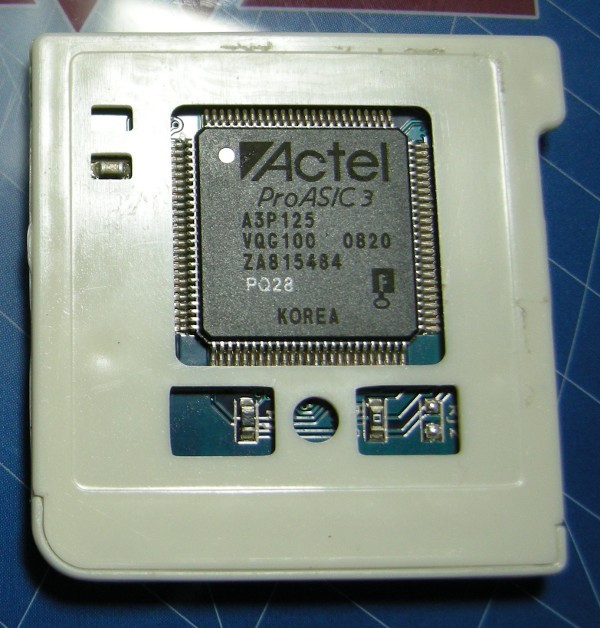
Blowing is unnecessary. You can try to make a pad for Actel chip with paper tape to put pressure on it if you do not want to return.
gateway-3ds-29eqqx.jpg
 
try squeezing the card where the SD slots in, also blow into the SD slot just to make sure its clean......other than that it will probably need replacing

I tried. I even tried putting piece of paper inside the slot to ensure it'll fit. Nothing changed :/

it's probably faulty, but I'll give you this stupid advice anyway: try blowing into it a lot. I got it from eachmall, too, and at first it didn't get recognized by the 3ds. I had to blow into it a lot before it started working. I know it will probably not work, but there's always a small chance...
I don't know about yours, but mine wasn't packaged well. it was merely put inside an envelope, and when it arrived the blue gateway box was squashed and the cart had gotten outside of it. I guess that's the price for spending less money (my cart has error 00000019 so I can't update it to use the latest firmwares, but several other people got the cart from eachmall and it works normally).

Same story o_O same packaging... Maybe they're selling faulty Gateway's for lower price? At first 3DS also did not reconize the Gateway card so i removed microsd and put it back several times and it started to work. But now it's not working anymore. I will try to blow into it some more... This crappy Gateway is not detecting microsd's.

 
Blowing is unnecessary. You can try to make a pad for Actel achip with paper tape to put pressure on it if you do not want to return.
gateway-3ds-29eqqx.jpg


I applied tape around Gateway but I still have filesystem error and SD Test Fail :/

Before I added tape, I touched that Actel chip and it's moving a little...
 
Sure its not your M-SD card? it sounds like its faulty, you usually get the black screen error when playing games when it starts to go faulty. Have you tested your card with h2testw and test the full capacity? Your other MSD cards maybe the same as well. You really should test them to make sure.
 
Same story o_O same packaging... Maybe they're selling faulty Gateway's for lower price? At first 3DS also did not reconize the Gateway card so i removed microsd and put it back several times and it started to work. But now it's not working anymore. I will try to blow into it some more... This crappy Gateway is not detecting microsd's.
I got a working one from there. Package was squished though. Stickers not applied and 1 sticker missing, but it works.
 
Sure its not your M-SD card? it sounds like its faulty, you usually get the black screen error when playing games when it starts to go faulty. Have you tested your card with h2testw and test the full capacity? Your other MSD cards maybe the same as well. You really should test them to make sure.


I am on Mac OSX, is there a simillar tool for this system? Is that possible that card become all of sudden incompatible?

MicroSD's - it must have 16GB capacity, because I can put there about 15,7GB of data. The one with 1GB is cheap chinese "no name" card and 8GB is original card (true 8GB capacity). All of it works when I connect it to my computer, it works in Android phone too.
 
the h2testw should test your cards whichever your on and yes your card can become faulty, I've had 4 go wrong with the same errors as you I bought another one from PCWorld and had no further problems. I'm betting your cards are at fault. Just google h2testw and run the whole capacity.

Edit: also your cards may work fine with your PC but when you put roms on it and it is tested to its max they start to go wrong.
 
the h2testw should test your cards whichever your on and yes your card can become faulty, I've had 4 go wrong with the same errors as you I bought another one from PCWorld and had no further problems. I'm betting your cards are at fault. Just google h2testw and run the whole capacity.

Edit: also your cards may work fine with your PC but when you put roms on it and it is tested to its max they start to go wrong.

Test results from h2testw:

Code:
Test finished without errors.
You can now delete the test files *.h2w or verify them again.
Writing speed: 3.73 MByte/s
Reading speed: 13.4 MByte/s
H2testw v1.4

Is something wrong with microsd?
 
I got a working one from there. Package was squished though. Stickers not applied and 1 sticker missing, but it works.

they gave me two of the same sticker >_> I had to trim one with a scissor to make it fit one of the sides.
 
Ah right,

The info on 16GB card states that it's Class 10 card. Shouldn't it have better write speed?

Edit:

Strange thing, when I bought the card, info on the package was "class 10" and now I look at the card and there's SDC4/16 written there...
 
Ah right,

The info on 16GB card states that it's Class 10 card. Shouldn't it have better write speed?

Edit:

Strange thing, when I bought the card, info on the package was "class 10" and now I look at the card and there's SDC4/16 written there...

No that's fine bud, it cheks out all OK, don't worry about the speed thing there might be a difference between whats advertised on the card, don't panik :). Its back to the gateway card then?
 
No that's fine bud, it cheks out all OK, don't worry about the speed thing there might be a difference between whats advertised on the card, don't panik :). Its back to the gateway card then?


So this log from h2testw:

Test finished without errors.
You can now delete the test files *.h2w or verify them again.
Writing speed: 3.73 MByte/s
Reading speed: 13.4 MByte/s
H2testw v1.4

simply means that card is ok an Gateway is faulty? MicroSD I checked is still giving filesystem error.
 
So this log from h2testw:

Test finished without errors.
You can now delete the test files *.h2w or verify them again.
Writing speed: 3.73 MByte/s
Reading speed: 13.4 MByte/s
H2testw v1.4

simply means that card is ok an Gateway is faulty? MicroSD I checked is still giving filesystem error.

Just off topic...That is an appalling write speed.

Try formatting the Card and then copy just one game to it. Does that work?
 
It is possible that the Gateway may be defective... However...

You got scammed, my friend.
SDC4 is the model of Kingston Class 4 cards.
I have several SDC4 cards, and they all read at over 20MB/s.

Either someone swapped the packaging (unlikely due to poor speeds), or you have a fake card.
See the pic attached.

kingston-jpg.10100


I recommend you return the card to the seller, since you have clearly been mislead.
If you DO decide to keep the Class 4 card, try filling it up to 100% with data, and see if it is possible to copy all the data off of it. Some fake cards will fail if you attempt to do that, because the sectors are fake, and it doesn't "actually" hold 16GB of data.
 

Attachments

  • Kingston.jpg
    Kingston.jpg
    6.8 KB · Views: 1,150
It is possible that the Gateway may be defective... However...

You got scammed, my friend.
SDC4 is the model of Kingston Class 4 cards.
I have several SDC4 cards, and they all read at over 20MB/s.

Either someone swapped the packaging (unlikely due to poor speeds), or you have a fake card.
See the pic attached.

kingston-jpg.10100


I recommend you return the card to the seller, since you have clearly been mislead.
If you DO decide to keep the Class 4 card, try filling it up to 100% with data, and see if it is possible to copy all the data off of it. Some fake cards will fail if you attempt to do that, because the sectors are fake, and it doesn't "actually" hold 16GB of data.

My card is exacly the same like this on the picture you posted. Today I checked it under Windows and OSX and Windows shows capacity 14,7 GB and OSX is showing 15,7GB wtf? Guess it's fake after all. I ordered Kingston 64GB sdxc just now, I hope it will work...
 
My card is exacly the same like this on the picture you posted. Today I checked it under Windows and OSX and Windows shows capacity 14,7 GB and OSX is showing 15,7GB wtf? Guess it's fake after all. I ordered Kingston 64GB sdxc just now, I hope it will work...

Um... OSX displays GiB and Windows displays GB. It is not the same.
 

Site & Scene News

Popular threads in this forum