Mayflash Classic Controller adapter doesn't work

  • Thread starter Thread starter Chaos Rush
  • Start date Start date
  • Views Views 11,841
  • Replies Replies 11

Chaos Rush

Well-Known Member
Member
Joined
Jan 11, 2010
Messages
170
Reaction score
53
Trophies
0
XP
454
Country
United States
So recently I got this:
http://www.amazon.com/WII-CLASSIC-CONTROLLER-TO-USB-Nintendo/dp/B003711698

But when I plug it in I get this message:
k4v3wi.png


And yes, I used the CD that came with it and installed whatever's on there. Supposedly it installs drivers, but it still doesn't work. This is what it looks like in the Windows device management: http://i44.tinypic.com/k4ftxe.png


Does anyone know why it's not working & why the CD doesn't have the drivers? I'm using a Classic Controller Pro. Also does anyone know where I can find the drivers for it? I've looked all over Google, so please don't link me to Google.
 
You wouldn't happen to be running a 64 bit version of Windows?
Yes, I'm running 64bit.

And I'm reading Amazon reviews and apparently other people with 64bit Windows 7 are experiencing the same problems. So I guess I wasted money then, what a piece of shit.
 
You wouldn't happen to be running a 64 bit version of Windows?
Yes, I'm running 64bit.

And I'm reading Amazon reviews and apparently other people with 64bit Windows 7 are experiencing the same problems. So I guess I wasted money then, what a piece of shit.
Yeah, that's why I asked that. Try the drivers I linked above.
I already tried that. Those are the exact same files on the CD, and they don't work, neither from the CD or the website.
 
Well I garner the problem is that you're running 32-bit signed drivers on a 64-bit OS. Try running the program in compatiblity mode?
 
Yes, I'm running 64bit.
And I'm reading Amazon reviews and apparently other people with 64bit Windows 7 are experiencing the same problems. So I guess I wasted money then, what a piece of shit.

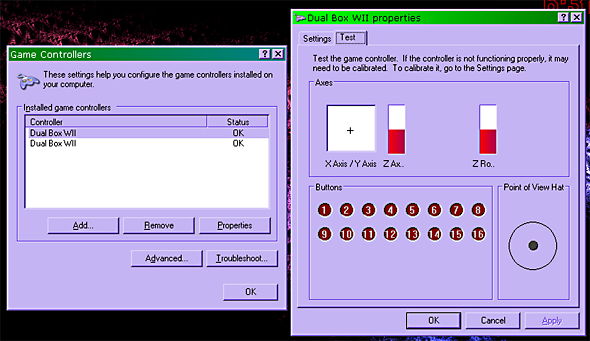
Ummm... I've had the wired model since Jan 2010, and the wireless battery powered model since Nov 2011, and I've never had any problems with either. No BSODs, no "errors," but then again I also never bothered with the bundled software to start with. I just plugged the thing in and there it was in the Windows Gamepad Setup screen, ready to calibrate.

Wireless_CC_2_USB_HID.png


Don't install the drivers, you don't even really need them.
If you want remapping and Turbo and such, just use Joy2Key.


Joy2_Key_Profs.png
 
If it was a driver issue, it'd be a different message entirely. The "USB device malfunctioned" message is, in my experience, most often received when a device doesn't have enough power. Try a powered USB hub, or plugging it directly into one of the ports on the back (right into the motherboard without an extension).
 
  • Like
Reactions: raulpica
I have had noting but bad experiences with Mayflash USB adapters. I have a 3-in-1 adapter for Gamecube, Xbox and PS2 controllers, and Gamecube is the only one that works correctly 100% of the time. PS2 is hit and miss, and the Xbox adapter is damn near useless.
 
Mayflash doesn't sign their drivers, you would have to be running in disabled drivers mode whenever you are using mayflash's adaptors on any windows 7x64 system that doesn't recognize the adaptor when plugged in.

disable-driver-signature-enforcement.png


Depending on what product you got, it would automatically work without drivers.

I use the wedge like PS2 to usb adaptor, didn't even need drivers on my windows 7x64 box.

IMG_170118b_zps9b56558f.jpg
 
No no no no no. "USB Devices not recognized" means that Windows can't read the USB's internal infos (PID, VID, n stuff). 64-bits, driver signature and stuff have nothing to do with that, and they come in play WAY later, only when Windows has succesfully detected the device.

That means it's either getting too little power than it needs or that the USB controller in it is fried.

I'm going for the latter one.
 

Site & Scene News

Popular threads in this forum