Make a Unity game for Wii U
Hi !
I'm proud to announce that the tutorial is finished !
There is the tutorial with installation of all software programs, build the game and install it to a Wii U Unit
Here is the Google Drive link : Unity Wii U Tutorial
The 2 parts are available in English and French.
The Tutorial for Wii U Cafe SDK Deluxe (my tool to convert Wii U Dev files to normal Wii U unit) is here : GBATemp Thread
Note : Just one little thing, the v1.3.0 of Wii U Cafe SDK is not released (yet) but there is the automated installation tutorial, but all other things are the same. I will tell when the v1.3.0 will be available
I'm available by PM or here for any questions !
- RetroAndDev
Known Issues :
#1 : The NDI display an error when log in
Screenshots :

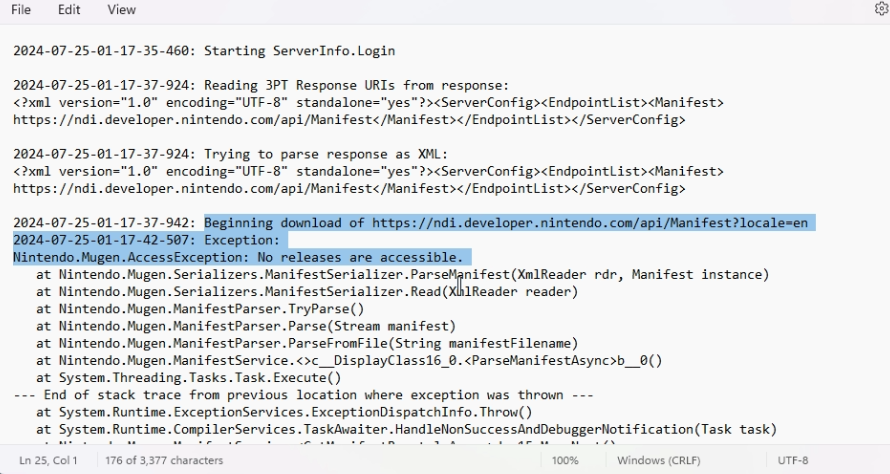
Fix :
Can you log in on developer.nintendo.com, and to your profile (top right corner with your username, and "manage account").
Scroll down to the bottom, and check your developer roles. If the section doesn't appear or is empty, you need to add the roles to yourself
Option 1 :
If you have an edit button on the page, use it
Option 2 : (For team more than 1 dev/users)
Go to "Admin" (next to Getting Started and others), "Users Management" on the left, and select your account. Go to the bottom and click "Edit"
In both options, you need to be the company admin (you are if you're the only member) on the DP (Developer Portail), if you're not, contact it to do this.
From the page, you will be able to scroll down again and add the 3DS and Wii U Roles. ("Company 3DS User" and " Company Wii U User")
After that, login on the NDI and follow the tutorial like normal
Original Post
Hello,
Today I am proud to introduce my first part of the tutorial about making a Wii U Game with Unity.
This tutorial will be divided in multiple parts and will be available in English and French.
And today, I release the first part of him.
Here is the link to the folder with the PDFs and required files : Google Drive Link
The Tutorial for Wii U Cafe SDK Deluxe is here : GBATemp Thread
It's all for today.
Have a nice week and happy coding your Unity Wii U Game !
I'm proud to announce that the tutorial is finished !
There is the tutorial with installation of all software programs, build the game and install it to a Wii U Unit
Here is the Google Drive link : Unity Wii U Tutorial
The 2 parts are available in English and French.
The Tutorial for Wii U Cafe SDK Deluxe (my tool to convert Wii U Dev files to normal Wii U unit) is here : GBATemp Thread
Note : Just one little thing, the v1.3.0 of Wii U Cafe SDK is not released (yet) but there is the automated installation tutorial, but all other things are the same. I will tell when the v1.3.0 will be available
I'm available by PM or here for any questions !
- RetroAndDev
Known Issues :
#1 : The NDI display an error when log in
Screenshots :
Fix :
Can you log in on developer.nintendo.com, and to your profile (top right corner with your username, and "manage account").
Scroll down to the bottom, and check your developer roles. If the section doesn't appear or is empty, you need to add the roles to yourself
Option 1 :
If you have an edit button on the page, use it
Option 2 : (For team more than 1 dev/users)
Go to "Admin" (next to Getting Started and others), "Users Management" on the left, and select your account. Go to the bottom and click "Edit"
In both options, you need to be the company admin (you are if you're the only member) on the DP (Developer Portail), if you're not, contact it to do this.
From the page, you will be able to scroll down again and add the 3DS and Wii U Roles. ("Company 3DS User" and " Company Wii U User")
After that, login on the NDI and follow the tutorial like normal
Original Post
Hello,
Today I am proud to introduce my first part of the tutorial about making a Wii U Game with Unity.
This tutorial will be divided in multiple parts and will be available in English and French.
And today, I release the first part of him.
Here is the link to the folder with the PDFs and required files : Google Drive Link
The Tutorial for Wii U Cafe SDK Deluxe is here : GBATemp Thread
It's all for today.
Have a nice week and happy coding your Unity Wii U Game !
Last edited by RetroAndDev,