Make a Unity game for Wii U

Hi !
I'm proud to announce that the tutorial is finished !
There is the tutorial with installation of all software programs, build the game and install it to a Wii U Unit

Here is the Google Drive link : Unity Wii U Tutorial

The 2 parts are available in English and French.

The Tutorial for Wii U Cafe SDK Deluxe (my tool to convert Wii U Dev files to normal Wii U unit) is here : GBATemp Thread

Note : Just one little thing, the v1.3.0 of Wii U Cafe SDK is not released (yet) but there is the automated installation tutorial, but all other things are the same. I will tell when the v1.3.0 will be available

I'm available by PM or here for any questions !

- RetroAndDev

Known Issues :
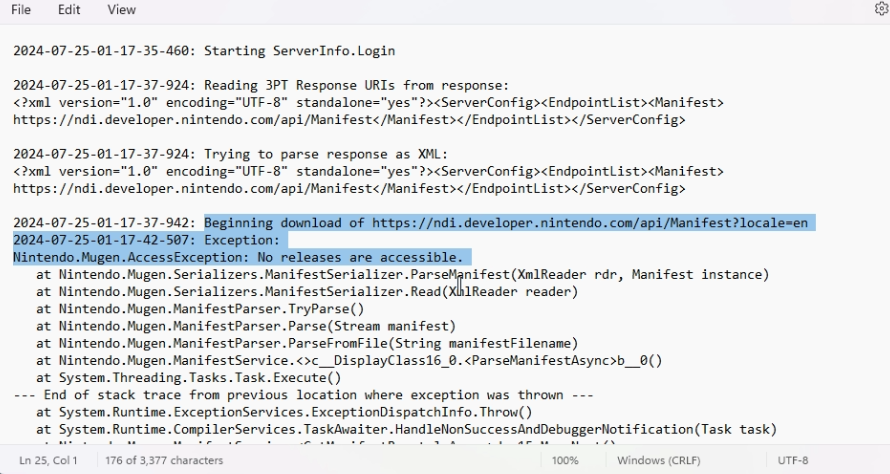
#1 : The NDI display an error when log in
Screenshots :
screenshot-106-png.449104
screenshot-107-png.449105

Fix :

Can you log in on developer.nintendo.com, and to your profile (top right corner with your username, and "manage account").
Scroll down to the bottom, and check your developer roles. If the section doesn't appear or is empty, you need to add the roles to yourself

Option 1 :
If you have an edit button on the page, use it

Option 2 : (For team more than 1 dev/users)
Go to "Admin" (next to Getting Started and others), "Users Management" on the left, and select your account. Go to the bottom and click "Edit"

In both options, you need to be the company admin (you are if you're the only member) on the DP (Developer Portail), if you're not, contact it to do this.

From the page, you will be able to scroll down again and add the 3DS and Wii U Roles. ("Company 3DS User" and " Company Wii U User")
After that, login on the NDI and follow the tutorial like normal


Original Post

Hello,
Today I am proud to introduce my first part of the tutorial about making a Wii U Game with Unity.

This tutorial will be divided in multiple parts and will be available in English and French.
And today, I release the first part of him.

Here is the link to the folder with the PDFs and required files : Google Drive Link

The Tutorial for Wii U Cafe SDK Deluxe is here : GBATemp Thread

It's all for today.
Have a nice week and happy coding your Unity Wii U Game !
 
Last edited by RetroAndDev,
Hey, Ive made a game and built it, but when i install and run the app on the WiiU it gets stuck on a black screen forever. Is there a fix for this?
 
I encounter the same issue while remaking Cafe SDK Deluxe (i'm on it btw). After investigation, I found that is it a massive issue with Cafe SDK Deluxe (v1.X.X). I suppose it had to do with NUSPacker, the TitleID is malformed, making NUSPacker use a random TitleID that cause retail units to "freeze" when loading the game.
Unfortunately, I encounter the same issue from 2 days now and I managed to get it working two time in a row before automating it with Cafe SDK Deluxe v2 and causing the same issue. I'm investigating.

More info on that to come this/next week with the first beta of Wii U Cafe SDK Deluxe.
if anyone managed to found a viable fix before be, feel free to post it here to help us
 
  • Like
Reactions: blackkawa
It's been a long time since I made a real update of this tool. Today, I post the first preview of the v2 !
Here is a link of me building, mastering and installing a Unity game on a retail Wii U unit.
Café SDK Deluxe v2 - Demonstration : Mastering & Installing a Unity game to a Wii U

Café SDK Deluxe v2.0.0 is almost ready as a standalone tool. No more need of Java and Python, now as a single executable file ! Faster installations, faster builds and easier to use

Stay tuned for release tomorrow or this weekend (as a beta).

I ordered a new Wii U unit for risky jobs as I don't want to brick my own with customs OS, firmware and apps... argh ! I already talked too much...
New announcements of tools and utilities for Wii U Unity Homebrew games are coming in the next few weeks. I'll keep the suspense a bit more.
See you tomorrow for release (I hope so !)
 
  • Like
Reactions: nothor
Hey, I just updated to Unity 2017.4.40f1, and now every time I try to build for WiiU I get this error: The type or namespace name `WiiU' does not exist in the namespace `UnityEngine'. Are you missing an assembly reference?
I find it strange, because there's no errors in the editor and Visual Studio recognizes everything. Does anybody know why?
 
First beta of Wii U Café SDK Deluxe v2 on live in the GitHub release
Documentation available here
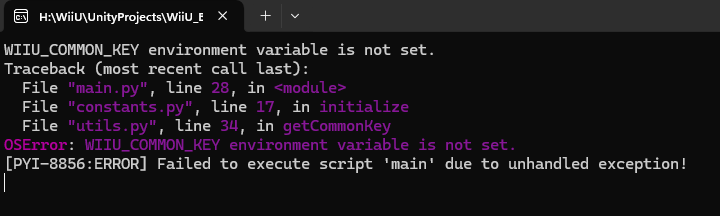
I'm having an issue in v2 where launching the .exe opens a CMD window with the following error:
WIIU_COMMON_KEY environment variable is not set.

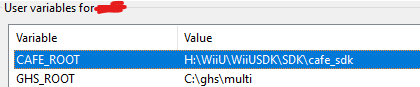
Obviously based on the error this seems to be an issue with missing a system environment variable, so I'd want to add a new one in settings, but I'm not sure where I'd point it to. The odd thing is that this is a fresh install of CafeSDK and Unity for Wii U, and previous versions of your tool are working perfectly on the same project. When setting up the install I followed the tutorial you posted on Google Drive a while ago (thanks for that by the way, made the whole setup process super easy!) and added in the environment variables you suggested in that but it doesn't mention anything about the common key as far as I can find so I figured it was worth asking.
system environment variables CAFE_ROOT and GHS_ROOT

Thanks again for making this tool, and hopefully this question isn't out of the scope of this thread. I'm guessing there's just a file included in CafeSDK or NDI that I need to point an environment variable to.
 
Ohhhh ! I completely forgot to talk about the Common Key env variable
Simply create an new variable under your user with the name WIIU_COMMON_KEY and set the value to the Wii U Common Encryption Key, You can find it on Google.
I'll edit the wiki to include that
 
  • Like
Reactions: gegus99
Ah OK, thank you! I'm now getting the error "Common Key is not valid", I've tried every result for keys I could find on Google but I might be missing part of the process. For each key I've tried I copy it and paste it into a blank text file, save that file, and then point the environment variable to that text file. Is that the proper way to do it? Thanks again for the help.
 
Ah OK, thank you! I'm now getting the error "Common Key is not valid", I've tried every result for keys I could find on Google but I might be missing part of the process. For each key I've tried I copy it and paste it into a blank text file, save that file, and then point the environment variable to that text file. Is that the proper way to do it? Thanks again for the help.
This never worked for me. I guess the common key needs to be a bin file. Just grab a hex editor, paste the common key inside and save it. Text files never worked for me
 
Ah, that makes sense, ok! That seemed to work, I still get errors on running (a new one while trying to get the unity title id about "'charmap' codec can't decode byte 0x81 in position 40: character maps to <undefined>") but I don't want to keep spamming this thread so I'll just stick with v1.2 for now since that's still working fine on this project :D
 
Hey, I just updated to Unity 2017.4.40f1, and now every time I try to build for WiiU I get this error: The type or namespace name `WiiU' does not exist in the namespace `UnityEngine'. Are you missing an assembly reference?
I find it strange, because there's no errors in the editor and Visual Studio recognizes everything. Does anybody know why?
Don't update. This only works on that one specific version.
 
Hello, I am trying to log into Nintendo Dev Portal through Dev Interface, but whenever I put in my login, I get a bunch of script errors, and once I get to the 2FA page, whenever I put my code in, the Submit button stays greyed out, preventing me from logging in, how do I get past this? Thanks.

UPDATE: Never mind! Paste in the code, then mash Enter, it'll log you in.
 
Hi, I have a problem with UnityWiiU regarding the build. At first it worked fine, but now it's not working and I'm getting these three errors.

Code:
Assembly conversion job F:\LG5\Temp/StagingArea/Data/Managed\Assembly-CSharp.dll failed.
System.Exception: Failed to assemble (F:/LG5/Build\_AOT\Assembly-CSharp.dll)
  at UnityEditor.WiiU.PostProcessCafePlayer+CafeUtils.Assemble (UnityEditor.WiiU.CafeSdkEnv sdkEnv, UnityEditor.WiiU.ProcessEnv procEnv, System.String inputName, System.String workDir, System.Collections.Generic.List`1 results, Boolean debugInfo) [0x001c9] in C:\buildslave\unity\build\PlatformDependent\WiiU\Editor\Managed\PostProcessWiiUPlayer.cs:307
  at UnityEditor.WiiU.PostProcessCafePlayer+CafeUtils+JobLinkMonoAssemblies.ThreadPoolCallback (System.Object threadContext) [0x00028] in C:\buildslave\unity\build\PlatformDependent\WiiU\Editor\Managed\PostProcessWiiUPlayer.cs:450
UnityEditor.HostView:OnGUI()


UnityException: Assembly conversion failed.
UnityEditor.WiiU.PostProcessCafePlayer.CompileAOT (BuildTarget target, BuildOptions options, WiiUBuildDebugLevel variant, System.String codeDir, Boolean allowDebugging, System.String stagingAreaDataManaged, System.String targetDir) (at C:/buildslave/unity/build/PlatformDependent/WiiU/Editor/Managed/PostProcessWiiUPlayer.cs:1143)
UnityEditor.WiiU.PostProcessCafePlayer.PostProcess (BuildTarget target, BuildOptions options, System.String installPath, System.String stagingAreaData, System.String stagingArea, System.String productName, System.String playerPackage, System.String stagingAreaDataManaged) (at C:/buildslave/unity/build/PlatformDependent/WiiU/Editor/Managed/PostProcessWiiUPlayer.cs:1559)
UnityEditor.WiiU.WiiUBuildPostprocessor.PostProcess (BuildPostProcessArgs args) (at C:/buildslave/unity/build/PlatformDependent/WiiU/Editor/Managed/ExtensionModule.cs:69)
UnityEditor.PostprocessBuildPlayer.Postprocess (BuildTargetGroup targetGroup, BuildTarget target, System.String installPath, System.String companyName, System.String productName, Int32 width, Int32 height, BuildOptions options, UnityEditor.RuntimeClassRegistry usedClassRegistry, UnityEditor.BuildReporting.BuildReport report) (at C:/buildslave/unity/build/Editor/Mono/BuildPipeline/PostprocessBuildPlayer.cs:263)
UnityEditor.HostView:OnGUI()

Error building Player: 3 errors

UnityEditor.BuildPlayerWindow+BuildMethodException: Build failed with errors.
  at UnityEditor.BuildPlayerWindow+DefaultBuildMethods.BuildPlayer (BuildPlayerOptions options) [0x001b9] in C:\buildslave\unity\build\Editor\Mono\BuildPlayerWindowBuildMethods.cs:162
  at UnityEditor.BuildPlayerWindow.CallBuildMethods (Boolean askForBuildLocation, BuildOptions defaultBuildOptions) [0x00050] in C:\buildslave\unity\build\Editor\Mono\BuildPlayerWindowBuildMethods.cs:83
UnityEditor.HostView:OnGUI()

I tried exporting my project from UnityPackage and creating a new project, but that didn't work. I also commented out the recant script, but that didn't work either.

I also tried compiling on an empty project and it works, but not on my project. How can I detect the script or asset that is blocking compilation?
 
Last edited by lyokohack,
I solved this build problem, I noticed that I have my two functions
C#:
void exampleeeeeeeeeeeeeeee(){
    
}


which is long in terms of function name that the build does not support this which gave me this last error, if someone has this error try not to put a long name on its function that can correct the problem

if anyone is interested in my creations here is a new video

 
I need some help on the Nintendo Dev Interface Program.

Every time i try to login in the portal, the program throws a script error and doesnt let me authenticate.

Since i use windows on PT-BR, the screenshot doesnt help much, but i would like to know how to bypass these script errors

1761654354123.png
 
I need some help on the Nintendo Dev Interface Program.

Every time i try to login in the portal, the program throws a script error and doesnt let me authenticate.

Since i use windows on PT-BR, the screenshot doesnt help much, but i would like to know how to bypass these script errors

View attachment 535825
You can’t
NDI is a piece of s***t
Just continue to allow the scripts to run and it will be good

NDI use a old version of Windows integrated web browser known as… Internet Explorer 😐
That’s why theses errors are show. Spam the yes button / allow to run scripts and you should be fine

For me it was never an issue to do that
 
  • Sad
Reactions: blackkawa

Site & Scene News

Popular threads in this forum