Hacking Luma3DS 9.0 ErrDisp

Zappo23

Active Member
OP
Newcomer
Joined
Jan 6, 2016
Messages
40
Trophies
0
Age
35
XP
141
Country
United States
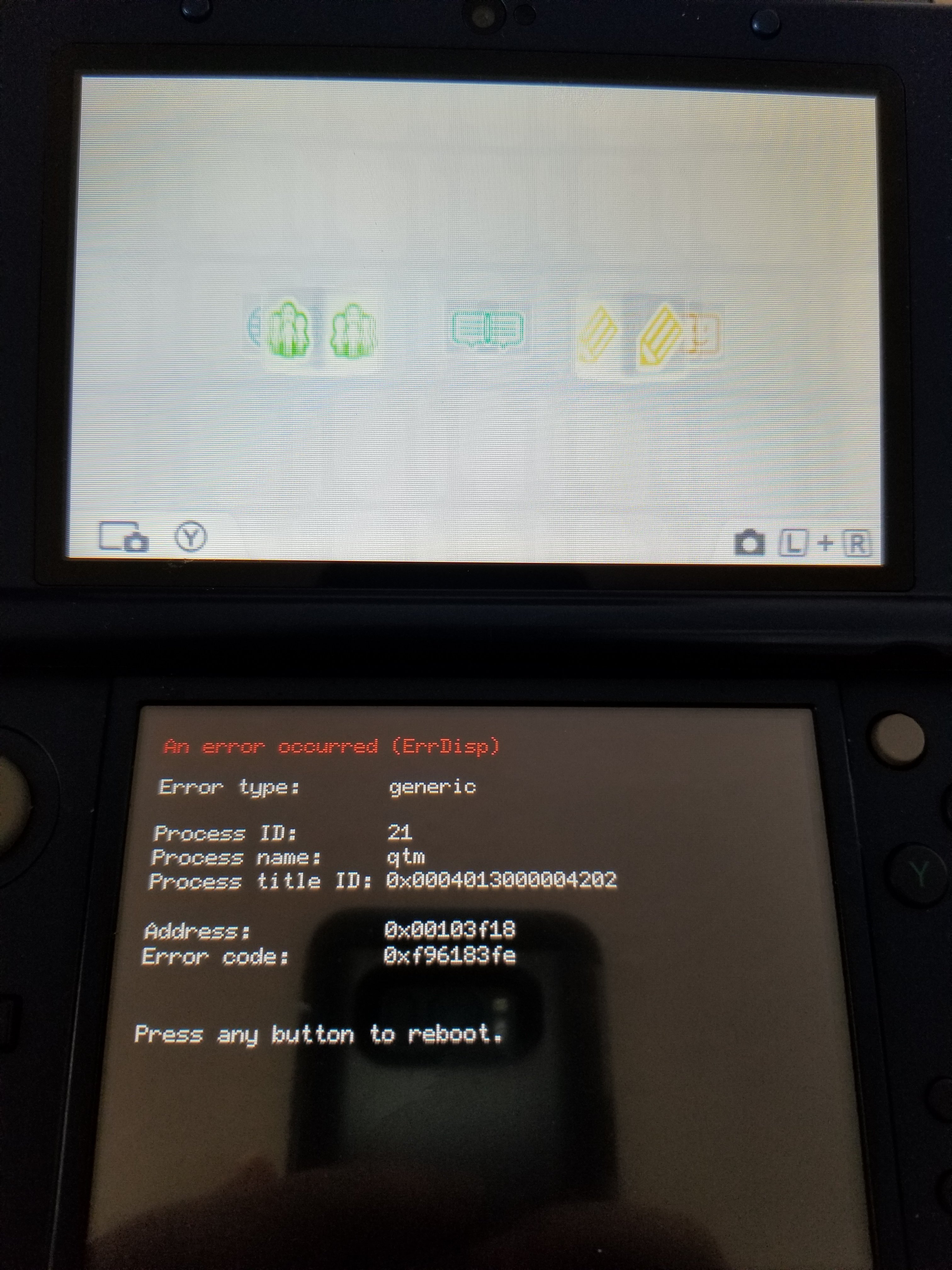
I am trying to figure out this issue. I have attempted to redownload the boot.firm, formatted the SD card (SDXC), and flashing back to a previous NAND to no avail. The only progress I've made is determining that when the SD card is in the system, the home menu will not even boot and it goes straight to the error you see below, but if I take the card out, it gets to the home menu before crashing. I am at a loss. Has anyone experienced this issue, and if so, did you solve it and how?

If you can't see the image, here is the text from it:

An error occurred (ErrDisp)

Error type: generic

Process ID: 21
Process type: qtm
Process title ID: 0x0004013000004202

Address: 0x00103f18
Error code: 0xf96183fe

Press any button to reboot.


Thanks.
20180325_153543.jpg
 
Last edited by Zappo23,

Ryccardo

watching Thames TV from London
Member
Joined
Feb 13, 2015
Messages
7,403
Trophies
0
Age
27
Location
Imola
XP
6,392
Country
Italy
QTM is the driver for stabilized 3D, and I frankly don't know why it would crash depending on whether the SD is in (or at all). Camera troubles?

For the "time of other people is free" series: tried flashing a known good ctrtransfer image (in case of OS corruption)?
Fully restoring a nand backup, immediately recreating a backup, and comparing them (nand failure... you would probably be the first)?
 
  • Like
Reactions: THYPLEX

Zappo23

Active Member
OP
Newcomer
Joined
Jan 6, 2016
Messages
40
Trophies
0
Age
35
XP
141
Country
United States
QTM is the driver for stabilized 3D, and I frankly don't know why it would crash depending on whether the SD is in (or at all). Camera troubles?

For the "time of other people is free" series: tried flashing a known good ctrtransfer image (in case of OS corruption)?
Fully restoring a nand backup, immediately recreating a backup, and comparing them (nand failure... you would probably be the first)?

So what you are saying is that something with the 3D stabilizer driver is possibly corrupted? I haven't tried to use the camera or 3D on this console, nor do I have any software that isn't stock on it that actively utilizes the 3D or camera.

When I restored the NAND backup the same issue occurred, which tells me that it might be that backup has a corruption somewhere in the file. If I created a SYSNAND backup on my other N3DS and used it for this one, is it possible it will resolve the issue, or do I run the risk of bricking it?

EDIT: If it helps, I used my other N3DS XL to do a system transfer following the 3DS Guide website instructions. So maybe the backup NAND on my original WOULD work?
 
Last edited by Zappo23,

Ryccardo

watching Thames TV from London
Member
Joined
Feb 13, 2015
Messages
7,403
Trophies
0
Age
27
Location
Imola
XP
6,392
Country
Italy
So what you are saying is that something with the 3D stabilizer driver is possibly corrupted?
Possibly, yes

nor do I have any software that isn't stock on it that actively utilizes the 3D or camera.
You do, Home itself supports 3D (even if it didn't, I think the QTM driver is loaded by default in the first place)


If I created a SYSNAND backup on my other N3DS and used it for this one,
Nand backups are inherently console specific, you would want a ctrtransfer image!
 

Zappo23

Active Member
OP
Newcomer
Joined
Jan 6, 2016
Messages
40
Trophies
0
Age
35
XP
141
Country
United States
Nand backups are inherently console specific, you would want a ctrtransfer image!

How would I create a CTRTransfer image to use?

EDIT: I found a guide to help install CTRTransfer Image, but it's for CTRTransfer 11.5 and since my FW is on 11.6 I want to make sure that using that guide and its linked assets will be fine for me. Here's the link for reference:

https://3ds.hacks.guide/ctrtransfer.html
 
Last edited by Zappo23,

Zappo23

Active Member
OP
Newcomer
Joined
Jan 6, 2016
Messages
40
Trophies
0
Age
35
XP
141
Country
United States
It's fine, just update back to 11.6 afterwards.

So I did that and I am still getting the same error as above. Not sure what to do from here.


EDIT: So I did some more digging and actually found someone deep in a Reddit thread that was having the exact same issue as I am now. There was a solution provided but the link to download the updated boot.firm is dead, so the only option is to compile and uncomment line 301 of this code and rename as boot.firm and replace the one on the SD card, but I don't know how to do that.

Can anyone compile that for me?
 
Last edited by Zappo23,

Redferne

Well-Known Member
Member
Joined
Oct 28, 2015
Messages
845
Trophies
0
XP
1,794
Country
United Kingdom
You can also try to run the head tracking calibration setup again. With some luck it could fix the issue. But if it is indeed a hardware issue you could also try to do without the 3D.
 

Zappo23

Active Member
OP
Newcomer
Joined
Jan 6, 2016
Messages
40
Trophies
0
Age
35
XP
141
Country
United States
You can also try to run the head tracking calibration setup again. With some luck it could fix the issue. But if it is indeed a hardware issue you could also try to do without the 3D.

Thanks, I'll try that once I solve the problem of BOOTING into an ErrDisp screen. Also, I already said waaaaay up top there that I don't use the 3D.
 

Zappo23

Active Member
OP
Newcomer
Joined
Jan 6, 2016
Messages
40
Trophies
0
Age
35
XP
141
Country
United States
Still can't find the cause. Though, update: Now the screen stays black regardless of whether the SD card is in the slot. Don't know what changed between last night and now, only that I tried a different boot.firm


EDIT: Finally found someone who could do the build. Here is the link to the new boot.firm that fixes the above issue. I don't know how long it will remain an active link, but I have a copy. If anyone needs it and the link is dead, please let me know. This works for Luma3DS 9.0 and to fix the above error in the OP.

The only issue I had afterwards was that I needed to shut off Super-Stable 3D and restrict 3D in Parental Controls to make the images look normal again.
 
Last edited by Zappo23,

The Real Jdbye

*is birb*
Member
Joined
Mar 17, 2010
Messages
22,574
Trophies
4
Location
Space
XP
12,506
Country
Norway
Still can't find the cause. Though, update: Now the screen stays black regardless of whether the SD card is in the slot. Don't know what changed between last night and now, only that I tried a different boot.firm


EDIT: Finally found someone who could do the build. Here is the link to the new boot.firm that fixes the above issue. I don't know how long it will remain an active link, but I have a copy. If anyone needs it and the link is dead, please let me know. This works for Luma3DS 9.0 and to fix the above error in the OP.

The only issue I had afterwards was that I needed to shut off Super-Stable 3D and restrict 3D in Parental Controls to make the images look normal again.
I thought you said you didn't use the 3D.
 

ArviDroid

Infamous GBAtemper
Member
Joined
Mar 26, 2016
Messages
428
Trophies
0
Age
23
XP
1,782
Country
Sweden
I don't but when the new boot.firm was loaded, even with the slider down the image was doubled without the 3D effect so in order to adjust the image to make it look normal again those are the steps I took to fix it.
Thanks for providing a link! Hopefully this will solve my similar problem with ErrDisp! I might add that I´ve yet to encounter a ErrDisp with this boot.firm and that there´s no problem with the 3D after changing boot.firm.

EDIT: Ocarina of Time now lags badly with 3D turned on in a certain sequence.
 
Last edited by ArviDroid,

Zappo23

Active Member
OP
Newcomer
Joined
Jan 6, 2016
Messages
40
Trophies
0
Age
35
XP
141
Country
United States
Thanks for providing a link! Hopefully this will solve my similar problem with ErrDisp! I might add that I´ve yet to encounter a ErrDisp with this boot.firm and that there´s no problem with the 3D after changing boot.firm.

EDIT: Ocarina of Time now lags badly with 3D turned on in a certain sequence.

You gotta keep super stable 3D turned off in System Settings > Other Settings. The QTM issue has to do with the Super Stable 3D. Its main purpose is to act as a workaround to whatever error the 3D is experiencing. If you keep 3D on using that boot.firm, you're probably going to experience intermittent issues.
 
Last edited by Zappo23,

ArviDroid

Infamous GBAtemper
Member
Joined
Mar 26, 2016
Messages
428
Trophies
0
Age
23
XP
1,782
Country
Sweden
You gotta keep super stable 3D turned off in System Settings > Other Settings. The QTM issue has to do with the Super Stable 3D. Its main purpose is to act as a workaround to whatever error the 3D is experiencing. If you keep 3D on using that boot.firm, you're probably going to experience intermittent issues.
It was lagging with the normal 3D too... No biggie for me to play without 3D, but I'll use it as much as possible anyway! Nice that I bought a new and at the same time broken 3DS! :P

EDIT: I believe you should either create a new thread adressing the solution directly or change the title to include [SOLVED] since the solution seems to be uncommon knowledge and is hard to come by!
 
Last edited by ArviDroid,
  • Like
Reactions: Zappo23

Era

Active Member
Newcomer
Joined
Jun 27, 2016
Messages
44
Trophies
0
Age
27
XP
99
Country
United States
From someone who just had this happened today. I thank all of you for your knowledge and guidance. That file did solve my problem as well and now everything is back to normal. I also turned off the super stable 3d now since I don't really use 3d anyway. :) Thank you all again.
 
General chit-chat
Help Users
  • Veho @ Veho:
    Once again I fell down the martial arts rabbit hole and am plumbing the murky depths of the internet's various martial arts and fighting crafts echo chambers.
  • Veho @ Veho:
    I like to get up to speed on that every now and then, see what the newest high wisdom everyone is spouting nowadays.
  • Veho @ Veho:
    If you're not actively involved and only get up to speed every few years or so, you can see the tide of public opinion flapping worse than my dong while I'm skipping naked down a hallway.
  • Veho @ Veho:
    And the "established wisdom" changes every decade.
  • Veho @ Veho:
    England is installing a new king.
  • Veho @ Veho:
    Their previous monarch has reached End Of Life and is being replaced.
  • Veho @ Veho:
    Like most forced updates, this one has terrible support and was very poorly received by the userbase.
  • Psionic Roshambo @ Psionic Roshambo:
    And mostly just adds useless features
  • Psionic Roshambo @ Psionic Roshambo:
    We need AI overlords
  • Veho @ Veho:
    Someone mowed a giant dick into the lawn in front of Westminster Abbey.
  • Veho @ Veho:
    Just in time for the coronation.
  • Veho @ Veho:
    That's what I said, maybe they were just doing a recreation of the Cerne Abbas giant but didn't finish it in time.
  • Veho @ Veho:
    The Abbey building was supposed to be the hat.
  • H @ hecker_isaac:
    goodmorning peeps
  • Psionic Roshambo @ Psionic Roshambo:
    Bell end lol
  • K3N1 @ K3N1:
    I got gas
  • Psionic Roshambo @ Psionic Roshambo:
    Save it Ken stuff is expensive lol
  • K3N1 @ K3N1:
    I save it for Walmart
  • Psionic Roshambo @ Psionic Roshambo:
    https://imgur.com/gallery/ZfBfPgk 100 million... Can think of better uses but OK lol
  • K3N1 @ K3N1:
    $35 just for drinks milk and bread today
  • K3N1 @ K3N1:
    I like how this is #2 in headphones Perytong Sleep Headphones Wireless, Bluetooth Sports Headband Headphones with Ultra-Thin HD Stereo Speakers Perfect for Sleeping,Workout,Jogging,Yoga,Insomnia, Air Travel, Meditation, Grey https://a.co/d/fPOFL4J
    Psionic Roshambo @ Psionic Roshambo: https://www.youtube.com/watch?v=PIm2ZaWD-Ig