Hacking Loading...

  • Thread starter Thread starter zataze
  • Start date Start date
  • Views Views 4,428
  • Replies Replies 28

zataze

Member
Newcomer
Joined
Sep 28, 2014
Messages
12
Reaction score
1
Trophies
1
Age
43
XP
92
Country
France
Hi,
I have looked for someone on the forum in the same situation as me, but I haven't found. I'm surprised to be the alone !!! (or I haven't correctly searched)
My specs :
3DS Version: 4.5.0.0E
Gateway card purchased at: http://www.cymods.com/fr/gateway-3ds.html
Release: GW_OMEGA_2.2_RELEASE (olso try with the 2.3Beta)

I followed the manual: Copy files "Blue Card (R4)" on the MicroSD and the "Launcher.dat" in SD

On the 3DS I can see and launch the "Deep Labyrinth ..."
But I am stuck on the screen "Loading..."

I try other SD and Micro SD in different sizes (between 1GB and 32GB), different speed (4, 10), format it in slow or fast FAT, FAT32 or exFAT, nothing works.

Hoppe you have a solution !

PS:
excuse my English.
 
so you have an Updated emunand? BE VERY CAREFUL UPDATING so you dont up date your system nand.


attention mise à jour!


your English is great! how was my french?
 
Thanks for quick replay.
>> so you have an Updated emunand?
I don't know wat is it, wher and how to get it.
>> your English is great! how was my french?
Olso great!
 
Where did you get the 3ds? Is it new or second hand?! Did you update to 4.5 or did it come with that firmware?
 
My 3DS is second hand, i buy it more than one year ago. I dont know if it come with this version or if it is updated.
 
When I google my problem I find subjects speaking about the same subject but on a R4i SDHC, the solution is to put the V1.80b.
What do you think?
 
have you updated all files (i mean everithing at http://www.gateway-3ds.com/downloads/, and copied the launcher.dat to your sd card, the rest to the bleu card, removed the emunand (since latest emunand could with some (micro-)sdcards get very slow))?

could do, but what r4i sdhc do you have, there are more brands then i could say for sure... the wrong one could be just your problem... the software made bij gateway should work just fine...
 
Again thank you for your interest.

First here are the results:
- R4i SDHC v1.80 >> Loading
- R4i SDHC v1.80 + Wood_R4_v1.61 >> Loading
- Wood_R4_v1.61 >> Loading

>> Have you updated all files
Yes, I did try the release 2.2 and beta 2.3b >> Loading
>> Removed the emunand
How?

>>what R4i SDHC do you have
How do I know?

>> I think you need to Log read up on emunand 1st ..
I also think, you know a french site?
 
It's time to eat.
Have a good night.
I would resume may be next Wednesday or Sunday.
I still listen to your ideas.

Thank you again.
 
By any chance has your systemnand got a green miiverse icon in the top right hand corner? Sounds like you have updated the systemnand accidentally instead of the emunand and pulled on the update.
 
If he can't even get the blue card to work, his issue isn't emunand related.

Likely either the blue card is defective or he has a bad micro SD card. Since he's tried multiple SD cards, that points to the blue card, which is not surprising since that thing is junk.

Try a folded up piece of paper between the blue card's label and the cart slot, or if you have another DS flashcart that works on a 3DS (like a DSTWO) you can use that instead. Just copy GW_INSTALLER.NDS to wherever you store DS games on that cart and run it (just make sure you only ever run it on a 3DS, not a DS).
 
no i think he updated wrong bluecard firmware... he thought update newer version makes it better, and put a wood update on it, but one that looks simmular but is different... or he even started the updater from a differend brand and screwed his card good, with wrong internal code.
 
If he can't even get the blue card to work, his issue isn't emunand related.

Likely either the blue card is defective or he has a bad micro SD card. Since he's tried multiple SD cards, that points to the blue card, which is not surprising since that thing is junk.

Try a folded up piece of paper between the blue card's label and the cart slot, or if you have another DS flashcart that works on a 3DS (like a DSTWO) you can use that instead. Just copy GW_INSTALLER.NDS to wherever you store DS games on that cart and run it (just make sure you only ever run it on a 3DS, not a DS).


the language barrier is a problem. that makes sense.

i thought we have few french speakers in this site, where we will get a better understanding of his problem.
 
Loading...

Copy files from
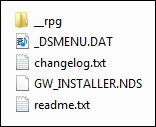
GW_OMEGA_2.3_BETA.zip \ GW_OMEGA_2.3_BETA \ Blue Card (R4i)
x0.png
to the microSD root folder. Run GW_INSTALLER.NDS
voila
 
I don't know why emunand is being mentioned as it looks like he cannot even load the exploit. Seems likely this is a partially updated 3ds hence my original questions. As Reecey said the Miiverse icon would be a giveaway.

zataze can you post pictures of your home screen or even a video of your process?
 
I don't know why emunand is being mentioned as it looks like he cannot even load the exploit. Seems likely this is a partially updated 3ds hence my original questions. As Reecey said the Miiverse icon would be a giveaway.

zataze can you post pictures of your home screen or even a video of your process?
yeah, but the fact he has the "loading" on the blue card would show its not updated (at least to 7.x or higher) sounds more like a dodgy SD card or a dodgy blue card, my bets would be on incorrectly set up SD card or bad SD card, i would suggest he tries a few different SD cards in the Blue card and makes sure he is copying the correct files to the root of the SD card
 
Maybe a stupid question but have you copied the folder Blue Card (R4) to the microSD card or have you copied the content of the folder? You have to copy the content of the folder so the root of the card should look like what eggsample posted a few posts ago.
 

Site & Scene News

Popular threads in this forum