Hacking JNUSTool unofficial GUI mod

  • Thread starter Thread starter Olmectron
  • Start date Start date
  • Views Views 97,935
  • Replies Replies 335
  • Likes Likes 28

Olmectron

Well-Known Member
Member
Joined
Dec 31, 2012
Messages
2,660
Solutions
1
Reaction score
1,838
Trophies
2
Age
33
Location
A game
XP
3,955
Country
Mexico
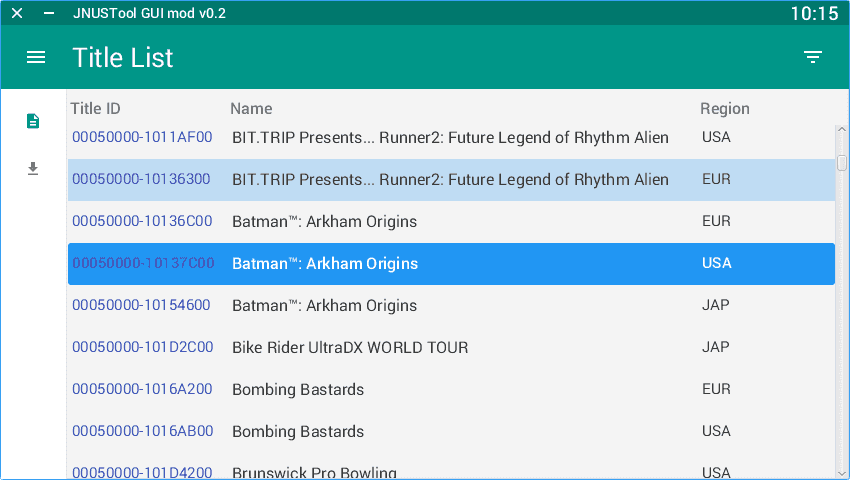
This fork simply features a Material Design to the original JNUSTool. Everything else than the GUI is exactly the same as the original. It's not been tested a lot, so it would be nice if some of you could help me testing.

GitHub page
https://github.com/Olmectron/JNUSTool/releases

Executables
  • Java 8 as a JAR executable (multiplatform).
  • Native EXE installer for Windows (64 bit only).

Requierements
  • (Only for the JAR version) Oracle's Java 8u111 or greater. Once installed, you should be able to open the file by double clicking it, or run from the command line java -jar JNUSTool-MOD.jar
  • The Common Key. You have to find it yourself out in the wild. Set it inside the app on the Settings Pane (press the engine icon in the left panel).
Features
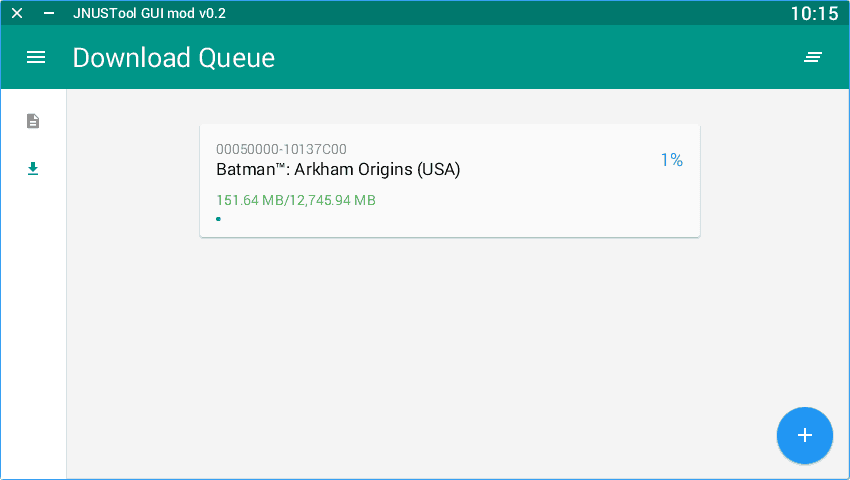
  • Download full titles and updates. You only need their Title ID. The default downloaded update is always the latest version. Add titles by pressing the big blue "+" button in the Download queue pane.
  • Queue your downloads. Keep adding titles to the download queue, and they will start to download one after another.
  • Drag & drop TIK files for starting their download automatically (the files should be already modded).
  • Simultaneous downloads. Great for users with a lot of bandwidth. Simply set the Simultaneous downloads options to anything above 1.
Thanks to @Maschell for this fantastic tool. He's the author of everything making the downloads work.

view0.PNG


view1.PNG
 
Last edited by Olmectron,
does it support manual title selecting or do i still need command line for that?

  • If the title you want isn't in the Title List, you can add any title ID you want in the download queue, using the Floating Button with a "+" sign in it.

You could also edit fulltitles.csv and add any titles you want there for them to appear in the list.
 
Last edited by Olmectron,
gonna test this mod and the quee function right now
Thanks! Try with some small games first, please, so you can test them on your Wii U too.

But, since it's the exact same code to download as today's updates to the original JNUSTool, I don't think there should be a problem.

Also, since this is the first release, there could be some crashes if you clear the download queue list before everything is downloaded, or if you move the items in the download queue by dragging and dropping, but I will take care of those for the next release.
 
Last edited by Olmectron,
I'll be straightforward, is this the same as new nus grabber? I have major problems with it so I'm hoping this will help me get needed files from the servers....
 
Thanks! Try with some small games first, please, so you can test them on your Wii U too.

But, since it's the exact same code to download as today's updates to the original JNUSTool, I don't think there should be a problem.

Also, since this is the first release, there could be some crashes if you clear the download queue list before everything is downloaded, or if you move the items in the download queue by dragging and dropping, but I will take care of those for the next release.
the quee system works!
 
the quee system works!
Good! Only thing left is to try to install games successfully using wupinstaller. But, again, it's the same code as JNUSTool from today, so there shouldn't be a problem. Please report back if there is.
 
Good! Only thing left is to try to install games successfully using wupinstaller. But, again, it's the same code as JNUSTool from today, so there shouldn't be a problem. Please report back if there is.
for that part is gonna take some time cause i need the .tik of the games and i don't have a .tik for every game in the list so it's gonna take longer
 
  • Like
Reactions: Olmectron
So technically te same as nusgrabber which is the same as newnus grabber?
I'm genuinely asking
JNUSTool is the recommended tool in the Wii U USB thread, so it seems to work better than NEWNUSGrabber (which is good, but is outdated).

This is simply a Material GUI added to JNUSTool, so it should download everything alright.

--------------------- MERGED ---------------------------

for that part is gonna take some time cause i need the .tik of the games and i don't have a .tik for every game in the list so it's gonna take longer
Okay. Here's hoping everything works out as expected.
 
  • Like
Reactions: fatsquirrel

Site & Scene News

Popular threads in this forum