
Issues connecting to my Switch with FTPD. Proxy server error.

EzioAuditore

Active Member
Newcomer
Joined
May 15, 2021
Messages
31
Reaction score
3
Trophies
0
Age
42
XP
168
Country
United States
I recently added FTPD to my homebrew and I'm trying to use it for the first time. I opened FTPD as instructed, I grabbed the IP. I entered it into my file explorer on my PC, and I get this error:
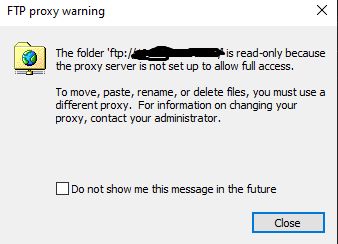
ftpd small.jpg


When I click close, it brings up the screen that asks me to pick a program to open a proxy server with.

Any idea what's going on? This isn't even supposed to be a proxy, is it?

Thanks

 
I recently added FTPD to my homebrew and I'm trying to use it for the first time. I opened FTPD as instructed, I grabbed the IP. I entered it into my file explorer on my PC, and I get this error:

View attachment 317739

When I click close, it brings up the screen that asks me to pick a program to open a proxy server with.

Any idea what's going on? This isn't even supposed to be a proxy, is it?

Thanks

Don't use 90DNS use DNS_MITM
 
I recently added FTPD to my homebrew and I'm trying to use it for the first time. I opened FTPD as instructed, I grabbed the IP. I entered it into my file explorer on my PC, and I get this error:

View attachment 317739

When I click close, it brings up the screen that asks me to pick a program to open a proxy server with.

Any idea what's going on? This isn't even supposed to be a proxy, is it?

Thanks

Windows Explorer can get jacked up for a myriad of reasons. Try a different (aka dedicated) FTP client. WinSCP or FileZilla are ones I use.

Which homebrew are you using? Most of them use port 5000

e: link to Total Commander. i hear it’s good stuff. ;-)
 
Last edited by binkinator,
  • Like
Reactions: impeeza
Windows Explorer only can use pasive FTPs so will no work fine with ftpD, I personally use Total Commander as file manager and forgot about Windows Explorer some time ago.
 
  • Like
Reactions: binkinator
Thanks for the input. I seem to have found a fix. Clicking taskbar and going down to windows explorer and restarting it seems to have worked. Appears it was a PC issue and unrelated to whatever I have on my Switch.
 
Thanks for the input. I seem to have found a fix. Clicking taskbar and going down to windows explorer and restarting it seems to have worked. Appears it was a PC issue and unrelated to whatever I have on my Switch.
Correct!
(Troubleshooting somebody’s PC isn’t my idea of fun…)

Glad you got it sorted. Enjoy your Switch!
 

Site & Scene News

Popular threads in this forum
