

- Joined
- Dec 19, 2010
- Messages
- 852
- Solutions
- 3
- Reaction score
- 27
- Trophies
- 0
- Age
- 53
- Website
- www.redbubble.com
- XP
- 610
- Country

I recently bought a iSmartMM (as a SCDS2 owner I feel that if I'm going to criticise the iSmartMM I should at least either try one or buy one) and was disappointed to see how little support there is for the iSmart MM on the official forums especially when it comes to skins and plugin files (unlike the SCDS2 which at least has an active community) so I decided to create some of my own. The Basic .ini file is almost identical to the SCDS2 plugin ini file.
The icons are 32x32 16bit BMP files.
The initial release contains plugins for the following Homebrew.
A2DS
A5200DS
A7800DS
ColecoDS
FrodoDS *
iSmart MM GBA Emulator *
IkuReader
Lameboy *
NESDS
S8DS *
SNESDS *
StellaDS *
ZXDS
Homebrew marked with * contain 1 or more different versions of the plugin.
v.1.1
Added
AmeDS
BeUp
ComicBookDS*
DSLibris
jEnesisDS*
Movie
MSXDS
NeoDS
SCUMMVM
Replacement Main Menu Icons
Download
Here's a preview image (many thanks to wasim for creating this for me).
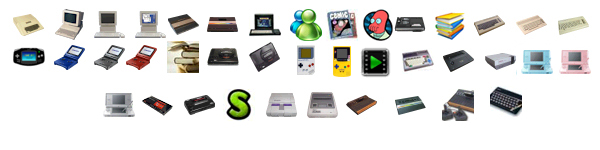
EDIT: File Reuploaded as ZXDS image was wrong size and format and A2DS 2 image was a duplicate of A2DS 1.
Code:
[plug setting]
icon=fat1:/ismartplug/Homebrew software name.bmp
name=Homebrew software name
The icons are 32x32 16bit BMP files.
The initial release contains plugins for the following Homebrew.
A2DS
A5200DS
A7800DS
ColecoDS
FrodoDS *
iSmart MM GBA Emulator *
IkuReader
Lameboy *
NESDS
S8DS *
SNESDS *
StellaDS *
ZXDS
Homebrew marked with * contain 1 or more different versions of the plugin.
v.1.1
Added
AmeDS
BeUp
ComicBookDS*
DSLibris
jEnesisDS*
Movie
MSXDS
NeoDS
SCUMMVM
Replacement Main Menu Icons
Download
Here's a preview image (many thanks to wasim for creating this for me).
EDIT: File Reuploaded as ZXDS image was wrong size and format and A2DS 2 image was a duplicate of A2DS 1.


